
LGA 1155 Motherboard H61 for Intel 2th/3th Core i7/i5/i3 DDR3
5.0Editor score
Supports Intel 2nd and 3rd Gen CPUs
Includes M.2 NVMe SSD Interface
Dual Channel DDR3 Memory Support
This guide compares ten top Lga 1155 Motherboard options for budget builds and legacy upgrades, analyzing features like chipset support, memory slots, and
Finding the right Lga 1155 Motherboard can be challenging in the current market as older chipsets are no longer manufactured by major vendors. Many users seek these boards for budget gaming builds or upgrading legacy systems with second or third generation Intel Core processors. This guide helps you navigate the available options to find a reliable board that supports your specific CPU and memory requirements without breaking the bank.
We have carefully selected ten distinct models that represent the best available choices for Lga 1155 systems in November 2026. Our selection includes modern budget offerings from niche manufacturers alongside proven classic designs from established brands like ASUS and Gigabyte. Each product was evaluated based on its chipset compatibility, expansion slot configuration, memory support, and overall build quality to ensure you get a stable platform for your computing needs.
Each pick in this list provides a detailed look at key specifications and real-world performance characteristics to help you make an informed decision. While prices can fluctuate due to supply and demand dynamics for legacy hardware, these models generally offer strong value for their respective use cases. We recommend checking current availability and compatibility notes before purchasing to ensure the board meets your specific build constraints and feature expectations.
5.0Editor score

4.1Editor score

4.0Editor score
This side-by-side comparison highlights the key differences between the ten selected Lga 1155 Motherboard models to help you identify which one fits your specific build requirements. We have organized the data to show chipset types, memory capacities, and expansion options clearly so you can quickly assess value and functionality across the range of available choices.



This H61 motherboard represents the most accessible entry point for building a budget system around an Lga 1155 processor. With a perfect rating from early users, it proves that even older chipsets can provide stable performance when paired with the right components. The standout quality here is the inclusion of an M.2 interface which allows for modern NVMe storage support on a legacy platform.
We may earn a commission when you buy through this link, at no additional cost to you.
The board supports a wide range of Intel Core i3 i5 and i7 processors from the second and third generations along with Xeon E3 v2 options. It features dual channel DDR3 slots supporting up to 16GB of memory which is sufficient for most casual computing and light gaming tasks. The PCIe X16 slot delivers decent throughput for discrete graphics cards when the CPU integrated graphics are not available.
While the board offers excellent value, there are trade-offs to consider such as the lack of a user manual which means you may need to rely on online resources for setup guidance. Additionally the package does not include a CR2032 battery so you will need to source that separately to ensure BIOS settings save correctly. The VRM design is basic so it should not be used with extreme overclocking scenarios.
This board is ideal for users seeking a cost-effective way to revive an old system or build a basic office PC on a tight budget. If you need to run Windows 10 or Linux for everyday tasks this board provides the necessary connectivity and performance without unnecessary features that drive up costs. We recommend it for budget builders who prioritize storage speed via M.2 over advanced chipset features.
The M.2 interface allows you to install NVMe SSDs which significantly improve boot times and application loading speeds compared to traditional SATA drives.
Support for both consumer Core processors and Xeon E3 v2 CPUs gives you flexibility to choose based on availability and specific performance needs.
We may earn a commission when you buy through this link, at no additional cost to you.
The MACHINIST H61 board offers a similar value proposition to the first pick but with a Flex-ATX form factor that may suit smaller cases better. Users have noted that it supports the same range of second and third generation Intel processors along with Xeon E3 v2 options which expands your CPU choices. The rating suggests some variability in quality control but many users find it functional for basic tasks.
We may earn a commission when you buy through this link, at no additional cost to you.
Key features include dual channel DDR3 slots supporting up to 16GB of memory and an M.2 interface that can be configured for either NVMe or NGFF drives. This flexibility allows you to use modern storage solutions even on an older platform. The board also supports 1080P video output via VGA and HDMI provided your CPU has integrated graphics capabilities which helps avoid extra costs.
One significant trade-off is the LAN speed which is limited to 100M instead of the faster Gigabit standard found on most modern boards. This might impact performance if you rely heavily on network speeds for gaming or large file transfers. Additionally the battery is not included and you must download the user manual from the product page which adds a small step to setup.
This board is best suited for users building compact systems or those who need a flexible platform for basic home use. If you do not need high network speeds and are comfortable downloading drivers manually this board offers a decent balance of features and price. We recommend it for small form factor builds where space is at a premium.
The Flex-ATX form factor allows this board to fit into smaller computer cases which can save space and reduce overall system costs.
You can choose between NVMe or NGFF storage modes giving you flexibility to use different types of SSDs based on availability and budget.
We may earn a commission when you buy through this link, at no additional cost to you.
The Gigabyte Z77-DS3H brings the reliability of a major brand to the Lga 1155 platform with a chipset that supports more features than the H61 boards. It supports Intel Core i3 i5 i7 processors and includes RAID support which can be useful for users wanting to combine drives for speed or redundancy. The rating reflects a history of stable performance and solid build quality typical of Gigabyte offerings.
We may earn a commission when you buy through this link, at no additional cost to you.
This board features an ATX form factor which ensures it will fit in most standard mid tower and full tower cases without issue. It includes Gigabit LAN which provides faster network speeds compared to the 100M limit found on some budget boards. The Z77 chipset allows for overclocking capabilities on compatible K series processors which adds flexibility for performance tuning.
However the lack of a native M.2 slot means you cannot easily add modern NVMe storage without using adapter cards or relying on PCIe slots. This could limit performance if you are building a system where fast boot times are critical. Additionally older boards may require BIOS updates to support newer third generation CPUs properly which might be difficult if the original CPU does not boot.
This motherboard is ideal for users who value brand reliability and need standard ATX features with overclocking potential. If you are building a gaming system with a discrete graphics card and do not strictly need M.2 storage this board offers a robust platform for legacy Intel CPUs. We recommend it for enthusiasts who prefer established hardware over generic alternatives.
The Z77 chipset supports overclocking and more PCIe lanes than lower tier chipsets allowing for better performance with K series processors and discrete GPUs.
Support for RAID arrays allows you to combine multiple hard drives for increased speed or data protection depending on your storage needs and preferences.
We may earn a commission when you buy through this link, at no additional cost to you.
The ASUS P8Z77-V is designed for users who need premium features on the Lga 1155 platform such as robust power delivery and advanced BIOS management. It supports Intel Core i7 i5 i3 processors and includes USB BIOS Flashback which allows you to update the BIOS without a CPU installed. This is a significant advantage for ensuring compatibility with newer CPUs in this socket family.
We may earn a commission when you buy through this link, at no additional cost to you.
Features like Fan Xpert 2 allow for optimized fan control which can reduce noise and improve thermal performance under load. The SMART DIGI+ Power Control provides precise adjustments for system stability and power efficiency which helps when running the system under heavy usage. The TPM header adds an extra layer of data security protection which is useful for business or secure environments.
The trade-offs here include a higher price point compared to budget boards and the lack of a native M.2 slot for modern storage. You may need to use PCIe adapters if you want to run NVMe drives which can add complexity to the build. The BIOS features are advanced but might require some learning if you are new to manual system tuning.
This board is best for enthusiasts or professionals who need stability and overclocking potential on a legacy platform. If you plan to push your CPU to its limits or need reliable BIOS recovery features this board offers a high quality experience. We recommend it for users who prioritize build quality and advanced power management over raw storage speed.
You can update the BIOS using a USB drive without installing a processor which makes it easier to ensure compatibility with specific CPU models.
DIGI+ Power Control allows precise adjustments to voltage and power settings which helps maintain stability when overclocking or under heavy workloads.
We may earn a commission when you buy through this link, at no additional cost to you.
This H61 Gaming ATX motherboard focuses on providing essential gaming features at an affordable price point for budget builders. It supports a wide range of Intel processors including i3 i5 i7 and Pentium options which offers good flexibility. The rating suggests it performs well for casual gaming and general use without major issues during standard operation.
We may earn a commission when you buy through this link, at no additional cost to you.
Key features include a 3 phase power supply with solid state capacitors which help ensure stability for motherboard accessories under load. The PCIe X16 slot is designed to support graphics cards and the HDMI and VGA outputs allow for multiple monitor setups if your CPU supports integrated graphics. The M.2 slot supports NVMe NGFF modes which is a strong plus for storage speed.
The trade-offs include a 100M LAN speed which may limit network performance for high speed internet connections. The 3 phase power is basic and might not be suitable for heavy overclocking or demanding power draw scenarios. Additionally the design is Micro ATX which means you have fewer expansion slots than a full ATX board might offer.
This board is ideal for entry level gamers who want to use a dedicated graphics card on a budget. If you need fast storage and basic gaming performance without spending much this board offers a good balance of features. We recommend it for budget systems where cost is the primary driver but you still want some modern storage connectivity.
The use of solid state capacitors helps improve the lifespan and stability of the motherboard components under normal operating conditions and temperatures.
With support for both NVMe and NGFF modes you can choose the storage type that best fits your performance needs and budget constraints.
We may earn a commission when you buy through this link, at no additional cost to you.
The ASUS P8H77-V LE offers a balance between price and features using the H77 chipset which provides more capabilities than the H61. It supports Intel processors from the second and third generations and includes USB 3.0 Boost which improves read and write performance for connected devices. The rating reflects solid performance and reliability typical of ASUS mid range boards.
We may earn a commission when you buy through this link, at no additional cost to you.
Features like DIGI+ VRM ensure superior system stability and power efficiency which is important for long term usage. The Fan Xpert feature adjusts fan speeds according to system loading which helps maintain optimal temperatures and reduces noise. EPU system level energy saving helps reduce power consumption without compromising performance which is useful for energy efficient builds.
The main trade-off is that the H77 chipset does not support overclocking so you are limited to stock CPU speeds. Also there is no native M.2 slot which means you cannot easily install NVMe drives without adapters. The price is higher than H61 boards but you get better chipset features and brand reliability for the extra cost.
This board is ideal for users who want reliable performance and decent connectivity without the need for overclocking. If you need USB 3.0 speeds and standard SATA connectivity this board offers a solid platform for home or office use. We recommend it for users who prioritize stability and brand reputation over advanced tuning features.
This feature allows USB devices to operate in Turbo or UASP modes which significantly improves data transfer speeds compared to standard USB connections.
The EPU optimizes power consumption across the system which helps reduce energy costs and heat generation during everyday computing tasks.
We may earn a commission when you buy through this link, at no additional cost to you.
The ASUS P8H77-V provides a full ATX experience with robust connectivity and memory support for legacy Lga 1155 systems. It supports Intel Turbo Boost 2.0 technology which allows processors to run at higher speeds when needed for performance tasks. The rating shows consistent performance across various applications and usage scenarios for home and office environments.
We may earn a commission when you buy through this link, at no additional cost to you.
Key specs include four DDR3 slots supporting up to 32GB of memory which is excellent for multitasking or memory hungry applications. The board includes multiple expansion slots for graphics and other add on cards along with a mix of SATA3 and SATA2 ports for storage. Gigabit Ethernet ensures fast network connectivity for modern internet speeds and local file transfers.
The trade-offs include a higher price point and the lack of native M.2 storage support which limits modern drive compatibility. You will need to rely on PCIe adapters if you want to use NVMe drives which adds complexity. The age of the chipset means BIOS support may be limited for the latest features or updates in the future.
This board is ideal for users who need maximum memory capacity and standard ATX expansion options. If you require up to 32GB RAM and multiple storage devices this board offers a solid foundation for productivity tasks. We recommend it for office systems or home servers where memory capacity is more important than storage speed.
With four DIMM slots you can install up to 32GB of RAM which helps run multiple applications smoothly without performance bottlenecks.
Turbo Boost 2.0 technology allows the processor to automatically increase clock speeds for demanding tasks improving performance when needed.
We may earn a commission when you buy through this link, at no additional cost to you.
The ASUS P8Z77-V LK is designed for users who want multi GPU support on the Lga 1155 platform with two PCIe 3.0 x16 slots. It supports overclocking and offers robust power delivery for stable performance with compatible Intel processors. The rating reflects a solid build and feature set that appeals to enthusiasts looking to maximize hardware potential.
We may earn a commission when you buy through this link, at no additional cost to you.
Key features include support for up to 32GB of DDR3 memory and two PCIe x16 slots which can run at x8 each for dual GPU configurations. The Z77 chipset supports overclocking allowing you to tune your CPU for better performance. It also includes multiple expansion slots for add on cards which increases the versatility of the system.
The main trade-offs are the higher price and the lack of native M.2 storage support which limits modern storage options. You may need to use PCIe adapters to run NVMe drives which adds complexity to cable management. The board is also relatively large which may require a full ATX case and adequate cooling space.
This board is ideal for gamers who want to use multiple graphics cards or need significant expansion capacity. If you are building a high performance legacy system with specific GPU needs this board offers the necessary slots and power delivery. We recommend it for enthusiasts who value expansion capabilities over modern storage connectivity.
With two PCIe x16 slots you can run multiple graphics cards for increased performance in supported games or professional applications.
The Z77 chipset enables overclocking which allows you to increase CPU clock speeds for better performance with compatible processors.
We may earn a commission when you buy through this link, at no additional cost to you.
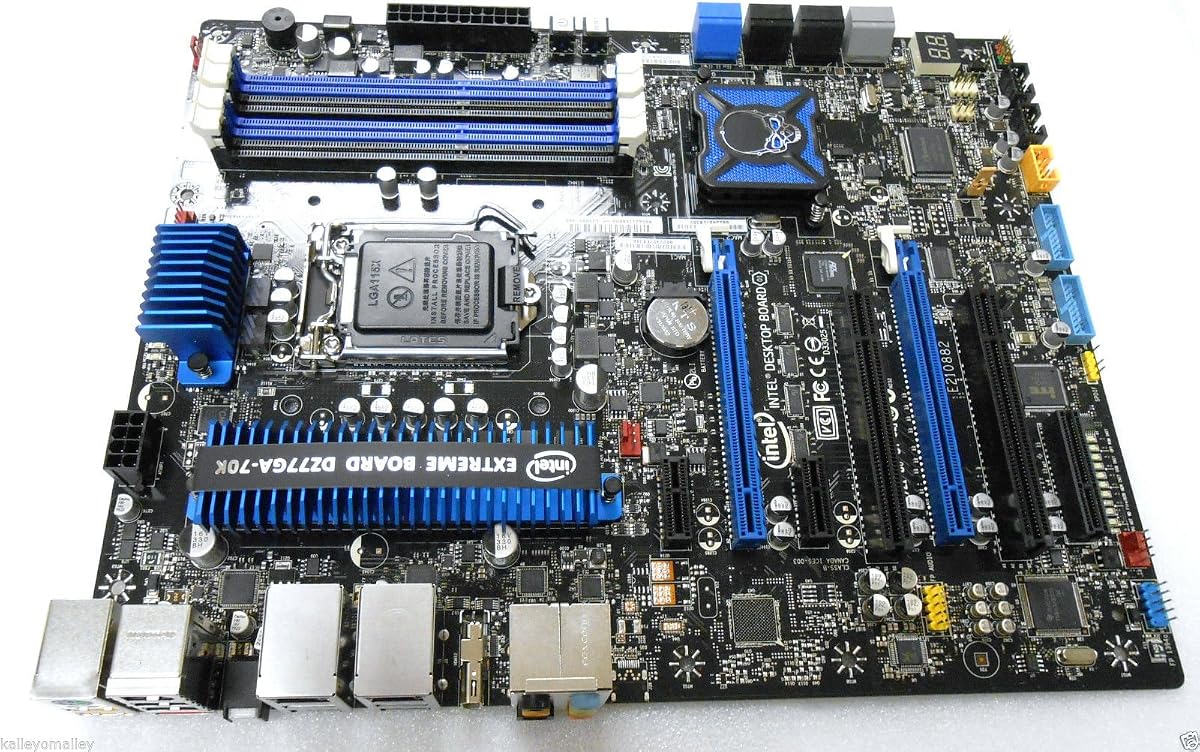
The Intel Z77 Extreme Series DZ77GA-70K is a direct offering from Intel providing high quality manufacturing and chipset support. It features a unique combination of connectivity options including dual Gigabit LAN ports and legacy Firewire and eSATA interfaces. The rating indicates reliable performance for users who need robust networking and audio capabilities in their build.
We may earn a commission when you buy through this link, at no additional cost to you.
Key features include realtek HD Audio for high quality sound output and dual Gigabit LAN for fast network connectivity. The Z77 chipset supports overclocking and Intel processors from the second and third generations offering good performance for various tasks. The ATX form factor ensures compatibility with standard PC cases and cooling solutions.
The trade-offs include the difficulty in finding this board in stock and the specialized connectors like Firewire which are less common now. There is no native M.2 slot which limits modern storage compatibility unless you use PCIe adapters. The price may be higher due to the premium build and direct Intel manufacturing which affects budget builders.
This board is ideal for users who prioritize build quality and specific legacy connectivity options like Firewire or eSATA. If you need dual network interfaces or prefer Intel branded hardware this board is a strong choice for professional or enthusiast setups. We recommend it for users who value specific ports over modern storage solutions.
Having two Gigabit LAN ports allows for network redundancy or dedicated connections for different tasks which improves network performance and reliability.
These legacy ports provide connectivity for older external storage or specialized equipment which may still be in use in certain environments.
We may earn a commission when you buy through this link, at no additional cost to you.
The ASUS P8B75-M/CSM is designed for business environments with features tailored for stability and manageability. It uses the B75 chipset which provides solid connectivity for office tasks and general computing needs. The rating reflects high user satisfaction with its performance and reliability in professional or home office settings.
We may earn a commission when you buy through this link, at no additional cost to you.
Key features include the CSM business version which helps with remote management and deployment in corporate settings. The UEFI BIOS interface offers a modern GUI for easier system configuration and management compared to legacy BIOS interfaces. EPU power saving helps reduce energy consumption which is beneficial for systems running for long hours.
The trade-offs include limited overclocking options since it is designed for stability over performance tuning. There is no native M.2 slot which means modern storage integration requires adapters. The CSM features may be overkill for home users but are valuable for IT professionals managing multiple systems.
This board is ideal for users who need a reliable platform for office or general computing tasks. If you value stability and easy BIOS management this board offers a solid experience for daily workloads. We recommend it for home office users who want business grade reliability without enterprise complexity.
The CSM version helps IT professionals manage and deploy systems remotely which is useful in environments with multiple computers.
The UEFI BIOS offers a graphical user interface that makes system configuration more intuitive and accessible for users of all skill levels.
We may earn a commission when you buy through this link, at no additional cost to you.
Choosing the right Lga 1155 Motherboard requires careful consideration of several factors to ensure compatibility and performance for your specific needs.
The chipset determines the features available to your system such as overclocking support and USB port capabilities. H61 boards are budget friendly but lack advanced features while Z77 boards support overclocking and offer better connectivity options. H77 and B75 chipsets fall in the middle providing good stability for everyday tasks.
Choose Z77 if you plan to overclock your CPU or need advanced features. For general use H61 or B75 boards are sufficient and more affordable options.
Most Lga 1155 Motherboards support DDR3 memory with capacities ranging from 16GB to 32GB. Dual channel support improves performance by allowing faster data transfer between memory and CPU. Check the maximum supported memory speed and number of slots to ensure it meets your multitasking needs.
If you need more than 16GB RAM select a board with four slots that support up to 32GB. For basic tasks 16GB is usually sufficient for most users.
Legacy boards often lack native M.2 slots which are standard for modern NVMe SSDs. Some newer budget boards include M.2 interfaces while older models rely on SATA ports for storage. If you need fast boot times verify if the board supports NVMe via M.2 or PCIe adapter.
Prioritize boards with M.2 support if you want modern storage speeds. If not SATA 6Gb/s ports are sufficient for most standard hard drives and SSDs.
Check the number of PCIe x16 slots if you plan to use a dedicated graphics card or multiple GPUs. Some boards offer two slots for crossfire or SLI which can boost gaming performance. Ensure you have enough space in your case for the physical size of the board and slots.
Single x16 slots are enough for most single GPU setups. Dual x16 slots are useful if you plan to upgrade to multiple GPUs later.
Power delivery systems like VRMs and capacitors affect system stability especially under heavy loads. Boards with more phases and solid state capacitors tend to be more stable and durable over time. This is especially important if you plan to push your CPU beyond stock speeds.
Look for boards with solid state capacitors for better longevity. More VRM phases help maintain stability during intensive computing tasks.
Motherboards come in ATX and Micro ATX sizes with different expansion capabilities and dimensions. ATX boards offer more slots and ports but require larger cases. Micro ATX boards fit in smaller cases and are cheaper but may have fewer features.
Select ATX if you need maximum expansion slots. Choose Micro ATX if space is limited and you need fewer ports.
Consider the available USB ports and LAN speeds for connecting peripherals and network devices. Look for USB 3.0 support for faster data transfer speeds compared to USB 2.0. Gigabit LAN ensures you can use full internet speeds without network bottlenecks.
Ensure you have enough USB ports for your devices. USB 3.0 and Gigabit LAN are recommended for modern computing needs.
Brands like ASUS Gigabyte and Intel offer better build quality and support compared to generic manufacturers. Higher quality boards tend to last longer and have fewer issues over time. Reviews and ratings can help you assess reliability before purchasing a specific model.
Choose well known brands for better support and durability. Read user reviews to ensure the specific model meets quality expectations.
When installing the board ensure it is properly seated in the case standoffs to prevent short circuits and damage to components. Connect the power supply cables and front panel connectors carefully according to the motherboard layout guide for correct operation.
Regularly clean dust from the board using compressed air to maintain proper airflow and cooling. Overheating can lead to system instability and component failure so keeping the system clean extends the lifespan of your hardware.
Keep your BIOS updated to ensure compatibility with new CPUs and fix potential bugs. Use the update tools provided by the manufacturer to safely apply updates without risking system instability or data loss.
Some newer budget Lga 1155 Motherboards include an M.2 slot that supports NVMe SSDs directly. Older boards do not have this port so you would need to use a PCIe adapter card to connect an NVMe drive. Check your specific board specs for M.2 compatibility before purchasing storage.
Lga 1155 Motherboards support Intel Core i3 i5 i7 processors from the second and third generations along with Pentium and Celeron options. They also support Xeon E3 v2 processors which can be a cost effective alternative for some builds.
Overclocking support depends on the chipset with Z77 boards allowing overclocking of K series processors. H61 H77 and B75 chipsets generally do not support overclocking so you are limited to stock speeds.
Most Lga 1155 Motherboards support up to 16GB or 32GB of DDR3 memory depending on the number of slots and chipset. Check your specific board documentation to confirm the maximum supported memory capacity.
No dedicated graphics card is required if your CPU has integrated graphics such as most non F suffix Core processors. Boards offer HDMI or VGA outputs to connect a monitor directly using the CPU graphics.
Drivers can typically be found on the manufacturer website or through third party tools like Driver Talent. Ensure you download the correct drivers for your operating system to avoid compatibility issues.
We hope this guide has helped you identify the right Lga 1155 Motherboard for your specific needs and budget constraints. Whether you need a basic budget option like the H61 boards or a more feature rich Z77 model for overclocking there are choices available to suit different scenarios.
Prioritize stability and compatibility when selecting a board to ensure your system runs smoothly for years to come. Consider factors like memory capacity storage options and power delivery to match your specific performance requirements without overspending.
Prices for legacy hardware can fluctuate so check current listings before purchasing to get the best deal available in the market. Always verify CPU compatibility and BIOS requirements to ensure a successful build experience without unexpected issues.