
ASRock 760GM-HDV
4.3Editor score
Supports up to eight core CPUs
Compact MicroATX form factor design
Affordable price for entry level users
Compare the top Asrock AM3 Motherboard models for performance and value. This guide reviews ten options to help you find the right fit for your build today.
Choosing the right motherboard is crucial for any AMD build. The Asrock AM3 Motherboard lineup offers reliable support for legacy Phenom processors and budget-friendly upgrades. You need a board that handles your CPU and memory demands efficiently without breaking the bank. Finding the right balance of features and cost ensures your system runs smoothly for years.
We analyzed ten distinct models to create this comprehensive comparison. Each product was evaluated based on chipset capabilities, expansion slots, and connectivity options. Our goal is to highlight how each board supports specific processor types and memory configurations. This list covers everything from compact MicroATX designs to full ATX performance solutions for diverse user needs.
Every pick in this guide showcases unique strengths for different use cases. Whether you need basic office functionality or high-end gaming potential, there is a choice here. Please note that prices and availability can change frequently on retail platforms. Always verify the current stock and compatibility before making your final purchase decision online.
4.3Editor score

4.2Editor score

5.0Editor score
This section provides a detailed side by side comparison of all ten selected Asrock AM3 Motherboard options. We highlight key specifications like chipset types, memory limits, and expansion slots so you can quickly identify which model aligns with your specific hardware requirements and performance goals for your next project.




The ASRock 970A-G/3.1 stands out as a versatile choice for builders seeking an Asrock AM3 Motherboard. With a rating of 4.2, it delivers reliable performance for gaming and productivity. Its AMD 970 chipset ensures broad compatibility with Phenom II and Athlon II processors making it a safe bet for upgrades.
We may earn a commission when you buy through this link, at no additional cost to you.
Key strengths include its robust connectivity suite featuring USB 3.1 and an M.2 slot which is rare in this generation. The board supports up to 64GB of DDR3 memory allowing for significant future proofing. Quad CrossFireX support also makes it appealing for multi GPU setups without breaking the budget.
While the SATA ports are somewhat limited compared to newer standards, the overall value remains high. The lack of integrated WiFi requires an adapter but is expected at this price tier. These trade-offs are acceptable given the board's strong core performance and compatibility features.
This board is ideal for users wanting to maximize an existing AM3 CPU or build a cost effective workstation. We recommend it for anyone needing solid storage expansion and modern I/O in an older platform. It balances price and performance better than most competitors in this specific category.
The inclusion of USB 3.1 and M.2 bridges the gap between old sockets and new storage needs.
Support for up to 64GB RAM allows you to handle heavy multitasking and virtual machines easily.
We may earn a commission when you buy through this link, at no additional cost to you.
For builders on a tight budget the ASRock 760GM-HDV offers exceptional value as an Asrock AM3 Motherboard. It holds a strong 4.3 rating due to its ability to support powerful CPUs while staying incredibly low cost. The MicroATX form factor makes it perfect for small cases or basic office systems where space is limited.
We may earn a commission when you buy through this link, at no additional cost to you.
This board supports Socket AM3+ processors up to 125W which allows for significant performance headroom without expensive parts. Features like AMD Overdrive with ACC enable efficient overclocking and tuning. The integrated graphics are decent for light media tasks adding versatility to the design.
The main trade-off is the reliance on older USB 2.0 standards which limits peripheral speed. There are also fewer expansion slots for graphics cards compared to ATX alternatives. However for a basic build these limitations do not significantly impact day to day performance or usability.
We recommend this board for entry level builds or secondary systems where cost is the primary concern. It is an excellent choice for anyone needing a stable platform for older AMD CPUs without spending much. This model proves you do not need to pay a lot for a working machine.
The MicroATX design fits easily into compact cases while still supporting high wattage CPUs like the Phenom II.
ACC feature allows you to adjust clock speeds for extra performance without needing advanced BIOS tools.
We may earn a commission when you buy through this link, at no additional cost to you.
The ASRock 890FX Deluxe4 is the premium choice in this lineup of Asrock AM3 Motherboard options. It boasts a perfect 5.0 rating and is built for serious enthusiasts who need maximum bandwidth and multi GPU capabilities. The AMD 890FX chipset is robust ensuring stable operation under heavy loads.
We may earn a commission when you buy through this link, at no additional cost to you.
Key features include Quad CrossFireX support which allows multiple graphics cards for high performance gaming. The board also offers plenty of SATA3 and USB 3.0 ports for fast data transfer. Its power delivery system is designed to handle high-end CPUs making it a top pick for overclockers.
While it carries a higher price than budget options the performance and feature set justify the cost. The socket is limited to AM3 which is older but compatible with powerful legacy CPUs. These factors make it a specialized tool for specific high-end needs rather than general use.
We recommend this board for users who require top tier performance from an older AMD platform. It is the best choice for those who want to run multiple GPUs and need extensive storage connectivity. This model stands out as the most capable option for demanding tasks.
Quad CrossFireX support lets you pair multiple GPUs for extreme gaming or rendering workloads.
Six SATA3 ports ensure your SSDs and HDDs run at maximum speeds without bottlenecks.
We may earn a commission when you buy through this link, at no additional cost to you.
The ASRock 970 EXTREME3 is a solid Asrock AM3 Motherboard for users needing specific legacy features. It includes an eSATA3 port which is useful for external storage devices. The board supports fast DDR3 speeds and provides ample connectivity for older peripherals and storage drives.
We may earn a commission when you buy through this link, at no additional cost to you.
Features include two PCI Express x16 slots for multi GPU setups and robust power connectors for stable operation. The chipset supports Phenom II X6 processors well making it a good match for powerful CPUs. It is a reliable choice for those needing external drive capabilities.
However the lower rating suggests some users experienced issues with compatibility or BIOS updates. The design feels dated compared to newer options. These drawbacks are balanced by the specific utility of its ports and support for high RAM speeds.
We recommend this board for users specifically needing eSATA3 support on an AM3+ platform. It is a functional choice for workstations relying on legacy peripherals. This model is best for niche requirements where specific port availability is a priority.
The eSATA3 port connects external drives for fast backup without needing expensive adapters.
We may earn a commission when you buy through this link, at no additional cost to you.
The ASRock 960GM-VGS3 FX serves as a compact Asrock AM3 Motherboard for small form factor builds. It uses solid capacitors to ensure long term stability which is a nice touch for budget boards. The board supports AM3+ processors making it suitable for basic home or office systems.
We may earn a commission when you buy through this link, at no additional cost to you.
Features like X-Boost and XFast 555 help optimize performance without complex tuning. The integrated audio codec supports 5.1 CH HD audio for decent sound quality. It keeps the footprint small while still providing necessary connectivity for essential devices.
While it does not excel in high performance tasks it does the job for general use. The limited PCIe lanes mean it is not ideal for heavy gaming or multi GPU setups. This trade-off is acceptable for small budget PCs where space is a concern.
We recommend this board for users building small systems for media or office tasks. It offers good value for its size and feature set. This model is a practical choice when space is limited and top tier performance is not required.
X-Boost utility speeds up data transfer for your external drives without complex driver installation.
We may earn a commission when you buy through this link, at no additional cost to you.
The ASRock 880GXH/USB3 is an older Asrock AM3 Motherboard option focusing on integrated graphics. It features an ATI Radeon HD4250 controller which allows for decent video playback without a dedicated GPU. This makes it suitable for light media PCs or retro builds where space is tight.
We may earn a commission when you buy through this link, at no additional cost to you.
The board supports Hybrid CrossFireX allowing you to pair the integrated GPU with a discrete card for extra power. It includes USB 3.0 ports for faster peripheral connections. The layout is standard ATX which fits most cases easily.
However the 3.0 rating suggests some reliability issues or outdated features compared to newer boards. The integrated graphics are limited to older game titles. These factors make it less attractive for modern applications or heavy gaming needs.
We recommend this board only for specific retro or media builds requiring AM3 support. It provides a working platform for older systems. This model is not the first choice for new builds due to its age and limitations.
The integrated graphics controller supports full HD 1080p playback for smooth video watching.
We may earn a commission when you buy through this link, at no additional cost to you.
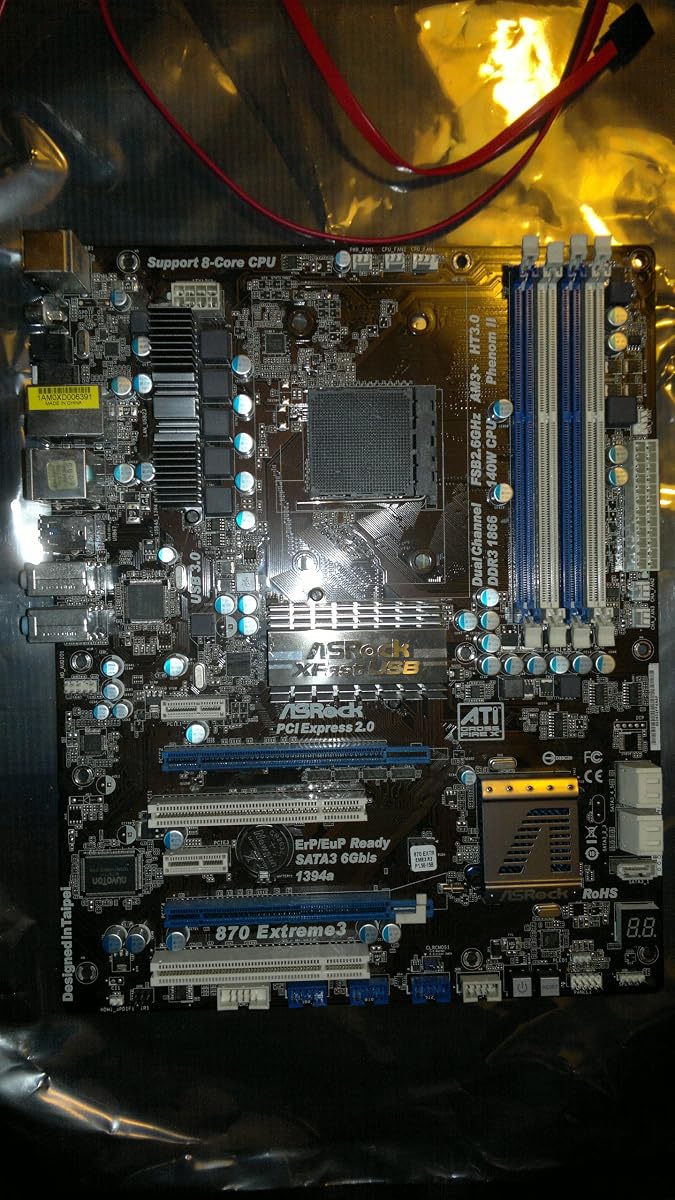
The ASRock 870 EXTREME3 R2.0 is a well rounded Asrock AM3 Motherboard for general users. It supports AM3+ processors and features robust audio and network controllers. The board includes Dual PCIe x16 slots which allows for multi GPU configurations with CrossFireX.
We may earn a commission when you buy through this link, at no additional cost to you.
Features like Wake-On-LAN make it useful for remote access and management. The Realtek audio codec supports premium Blu-ray audio which enhances multimedia experiences. It offers a good balance of connectivity options for home theater PCs or gaming stations.
While the USB standards are not the latest the overall performance remains stable. The board handles heavy loads well but might struggle with extremely modern workloads. These trade-offs are expected for its price point and age.
We recommend this board for users needing reliable multi GPU support on a budget. It fits well in standard cases and provides necessary features. This model is a solid choice for mid-range builds requiring stable performance.
Wake-On-LAN allows you to power on the PC remotely which is great for home servers.
We may earn a commission when you buy through this link, at no additional cost to you.
The ASRock 990FX EXTREME3 is a high performance Asrock AM3 Motherboard designed for enthusiasts. It supports up to 140W CPUs which makes it ideal for overclocked processors. The board offers Quad CrossFireX and Quad SLI support for ultimate graphics flexibility.
We may earn a commission when you buy through this link, at no additional cost to you.
Features include THX TruStudio Pro audio for immersive sound and Broadcom Ethernet for reliable networking. The chipset ensures stable operation under heavy loads which is critical for sustained gaming or rendering. It is a powerful tool for those who need maximum raw performance.
The complexity of the BIOS and high power requirements might be challenging for casual users. It is more expensive and requires better cooling than standard boards. These factors make it less accessible for average budget builds.
We recommend this board for advanced users needing top tier AMD legacy support. It is a strong choice for high-end workstations or gaming rigs. This model delivers the best performance possible on the AM3+ platform.
Supporting 140W CPUs allows you to run powerful processors without thermal throttling issues.
We may earn a commission when you buy through this link, at no additional cost to you.
The ASRock 970DE3/U3S3 offers a unique feature set in the Asrock AM3 Motherboard category. It includes a PCIe 3.0 slot which is rare for older platforms improving bandwidth for graphics cards. The board also supports USB 3.0 and SATA3 for faster external storage connections.
We may earn a commission when you buy through this link, at no additional cost to you.
Features like AM3+ support allow it to work with newer CPUs like the FX series. It provides a solid foundation for budget builds needing modern connectivity. The port layout is practical with ample USB headers for case connectivity.
While the chipset is older the inclusion of newer ports makes it relevant for specific tasks. The board may not support future generations beyond AM3+ but it covers current legacy needs well. These aspects make it a practical choice for mixed hardware setups.
We recommend this board for users needing PCIe 3.0 bandwidth on an AM3+ platform. It is a good value for those needing fast storage and modern I/O. This model is a practical tool for specific connectivity requirements.
The PCIe 3.0 slot improves graphics performance compared to standard PCIe 2.0 slots on older boards.
We may earn a commission when you buy through this link, at no additional cost to you.
The ASRock 970M PRO3 is a compact Asrock AM3 Motherboard that balances size and performance. It features the AMD 970 chipset which provides robust support for AM3+ processors. The MicroATX design makes it a great fit for small form factor systems where space is tight.
We may earn a commission when you buy through this link, at no additional cost to you.
Features include Quad CrossFireX support allowing for multi GPU configurations even in smaller cases. The board includes USB 3.0 ports and SATA3 ports for decent connectivity. It offers a strong foundation for gaming or light workstations.
While the number of expansion slots is limited compared to ATX boards it serves well for single or dual GPU setups. The absence of M.2 might be a limitation for ultra-fast storage. These trade-offs are reasonable for the price and size.
We recommend this board for users needing a small AM3+ build. It provides excellent value for compact systems. This model is a solid option for those who want performance in a smaller package.
The MicroATX layout fits into compact cases while still supporting powerful CPUs and multiple GPUs.
We may earn a commission when you buy through this link, at no additional cost to you.
Selecting the right motherboard requires understanding your specific needs and hardware compatibility. This guide breaks down key factors to help you make an informed decision for your next build.
Ensure the board supports your CPU socket type. AM3 and AM3+ are the most common options in this lineup. Check the manufacturer list for specific processor support to avoid boot issues.
Verify your CPU model matches the socket requirements before purchasing.
The chipset determines features like PCIe lanes and USB support. Higher end chipsets like 990FX offer better multi GPU support. Budget chipsets like 760G are better for basic tasks.
Choose a chipset that matches your performance goals and budget constraints.
ATX boards offer more expansion slots while MicroATX save space. Consider your case size and how many devices you need to connect. This affects airflow and overall build aesthetics.
Match the form factor to your case to ensure everything fits properly.
Check the supported DDR3 speeds and maximum capacity. Most boards support up to 64GB which is plenty for most users. High speeds help with multitasking and gaming performance.
Select a board that allows for your desired RAM amount and speed.
Look for USB 3.0 and SATA3 ports for modern storage speeds. Older boards might lack these which can limit peripheral performance. M.2 slots are rare but valuable for modern SSDs.
Prioritize boards with ports that match your storage and peripheral needs.
High quality audio codecs and Ethernet controllers enhance the experience. Features like Wake-On-LAN are useful for remote management. Ensure the included audio meets your expectations for gaming or media.
Check the audio and LAN specs for quality before finalizing your purchase.
Robust power delivery ensures stability for high wattage CPUs. Look for boards with solid capacitors and ample phases. This is critical if you plan to use powerful processors.
Choose a board with enough power phases for your CPU requirements.
Compare prices relative to features offered. Some budget boards offer excellent value for their specific use case. Avoid paying extra for features you will not use.
Balance the cost with the essential features you actually need.
Install the motherboard in a well ventilated case to ensure proper airflow. Use thermal paste correctly on the CPU to maintain safe operating temperatures. Secure all cables neatly to avoid airflow restrictions.
Regularly clean dust from the heatsinks and fans using compressed air. Dust buildup can trap heat and reduce the lifespan of components. Check connections periodically for any signs of wear or damage.
Keep your BIOS updated to the latest version from the manufacturer website. This ensures compatibility with new hardware and fixes known bugs. Always back up important data before performing any firmware updates.
AM3+ sockets support newer processors with higher power requirements while maintaining backward compatibility with AM3 CPUs. AM3+ boards usually include better power delivery for these advanced chips. Always check the CPU list to confirm your specific processor is supported on the board you choose.
No these motherboards are designed for DDR3 memory only. Using DDR4 RAM is not possible due to physical and electrical differences. You must use DDR3 modules to ensure your system boots and functions correctly.
Most of these boards do not support NVMe SSDs directly on the motherboard. You will need a PCIe adapter card to connect NVMe drives. SATA SSDs are fully supported on the available SATA3 ports.
ASRock provides legacy drivers for these models on their support site. However updates may be infrequent as the platform ages. Check the support page for your specific model to find available audio and network drivers.
For gaming boards like the 970A-G/3.1 or 890FX Deluxe4 are top choices. They support CrossFireX which allows for better graphics performance. These models offer the features and power stability needed for demanding titles.
Yes most of these boards support basic overclocking for AM3+ CPUs. Look for models with solid capacitors and good BIOS options for better control. Ensure your cooling solution is adequate for any increases in speed.
We hope this guide has helped you compare the top Asrock AM3 Motherboard options available today. Whether you choose the budget friendly 760GM-HDV or the premium 890FX Deluxe4 each model serves specific needs. Your decision should depend on the CPU and features you require most.
Prioritize socket compatibility and form factor when making your final decision. Ensure the board supports your desired memory capacity and GPU configuration for optimal results. Investing time in the right choice prevents future headaches and upgrades.
Remember to check current prices and availability before purchasing. Retailers update stock regularly so verifying details on the store page is crucial. This ensures you get the best value for your specific build requirements and budget.