
Thermalright Assassin X120 Refined SE
4.7Editor score
Four heat pipes with AGHP
TL-C12C PWM fan included
Compatible with Intel and AMD
This guide compares the top 10 CPU air cooler fan heatsink models for performance noise and compatibility helping you choose the right cooling solution for
Choosing the right CPU air cooler fan heatsink is essential for maintaining stable performance and longevity in your computer system. A good cooler dissipates heat efficiently while keeping noise levels low during intensive tasks like gaming or video editing.
We evaluated ten leading models based on thermal performance, build quality, fan technology, and compatibility with modern sockets. Our analysis focuses on real-world cooling capabilities and ease of installation to help you make an informed decision.
Each pick highlights specific strengths such as budget value, premium silence, or advanced features like digital screens. Keep in mind that availability and pricing can change frequently so verify current details before purchasing your next cooling solution.
4.7Editor score

4.8Editor score
4.7Editor score
The following table provides a side-by-side comparison of all ten models featured in this guide. We highlight key specifications and compatibility notes to help you quickly identify the best fit for your specific build requirements.


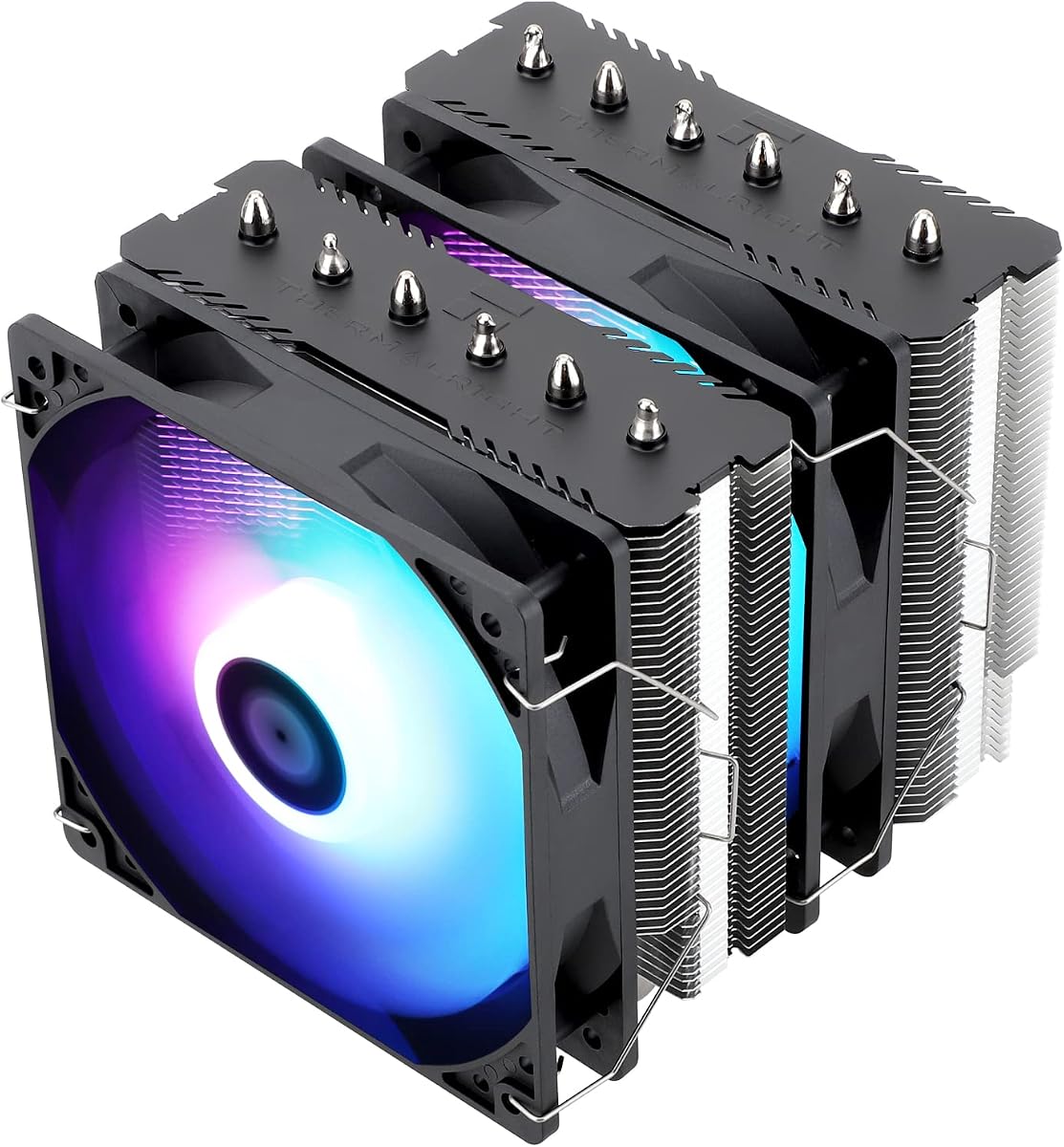
The Thermalright Assassin X120 Refined SE stands out as a top choice for budget-conscious builders seeking reliable cooling performance. With a solid 4.7 rating and robust construction, it delivers efficient thermal management without breaking the bank. This unit is designed to handle mid-range CPUs with ease.
We may earn a commission when you buy through this link, at no additional cost to you.
Its four 6mm heat pipes utilize AGHP technology to ensure consistent cooling regardless of orientation. The included TL-C12C PWM fan provides ample airflow while maintaining a low noise profile under 26dB. The aluminum heatsink cover adds a touch of aesthetics while protecting the fins.
While it lacks premium features like RGB lighting, the cooler focuses on core performance and durability. The mounting system supports both Intel and AMD platforms securely, making installation straightforward for most users. It offers a balanced solution for everyday computing needs.
Anyone looking for an affordable yet effective air cooler should consider this model. It is ideal for standard workstations or gaming rigs that do not require extreme overclocking. The value proposition here is hard to beat in the current market.
AGHP technology prevents heat pipes from failing due to orientation issues, ensuring consistent cooling in various case positions.
The S-FDB bearing fan operates quietly, making it suitable for quiet offices or home theater setups where noise matters.
We may earn a commission when you buy through this link, at no additional cost to you.
The Thermalright Peerless Assassin 120 SE ARGB offers premium cooling capabilities with a visually appealing ARGB aesthetic. Its six heat pipes and dual fan setup deliver exceptional thermal performance suitable for high-end processors. This model strikes a great balance between performance and style.
We may earn a commission when you buy through this link, at no additional cost to you.
With a TDP rating up to 245W, it can handle intense workloads and overclocking scenarios effectively. The TL-C12C-S fans provide sufficient airflow while the ARGB lighting adds a customizable touch to your build. The dual tower design ensures maximum surface area for heat dissipation.
However, the cooler's large dimensions require careful case selection to avoid clearance issues. Ensure your chassis can accommodate a 155mm height before purchasing. The RGB synchronization depends on your motherboard support which may add complexity for some users.
This cooler is perfect for enthusiasts who want top-tier cooling without sacrificing aesthetics. It works well with both modern Intel and AMD platforms. For those seeking a high-performance solution with style, this model is a compelling option.
The dual tower configuration increases surface area significantly allowing better heat transfer and lower CPU temperatures under load.
Supporting up to 245W TDP ensures stable performance even during demanding tasks like 3D rendering or gaming.
We may earn a commission when you buy through this link, at no additional cost to you.
The Noctua NH-D15 chromax.Black is widely regarded as a benchmark for air cooling performance and quiet operation. With a 4.8 rating and extensive awards, it consistently delivers class-leading results. The all-black design matches modern aesthetics while maintaining Noctua's reputation for quality.
We may earn a commission when you buy through this link, at no additional cost to you.
Equipped with two NF-A15 140mm fans and six heat pipes, it handles heat effectively even on hot processors. The included NT-H1 thermal paste ensures optimal contact right out of the box. The SecuFirm2 mounting system makes installation secure and straightforward across many platforms.
Its size may pose challenges in smaller cases so check clearance carefully before purchase. The price is higher than many competitors but reflects the superior engineering and longevity. It is an investment for those prioritizing silent and stable operation.
This cooler is ideal for users seeking the best possible air cooling solution without water cooling. It suits silent PC builders and overclockers alike. The 6-year warranty further reinforces its reliability and long-term value.
The fans are engineered for low noise making it perfect for home theater PCs or quiet work environments.
High-grade materials ensure durability and consistent performance over years of use without degradation.
We may earn a commission when you buy through this link, at no additional cost to you.
The Noctua NH-U12A chromax.Black delivers exceptional cooling in a compact single tower design. It balances space efficiency with strong thermal performance making it suitable for many standard cases. The all-black finish complements dark build aesthetics beautifully.
We may earn a commission when you buy through this link, at no additional cost to you.
Dual NF-A12x25 fans maximize airflow through the heatsink ensuring efficient heat removal. It fits most tower cases while avoiding obstruction of RAM or PCIe slots. The SecuFirm2 mounting system supports modern sockets for both Intel and AMD CPUs.
Though it costs more than some single tower options, the performance and quietness justify the price. Ensure your case supports 158mm height to avoid issues during installation. This model is excellent for balanced systems needing reliable cooling.
It is a great choice for users who prefer a single tower layout without sacrificing performance. Ideal for mid-range gaming PCs or workstations. The warranty and brand support add further confidence to this purchase.
The compact single tower design allows better clearance around motherboard components while still delivering robust cooling.
Two fans increase airflow volume significantly improving cooling efficiency without increasing noise levels.
We may earn a commission when you buy through this link, at no additional cost to you.
The Thermalright Assassin X 120R Digital ARGB introduces a digital screen feature that displays real-time system stats. This adds a modern touch to traditional air cooling solutions. The unit maintains solid thermal performance with four heat pipes and a powerful fan.
We may earn a commission when you buy through this link, at no additional cost to you.
Its 2000RPM PWM fan provides ample cooling but may be louder at high speeds. The top cover screen can show CPU temperature and usage via TRCC software. ARGB lighting syncs with the motherboard for a customized look.
Installation is straightforward with included accessories for both Intel and AMD platforms. Keep in mind that the digital screen relies on software which might not appeal to everyone. This model suits builders who value visual feedback and style.
If you want a cooler that shows vital stats while cooling your CPU this is a strong choice. It fits well in modern gaming setups. Ensure your case height supports 151mm for a fit install.
The digital top cover allows real-time monitoring of CPU temperature and usage without needing external software on the desktop.
ARGB lighting and the digital screen create a futuristic look that enhances the visual appeal of your PC build.
We may earn a commission when you buy through this link, at no additional cost to you.
The Noctua NH-D15 is a legendary model known for reliable and efficient cooling performance. Its classic design remains a top choice for those who prioritize function over flash. It continues to set standards for air cooling technology in the industry.
We may earn a commission when you buy through this link, at no additional cost to you.
Two NF-A15 fans ensure optimal airflow while maintaining a quiet environment. The dual tower design maximizes surface area for heat dissipation. Included mounting hardware supports the latest Intel and AMD sockets for easy upgrades.
While it lacks RGB lighting, the performance and reliability speak for themselves. The 6-year warranty provides peace of mind for long-term use. It is slightly larger than some modern options so verify case clearance.
This model is perfect for users who value pure performance and silence. It remains a benchmark for air coolers in 2026. The classic look fits well in professional or minimalist builds.
Decades of engineering go into this cooler ensuring that it meets high standards for cooling and durability.
The NF-A15 fans are specifically optimized for high static pressure ensuring maximum cooling efficiency.
We may earn a commission when you buy through this link, at no additional cost to you.
The Noctua NH-D15S chromax.Black is an asymmetrical version designed to improve RAM compatibility. It retains most of the dual tower performance while clearing high-profile memory modules. This makes it ideal for builds with large RAM sticks.
We may earn a commission when you buy through this link, at no additional cost to you.
The single NF-A15 fan provides strong airflow keeping temperatures low without excessive noise. The all-black design offers a sleek look that blends well with dark systems. Mounting includes secure hardware for Intel and AMD sockets.
While slightly less powerful than the dual fan D15 it still handles high heat loads well. The 65mm clearance ensures your RAM is not obstructed. It is a practical choice for users needing compatibility.
This cooler suits those who want dual tower cooling without sacrificing RAM slots. It works well in many tower cases up to 160mm height. The warranty ensures long-term reliability for your investment.
The asymmetrical design allows taller RAM modules to be installed without interference or clearance issues.
Using one high-quality fan simplifies cable management and reduces overall system power consumption.
We may earn a commission when you buy through this link, at no additional cost to you.
The Noctua NH-D9L is specifically designed for small form factor builds requiring low height. It provides dual tower cooling in a compact 110mm profile. This makes it perfect for HTPCs or ITX cases where space is limited.
We may earn a commission when you buy through this link, at no additional cost to you.
Despite its small size it delivers reliable cooling for standard CPUs. The NF-A9 fan operates quietly ensuring a peaceful environment. Mounting hardware supports current Intel and AMD platforms with ease.
While airflow is less than larger fans it suits lower TDP processors well. The dual tower design still offers better cooling than typical single towers. It is an essential option for compact system builders.
Choose this if you are building a small PC and need reliable cooling. The low profile ensures compatibility with tight chassis dimensions. The quality and warranty add confidence to this specialized purchase.
This cooler addresses the specific needs of compact builds offering cooling power without excessive height.
The 92mm fan is optimized for low noise making it ideal for living room or office environments.
We may earn a commission when you buy through this link, at no additional cost to you.
The Noctua NH-U12S is a classic slim tower cooler offering solid performance in a compact design. It avoids blocking RAM or PCIe slots on most motherboards. The NF-F12 fan ensures strong airflow with minimal noise.
We may earn a commission when you buy through this link, at no additional cost to you.
Its slim profile makes it compatible with many standard cases without clearance issues. It handles mid to high-end CPUs effectively. The mounting system is secure and supports latest sockets for Intel and AMD.
While it costs more than budget options the performance and reliability are worth it. It lacks RGB lighting but focuses on function and durability. The 6-year warranty backs its long-term use.
This cooler is suitable for users wanting a reliable single tower solution. It fits well in standard towers while maintaining quiet operation. A great choice for general-purpose builds needing efficient cooling.
The slim design balances airflow and fit ensuring it works in most standard tower cases.
The NF-F12 fan uses focused flow technology to increase static pressure for better cooling efficiency.
We may earn a commission when you buy through this link, at no additional cost to you.
The Thermalright Peerless Assassin 120 SE offers excellent cooling performance at an affordable price point. With six heat pipes and dual fans it rivals more expensive options. The asymmetric layout improves compatibility with graphics cards.
We may earn a commission when you buy through this link, at no additional cost to you.
Its soldered base ensures efficient heat transfer from the CPU. The AGHP technology maintains cooling performance in any orientation. Dual TL-C12C PWM fans provide strong airflow while staying relatively quiet.
While it requires the original backplate for AMD installation this is a minor setup step. The nickel-plated pipes add durability and resistance to corrosion. This unit is a strong competitor in the budget tower market.
If you seek dual tower cooling without a high price tag this is ideal. It fits well in standard cases with 155mm clearance. A top pick for budget builders wanting premium features.
The soldered base improves heat transfer efficiency ensuring faster cooling of the processor core.
The offset layout allows for better clearance around tall graphics cards and motherboard components.
We may earn a commission when you buy through this link, at no additional cost to you.
Selecting the right air cooler involves considering multiple factors to ensure optimal cooling performance and compatibility with your existing hardware.
The Thermal Design Power (TDP) rating indicates how much heat a cooler can dissipate effectively. Choose a cooler with a TDP rating equal to or higher than your CPU's max output to prevent thermal throttling during heavy tasks.
Always match the cooler's TDP capacity to your processor's heat output for stable performance.
Ensure the cooler supports your motherboard socket type whether it is Intel LGA1700/1851 or AMD AM4/AM5. Most modern coolers include mounting kits for multiple sockets but always verify before purchasing to avoid installation issues.
Check the product specifications list for your specific socket number to guarantee a secure fit.
Large coolers may overhang RAM slots limiting high-profile memory module use. Look for models with enough offset or height clearance if you plan to use tall heat spreaders.
A cooler that allows 60mm or more clearance is ideal for most high-performance memory modules.
Measure your case's maximum CPU cooler height before buying. Most towers range from 150mm to 160mm so ensure your chassis supports this to avoid assembly problems.
Always verify the interior height clearance to ensure the cooler fits without contacting the side panel.
PWM fans adjust speed based on temperature reducing noise when the system is idle. Look for models with low decibel ratings and S-FDB or similar durable bearings for long life and quiet operation.
Prioritize models with PWM support and low noise ratings for a quieter computing experience.
Quality coolers use robust mounting systems like SecuFirm2 to ensure even pressure and secure contact. This improves cooling efficiency and prevents the unit from shifting over time due to vibrations.
A secure and adjustable mounting system ensures stable contact between the CPU and heatsink base.
High-end coolers often include premium thermal paste like NT-H1 for optimal heat transfer. This saves time and ensures you use quality material that matches the cooler's performance standards.
Check if thermal paste is included to simplify setup and ensure immediate optimal performance.
Materials like copper heat pipes and aluminum fins balance performance and cost. Soldered contact or nickel plating can improve durability and conductivity. Also consider aesthetics if your case has a clear side panel.
Look for copper pipes and aluminum fins with secure construction for best cooling and longevity.
Before installation ensure your CPU surface is clean and free of old paste. Apply a pea-sized amount of new thermal paste to the center of the CPU before attaching the cooler to ensure proper thermal conductivity.
Secure the cooler using the provided mounting system tightening screws evenly to apply consistent pressure. Connect the fan cable to the CPU fan header on the motherboard to enable PWM speed control.
Periodically check the cooler for dust buildup which can reduce airflow and increase noise. Use compressed air to clean fins and fans every few months to maintain efficient cooling performance over time.
Yes airflow direction typically matters for optimal case ventilation. Most tower coolers are designed to push air from front to back so that it aligns with case exhaust fans. Installing the fan backwards may trap hot air inside the case.
Not all tower coolers fit ITX cases due to height restrictions. Look for models specifically rated under 120mm height like the NH-D9L. Always check your case's maximum cooler height specification before purchasing.
Most quality air coolers include high-performance thermal paste. You generally do not need to buy extra paste unless the included amount is insufficient for multiple installations or you prefer a specific brand.
A good air cooler operates below 30dB at full speed. Models below 25dB are considered very quiet. Use software monitoring to check fan speeds as idle noise is often inaudible regardless of model.
Air coolers are generally more reliable and require less maintenance than liquid coolers. While liquid cooling may offer slight performance gains on extreme heat, air cooling is preferred for long-term stability and simplicity.
Height alone does not guarantee better cooling. Design factors like fin density pipe quality and fan speed play larger roles. A compact unit with high-quality components may outperform a larger cheaper cooler.
Yes many modern tower coolers support AM5 sockets with included mounting kits. Verify that the specific model lists AM5 compatibility as some older kits may require upgrades or adapters.
If a cooler exceeds your case height limit it will not fit without modifying the case or using a smaller model. This can lead to inability to close side panels or damage to components during assembly.
Choosing the right CPU air cooler fan heatsink depends on balancing performance needs with budget and case constraints. The Thermalright Assassin X120 Refined SE offers excellent value while Noctua's NH-D15 sets the standard for premium quiet performance.
Focus on TDP compatibility and physical clearance to ensure the cooler fits your system without issues. Whether you prioritize silence or raw cooling power there is a model in this guide to suit your needs.
Remember that availability and pricing can fluctuate so always verify current stock and deals before purchasing. With the right cooling solution your system will run cooler and quieter for years to come.