
BENFEI 4in1 USB 3.0
4.5Editor score
Four card slots simultaneously
USB-C and USB 3.0 support
18-month warranty included
This guide compares the top ten compact flash card reader models for speed, compatibility, and durability to help photographers and creators choose the right
Finding the right compact flash card reader is essential for photographers and videographers who need reliable data transfer. A good reader supports multiple card types and offers fast speeds to save time during critical workflows.
We compared ten top models based on speed, compatibility, build quality, and user feedback. Each product was evaluated for its ability to handle modern and legacy cards efficiently across various devices.
Each pick highlights key features and ideal use cases for different needs. Please note that prices and availability can change frequently, so check current listings before making your final purchase decision.
4.5Editor score

4.7Editor score

4.4Editor score
The following table provides a side-by-side comparison of all ten products evaluated in this guide. It highlights key specifications to help you quickly identify the model that best fits your specific needs and device compatibility.



The Lexar Multi-Card 3-in-1 Reader stands out as the top choice for professionals needing speed and reliability. With a rating of 4.7 stars, users praise its ability to handle SD, microSD, and CF cards efficiently. The USB 3.1 interface ensures data moves quickly, which is crucial for large photo and video files.
We may earn a commission when you buy through this link, at no additional cost to you.
Its standout feature is the transfer speed reaching up to 312MB/s for SD and microSD cards, while CF cards support up to 160MB/s. This performance minimizes downtime during shoots or editing sessions. The reader is also backward compatible with UHS-I cards, ensuring flexibility across different camera gear generations. This versatility makes it a robust tool for hybrid shooters.
However, it does not support CFast cards, which are used in some high-end cinema cameras. Additionally, it uses a standard USB-A connector, which may require an adapter for modern laptops with only USB-C ports. These trade-offs are acceptable given the speed and reliability it offers for the vast majority of photographers and content creators.
This reader is ideal for photographers and videographers who prioritize speed and compatibility with SD and CF formats. If you need a dependable tool that handles large files quickly without breaking the bank, this Lexar model is a highly recommended investment for your workflow.
The high-speed interface ensures that large 4K video files or bursts of high-resolution photos transfer in seconds rather than minutes.
Supporting SD, microSD, and CF cards means one device can handle most of your current camera gear without needing multiple adapters.
We may earn a commission when you buy through this link, at no additional cost to you.
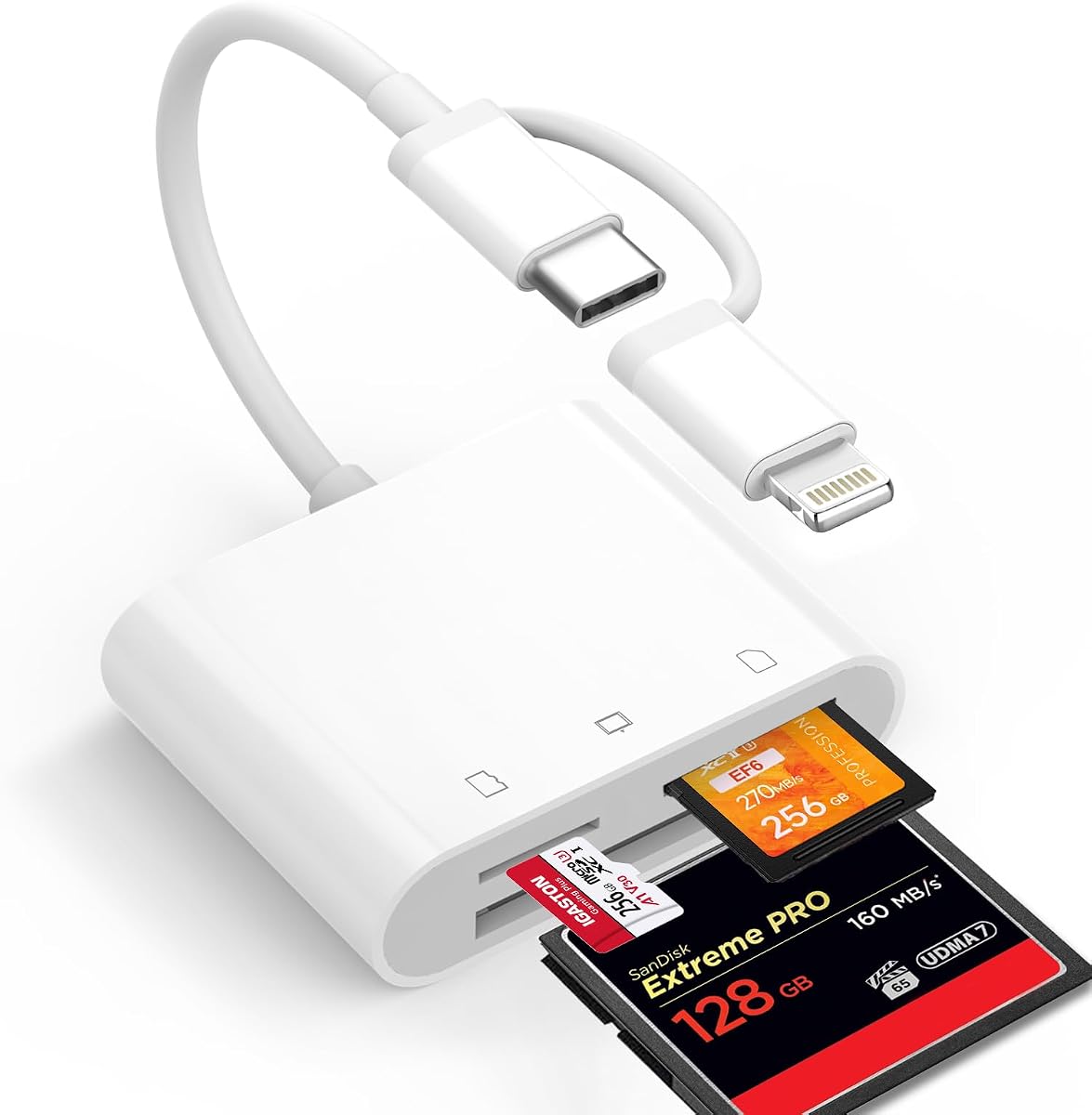
The BENFEI 4in1 USB 3.0 Reader offers exceptional value for those on a budget without sacrificing essential features. Rated 4.5 stars, it supports SD, Micro SD, MS, and CF cards simultaneously. The unique 2-in-1 design with both USB-C and USB 3.0 connectors makes it versatile for older laptops and newer devices like the iPhone 15 series.
We may earn a commission when you buy through this link, at no additional cost to you.
Its ability to read and write four cards at the same time is a significant workflow booster. You can offload footage from multiple cameras without swapping cards constantly. The integrated design ensures high data speed access, and the built-in IC chip provides stability for HD movie transfers. The 18-month warranty adds peace of mind for long-term use.
Note that it is incompatible with standard Memory Stick and CF Type I cards, which might affect users with older equipment. Also, actual transfer speeds depend on the card quality and port type, so expect variations. These limitations are minor compared to the cost savings and functional breadth it provides for most users.
This reader is perfect for hobbyists or professionals needing a budget-friendly multi-card solution. If you want to read multiple card types simultaneously without spending much, the BENFEI model is a smart choice for your toolkit.
The combination of USB-C and USB 3.0 means you can connect to almost any laptop or tablet without extra dongles.
Reading four cards at once saves time during post-production, allowing you to batch process footage from different sources efficiently.
We may earn a commission when you buy through this link, at no additional cost to you.
The CFast 2.0 Card Reader is engineered for professionals who require support for high-end cinema cameras and robust build quality. With a 4.4 rating, it supports CFast, CF, SD, TF, and XD cards. The dedicated CFast 2.0 slot allows for blazing-fast transfers, making it essential for filmmakers working with large RAW video files.
We may earn a commission when you buy through this link, at no additional cost to you.
Its 5Gbps USB 3.0 interface ensures rapid data movement, significantly reducing wait times compared to standard readers. The aluminum body helps dissipate heat during prolonged transfers, enhancing durability and reliability in demanding environments. The ability to read five cards simultaneously streamlines workflow for multi-camera setups or diverse storage formats.
While it is more expensive than basic models, the specialized support for CFast justifies the cost for pros. It might be slightly bulkier than pocket-sized readers, but the durability is worth it for field work. These factors make it a premium tool designed for serious content creators.
This reader is best suited for cinematographers and high-end photographers using CFast cards. If you need professional-grade speed and reliability alongside legacy format support, this model offers the performance you demand.
The dedicated CFast 2.0 slot enables offloading of massive video files quickly, keeping your production schedule on track.
The aluminum housing prevents overheating during long transfers, ensuring consistent performance even during extended usage sessions.
We may earn a commission when you buy through this link, at no additional cost to you.
The 6-in-1 Card Reader is designed for users who work with a wide variety of legacy and modern storage formats. Rated 4.3 stars, it supports CFast, CF, SD, MicroSD, MS, and xD cards. The dual connector design allows it to work with both USB-C devices and standard USB ports, offering maximum flexibility across different systems.
We may earn a commission when you buy through this link, at no additional cost to you.
Reading six cards simultaneously is a major advantage for multi-camera shoots or archiving projects. The aluminum alloy chassis ensures heat dissipation and durability, making it suitable for professional use. The 5Gbps speed ensures data transfers are quick, reducing downtime during critical workflows. It is a powerful tool for those managing diverse media assets.
However, managing six slots might be overkill for casual users who only use SD cards. The price reflects its broad compatibility and premium build, which might not be necessary for everyone. Despite this, its versatility makes it a strong contender for professionals with mixed equipment needs.
This reader is ideal for photographers and archivists dealing with older camera formats alongside modern ones. If you need a single device to handle almost any memory card format, this model provides comprehensive coverage and performance.
Supporting six card types means you can archive old projects using legacy cards without needing separate adapters for each format.
Transferring from multiple cards at once drastically cuts down the time spent waiting for data to move to your computer.
We may earn a commission when you buy through this link, at no additional cost to you.
The ZIYUETEK CF Card Reader provides a solid balance of speed and capacity for multi-card workflows. Rated 4.5 stars, it supports SDXC, SDHC, SD, Micro SD, M2, MS, and CF cards. The high-performance chip allows for up to 5Gbps transfer speeds, ensuring efficient data handling for various file types and sizes.
We may earn a commission when you buy through this link, at no additional cost to you.
Its slim aluminum cover adds durability while keeping the device lightweight for travel. The built-in protection against over-current and short circuits safeguards your connected equipment and the hub itself. Hot swapping support and plug-and-play functionality mean you can use it on Windows, Mac, or Linux without drivers. This reliability is valued by users needing consistent performance.
The fixed connector limits portability compared to detachable cables, and the aluminum surface may show wear over time. These issues are minor compared to the functional benefits it offers for the price. It remains a robust option for users who need to manage multiple cards regularly.
This reader is great for photographers or travelers who carry multiple camera formats. If you want a reliable and fast multi-card solution that is easy to carry, the ZIYUETEK model is a strong recommendation.
The ability to read five cards at once streamlines your data transfer process, saving significant time during editing sessions.
Built-in safeguards protect your computer from power surges or short circuits that might damage ports during operation.
We may earn a commission when you buy through this link, at no additional cost to you.
The UGREEN USB C SD Card Reader is optimized for modern devices that rely on USB-C ports. With a 4.5 rating, it supports SD, Micro SD, CF, and MS cards. Its design is born for all USB-C devices, making it a seamless accessory for iPhone 15, MacBooks, and Android phones without needing extra dongles.
We may earn a commission when you buy through this link, at no additional cost to you.
Transfers happen at up to 5Gbps speeds, allowing quick movement of large files directly to phones or tablets. The four cards work simultaneously feature ensures you can browse and download from all connected cards without interrupting the flow. It is plug and play across Windows, Mac, Linux, and Chrome OS, ensuring broad usability. This convenience is ideal for mobile creators.
It does not include a USB-A adapter, limiting it to USB-C devices unless you have an adapter. The single cable design is compact but can be restrictive if you need detachable cables for storage. Despite these minor drawbacks, it excels for modern laptop and smartphone users.
This reader is perfect for mobile photographers and travelers using USB-C tablets or phones. If you need direct access to memory cards without adapters, this UGREEN model offers the most streamlined experience for modern devices.
Native support for USB-C means no extra adapters are needed for most laptops and tablets, simplifying your gear setup significantly.
Transfer large video files directly to your phone or tablet for quick editing or sharing while you are on the go.
We may earn a commission when you buy through this link, at no additional cost to you.
The SmartQ C368 USB 3.0 Card Reader focuses on essential functionality for everyday use. Rated 4.6 stars, it supports SD, Micro SD, MS, and CF cards with four slots. The blue LED indicator provides clear status feedback, which is helpful when working in low-light environments or verifying device power during transfers.
We may earn a commission when you buy through this link, at no additional cost to you.
It supports data transfer speeds up to 5Gbps, ensuring quick access to files on USB 3.0 ports. Compatibility extends across Windows, Mac, and Linux systems without driver installation. The cable organizer included in the box helps keep your workspace tidy and protects the connection during travel. Its simplicity makes it user-friendly for non-technical users.
While it lacks premium materials like aluminum, the plastic build is adequate for occasional use. It does not offer simultaneous multi-card reading, requiring swapping for multiple devices. However, for users prioritizing ease of use and basic performance, this model delivers reliably without unnecessary complexity.
This reader is best for casual photographers or home users needing a simple card reader. If you want a hassle-free device that works immediately with your computer and cards, the SmartQ model is a practical choice.
The LED indicator lights up when powered, helping you confirm the device is active and ready for data transfer.
The cable organizer helps prevent tangling and damage during transport, ensuring your setup stays ready for use.
We may earn a commission when you buy through this link, at no additional cost to you.
The Denlane Dual Connector Card Reader is tailored for users transitioning between Lightning and USB-C devices. With a 4.3 rating, it supports CF, SD, and MicroSD cards via a dual connector design. It is particularly useful for owners of older iPhones and newer USB-C iPads needing a single solution for accessing camera cards.
We may earn a commission when you buy through this link, at no additional cost to you.
It is Apple MiFi certified for stable transmission speeds without extra power. The fixed connectors prevent loss, and bi-directional transfer allows saving photos from your phone to the card to free up storage. No app or network is required, making it ideal for traveling photographers who need quick access to files on mobile devices.
Note that you cannot use both connectors simultaneously, which limits flexibility when switching devices. It supports only three card types, excluding older formats like XD. However, for iPhone users needing reliable direct access to camera media, it solves a common pain point effectively.
This reader is ideal for iPhone and iPad owners managing photos on the go. If you need to view or save photos directly to your mobile device without a computer, this Denlane adapter is a convenient option.
The fixed Lightning and USB-C connectors eliminate the need for separate dongles, covering a wide range of Apple devices.
Save photos directly from your phone to the memory card to quickly free up storage space during trips or events.
We may earn a commission when you buy through this link, at no additional cost to you.
The ChiaoPio USB C SD Card Reader simplifies data transfer with a built-in USB-C connector that does not block other ports. Rated 4.5 stars, it supports CF, SD, and MicroSD cards. Its compact design allows you to plug it in and forget it, keeping your workspace tidy and your workflow uninterrupted during editing sessions.
We may earn a commission when you buy through this link, at no additional cost to you.
It is compatible with iPhone 15, iPads, Macs, and Android devices with USB-C. The reader works without additional power, drawing energy directly from the connected device. It requires no drivers, ensuring instant compatibility across Windows and macOS. This seamless integration makes it an excellent companion for daily use on laptops.
The non-detachable cord limits flexibility if you need to move the reader away from the device. It is strictly for USB-C ports, so older USB-A users would need an adapter. However, for modern laptops with limited ports, this fixed design solves a significant accessibility issue.
This reader is perfect for laptop users needing a space-saving solution for card access. If you prioritize a tidy desk setup and direct connectivity without dongles, the ChiaoPio model is a practical and efficient choice.
The built-in cord ensures the connector does not obstruct adjacent USB-C ports, allowing you to use other accessories simultaneously.
No external power source is required as the reader draws energy from the connected device, simplifying setup and travel.
We may earn a commission when you buy through this link, at no additional cost to you.
The UGREEN SD Card Reader USB 3.0 is a robust hub designed for reading multiple card types simultaneously. With a 4.6 rating, it supports SD, Micro SD, CF, and MS cards, plus MMC. The inclusion of MMC support makes it unique for users with older or industrial camera equipment that relies on this format.
We may earn a commission when you buy through this link, at no additional cost to you.
It supports up to 5Gbps speeds and 2TB cards, ensuring it remains relevant for high-capacity needs. The 1.7 ft cable provides enough slack to work comfortably with your computer while keeping the device near the cards. Plug and play compatibility with Windows, Mac, Linux, and Chrome OS ensures broad utility without software setup.
However, it relies on USB-A ports, which limits it on modern laptops. The cable length is manageable but may not reach across all desks. Despite this, its broad legacy format support is a strong advantage for professionals managing diverse archives. It is a versatile tool for comprehensive card reading.
This reader is ideal for professionals needing to read older MMC and CF cards alongside modern formats. If you manage a large archive of media and need broad format support, this UGREEN hub provides the necessary capabilities.
Inclusion of MMC and CF slots means you can access older media without needing outdated equipment or specialized adapters.
Support for 2TB cards ensures you are prepared for future storage needs without needing to replace your hardware.
We may earn a commission when you buy through this link, at no additional cost to you.
Choosing the right compact flash card reader requires careful consideration of your specific workflow needs and device compatibility. This guide outlines the most critical factors to evaluate before making a purchase to ensure you get a reliable tool for your photography or videography needs.
The most important factor is ensuring the reader supports all the memory card formats you use. Some readers support only SD and Micro SD, while others include Compact Flash, CFast, XD, or Memory Stick. Check your camera models and archived cards to confirm which slots you need. A reader that misses one format may require you to buy multiple devices.
Verify that the reader explicitly lists support for your specific card types before purchasing.
Transfer speed directly impacts how quickly you can move large photo or video files. Look for readers that support USB 3.0 or higher standards like USB 3.1 to achieve speeds up to 5Gbps. Ensure your computer has matching ports to utilize these speeds effectively. Faster speeds reduce downtime during critical editing or backup workflows.
Prioritize readers with high maximum speed ratings to match your fastest memory cards.
Modern laptops often have only USB-C ports, while older systems use USB-A. Some readers offer dual connectors or adapters to bridge this gap. If you use mobile devices like iPhones or Android phones, USB-C is essential. Ensure the reader has the correct connector for your primary workstation or travel device.
Select a reader with the connector type that matches your most frequently used devices.
Many professional workflows require reading multiple cards at once from different cameras. Some readers allow four or five cards to be read simultaneously, which saves significant time compared to swapping cards one by one. This feature is particularly valuable for event photographers or videographers with multiple rigs.
Choose a multi-card hub if you regularly work with more than one memory card per shoot.
Build quality determines durability and heat management during long transfers. Aluminum housings dissipate heat better than plastic and resist damage from drops. A sturdy build is essential for field use where the reader may be packed with gear. Cheaper plastic models may overheat or break under heavy use.
Opt for metal construction if you need reliability during frequent travel or professional use.
Most modern readers are plug and play, but it is crucial to confirm support for your specific OS. Some readers may require drivers for older Windows versions or Linux distributions. Ensure the product page lists compatibility with Windows, macOS, or Linux as needed for your setup.
Check system requirements to avoid driver installation headaches after purchase.
A reliable warranty indicates the manufacturer stands behind their product quality. Look for warranties of at least one to two years to protect against defects. Good customer service is also vital if you encounter compatibility issues during setup. This protection ensures long-term value for your investment.
Prioritize brands that offer clear warranty terms and responsive support channels.
For travelers, compact size and weight are significant considerations. Smaller readers fit easily into camera bags without taking up too much space. Some designs include cable organizers or foldable connectors to reduce bulk. A portable reader ensures you can access data anywhere without carrying heavy gear.
Select a compact model if you frequently move between locations or travel often.
To begin using your card reader, connect the device directly to an available USB port on your computer or mobile device. Ensure you select a port that matches the reader's connector type, such as USB-A or USB-C, to achieve the fastest possible transfer speeds. If your system does not recognize the device immediately, check that the port is functioning properly and try restarting your computer.
Once connected, your operating system should automatically detect the reader and assign it a drive letter or mount it as an external storage device. You can then open the drive in File Explorer or Finder to access files stored on the inserted cards. Always eject the reader safely before unplugging it to prevent data corruption, especially after large file transfers.
To maintain the reader, keep it in a cool, dry place away from direct sunlight or extreme temperatures. Avoid exposing the contacts to moisture or dust, as this can interfere with connectivity over time. Periodically clean the exterior with a dry cloth and ensure the slots are free from debris. Following these steps will help extend the lifespan and reliability of your device.
Most of the readers reviewed are fully compatible with macOS and are plug-and-play, meaning no additional drivers are needed. They work seamlessly with modern MacBooks and iMacs, particularly those with USB-C ports. Always check the product specifications to ensure your specific card format is supported by the reader.
No, the majority of these readers are designed to be plug-and-play on Windows and Mac systems. They rely on standard operating system drivers to function immediately upon connection. If you encounter issues, try connecting to a different USB port or restarting your device before considering driver updates.
Yes, many readers support Android devices via USB-C connectivity, allowing you to access photos and videos directly. You may need to use a file manager app on your phone to browse the card contents. Ensure your phone supports USB OTG (On-The-Go) for the connection to work properly.
USB 3.1 generally offers higher transfer speeds and improved power efficiency compared to USB 3.0. For high-capacity cards and large video files, USB 3.1 provides faster data movement. However, both standards are backward compatible with USB 2.0 ports, though at reduced speeds.
Yes, several models reviewed support simultaneous reading of multiple cards, such as SD, CF, and Micro SD. This feature is especially useful for professionals managing data from multiple cameras. It reduces the need to constantly swap cards during data offloading sessions.
No, these readers are powered directly by the USB connection to your computer or device, so no extra power supply is needed. They draw sufficient energy from the host port to operate reliably. This design keeps the setup clean and portable for travel.
Yes, most modern readers support SDXC cards up to 2TB capacity as long as your operating system supports exFAT formatting. Ensure your system is updated to handle large file systems correctly. Always safely eject the card after transferring data to prevent potential corruption.
First, try connecting the reader to a different USB port or another computer to rule out a faulty port. Check that the cable is securely connected and inspect it for any visible damage. If the issue persists, consult the manufacturer's troubleshooting guide or contact customer support.
Selecting the right compact flash card reader depends largely on your specific workflow needs and the devices you use. Our top picks include the Lexar Multi-Card 3-in-1 for overall performance and the BENFEI 4in1 for budget-friendly versatility. These models offer robust features that cater to both professionals and casual users.
Prioritize factors such as card compatibility, transfer speed, and connector type to ensure the reader fits your setup. A model that supports all your card formats and connects directly to your laptop without adapters will save time and reduce frustration. Investing in a durable reader protects your valuable data and extends the life of your equipment.
Remember that prices and availability change frequently so always check current listings before making your purchase. We hope this guide helps you find a reliable and efficient solution for your photography or videography needs.