
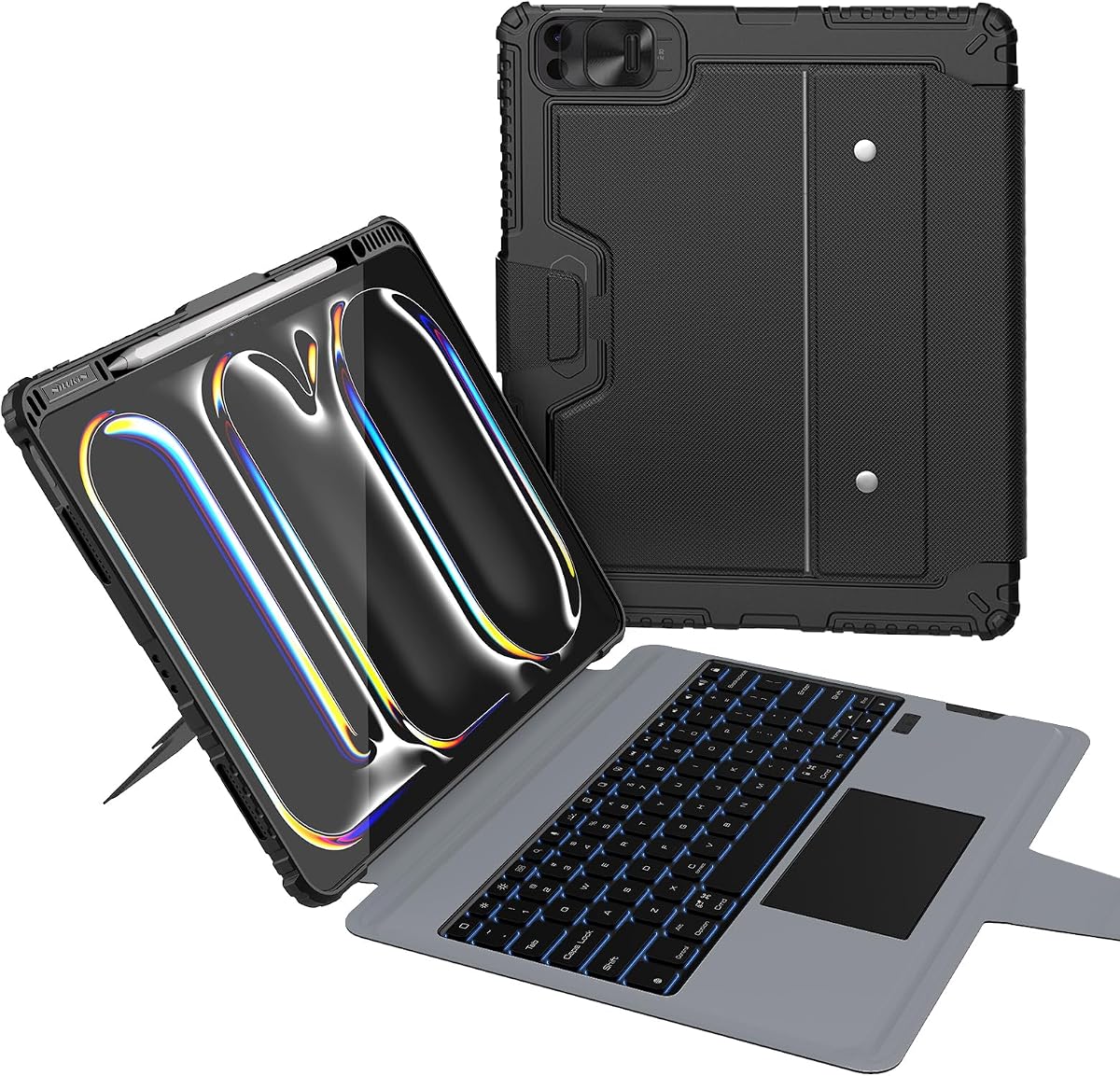
Harvopu for iPad Pro 13 Inch Case with Keyboard (M5/M4) 2025/2024, Black
4.4Editor score
Seven color backlight modes
High sensitivity trackpad
Three stable viewing angles
Finding the right keyboard case for your iPad Pro 13 M4 transforms it into a powerful laptop replacement. You need a solution that offers tactile typing, reliable trackpad navigation, and robust protection without adding excessive bulk to your daily carry routine.
We evaluated ten top-rated keyboard cases based on compatibility, build quality, typing experience, and feature sets. Our analysis focuses on magnetic connectivity, trackpad responsiveness, battery life, and how well each case supports versatile viewing angles for different workflows and environments.
Each pick below highlights specific strengths like backlighting, detachability, or rugged protection to help you choose wisely. Keep in mind that product availability and pricing can fluctuate over time, so always verify the latest details before making your final purchase decision today.
4.4Editor score

4.3Editor score

4.2Editor score
As an Amazon Associate we earn from qualifying purchases.
This side-by-side comparison highlights the unique specifications and key capabilities of each keyboard case option available for the iPad Pro 13 M4 and M5 models to help you identify the perfect match for your needs.



The Apple iPad Magic Keyboard Case stands out as the top choice for professionals seeking a laptop-like experience. With a rating of 4.3, it offers a glass trackpad with haptic feedback and a dedicated function row for quick shortcuts. The two-cantilever hinge design ensures smooth adjustments for any viewing angle.
We may earn a commission when you buy through this link, at no additional cost to you.
This case provides a great typing experience with scissor mechanism keys that feel responsive and precise. The built-in glass trackpad supports Multi-Touch gestures, making navigation intuitive without needing an external mouse. Additionally, the USB-C connector allows for pass-through charging so your iPad stays powered during long sessions.
While the price is higher than third-party options, the build quality and seamless integration with iPadOS justify the cost for many users. The front and back protection is excellent, though it does add more weight than ultra-slim alternatives. These trade-offs are acceptable given the performance and durability it offers.
If you prioritize typing comfort and trackpad precision, this Magic Keyboard is the ideal companion for your iPad Pro 13 M4. It transforms the tablet into a capable workstation effortlessly. We recommend this for those who want a premium, reliable solution for daily productivity tasks.
The glass trackpad with haptic feedback mimics the feel of a MacBook, providing precise cursor control and gesture support.
Scissor mechanism keys with backlighting ensure comfortable typing even in low light environments during long work sessions.
We may earn a commission when you buy through this link, at no additional cost to you.
The ESR case offers a flexible approach with a multi-mode magnetic stand and detachable back design. Rated 4.2, it allows you to transform your iPad into a productivity machine easily. The ultra-strong magnets let you open the floating cantilever stand to your desired angle for typing or browsing comfortably.
We may earn a commission when you buy through this link, at no additional cost to you.
You can detach the back case for instant hands-on access while keeping full-body protection. It supports raised screen view for better posture and portrait mode for FaceTime calls. The extended multi-touch trackpad is sensitive enough for most daily tasks like swiping and zooming effectively.
While it lacks the premium finish of Apple's keyboard, it provides solid versatility at a lower price point. Some users note the trackpad may not be as precise as glass alternatives. This is a minor compromise considering the range of modes and protection it provides.
This case is perfect for users who want flexibility between tablet and laptop modes without spending heavily. It balances functionality and affordability well. We suggest it for students or casual users needing adaptable protection and typing capabilities.
Detach the keyboard case to use the iPad as a standalone tablet for drawing or reading while maintaining full protection.
Raised screen view improves posture during long typing sessions making it ideal for working from home or coffee shops.
We may earn a commission when you buy through this link, at no additional cost to you.
This ESR variant focuses on flexibility with a landscape stand that adjusts from 20 to 75 degrees. With a rating of 4.4, it offers a secure magnetic connection to attach or remove the keyboard as needed. The 65 percent larger trackpad provides smoother control for navigation and editing tasks.
We may earn a commission when you buy through this link, at no additional cost to you.
The adjustable landscape stand adapts to your perfect viewing angle while the low-angle support is ideal for drawing. You can detach into single-case mode for gaming or reading without the keyboard bulk. This ensures unmatched versatility compared to fixed designs found in other cases.
The inclusion of a pencil holder prevents your Apple Pencil from being scratched or falling off. While the trackpad is larger, it lacks some of the glass surface refinement of premium models. This makes it a practical choice for budget-conscious users needing multiple modes.
If you need a case that supports both typing and drawing with adjustable angles, this is a strong contender. The value it offers is excellent for students or digital artists. We recommend it for those who want versatility without high costs.
The larger click-anywhere trackpad enhances precision during editing and app switching making navigation more efficient and fluid.
Multiple viewing angles allow you to customize your workspace for reading writing or drawing based on your posture needs.
We may earn a commission when you buy through this link, at no additional cost to you.
The typecase Edge brings a magical touch with 11-color backlight keys and 3 levels of brightness. Rated 4.2, this magnetic keyboard case elevates your iPad experience with precise navigation and a lightweight profile. The floating cantilever design allows effortless adjustment to your preferred viewing angle.
We may earn a commission when you buy through this link, at no additional cost to you.
Magnetically morph your iPad into a sleek laptop within seconds with the reliable magnetic closure that also holds your Pencil. The instant wake and sleep feature conserves energy efficiently while typing. Full front and back coverage protects your device from everyday wear and tear.
While the trackpad is responsive, it is not as large as some competitors. Some users might find the backlight customization fun but not essential for productivity. However the combination of style and function makes it appealing for creatives and casual users alike.
This case is a great choice if you value aesthetics and customization alongside standard typing features. The floating design adds a unique ergonomic benefit. We suggest it for users who want a stylish and functional case.
Adjust 11 backlight colors to match your mood or environment for a personalized typing experience in any lighting condition.
The floating cantilever design allows smooth transitions between angles ensuring comfort whether typing sketching or viewing videos.
We may earn a commission when you buy through this link, at no additional cost to you.
Logitech's Combo Touch offers the biggest trackpad yet for an intuitive tracking experience. With a rating of 3.7, it provides multiple use modes including detachable keyboard for sketching or reading. The large Multi-Touch trackpad lets you swipe pinch and double-tap naturally.
We may earn a commission when you buy through this link, at no additional cost to you.
Use your way modes allow you to switch up activities without removing the iPad from the case. The adjustable wireless backlit keyboard glows elegantly for day or night work. Smart Connector ensures seamless secure connectivity powered directly by your iPad without extra charging.
While the trackpad is impressive, the lower rating suggests some users have concerns with stability or fit. The kickstand offers good flexibility but may not feel as sturdy as cantilever designs. Still the size of the trackpad is a major advantage for navigation.
If you need maximum trackpad space and versatile modes, this Combo Touch is worth considering. It transforms your iPad into a full workstation. We recommend it for those prioritizing navigation comfort and flexibility.
The largest trackpad allows multi-touch gestures like pinch to zoom making browsing and editing documents significantly easier.
Remove the keyboard completely to sketch or read with total freedom while keeping the case protective and secure.
We may earn a commission when you buy through this link, at no additional cost to you.
Harvopu offers an affordable magnetic detachable keyboard case with 7-color backlight and 3-level brightness. Rated 4.4, it features a built-in 500mAh battery that lasts long between charges. The high-sensitivity trackpad supports gestures for scrolling and zooming to improve productivity.
We may earn a commission when you buy through this link, at no additional cost to you.
This case uses stain-resistant PU material that wipes away dirt easily. The internal TPU shell with honeycomb mesh protects from drops and heat. Three stable viewing angles allow you to choose from 110 to 130 degrees for comfortable typing and video calls.
While you need to charge it separately, the battery lasts weeks which is impressive for a Bluetooth keyboard. The trackpad is smaller than premium options but functions well for basic tasks. The stable Bluetooth connection ensures hassle-free setup and reliability.
For those seeking value and essential features, this Harvopu case is a smart choice. It provides protection and typing convenience at a low price. We recommend it for students and budget-conscious users.
The built-in 500mAh battery delivers weeks of active typing before needing a recharge via the included Type-C cable.
Special PU material repels dirt and stains keeping the case clean and fresh even after heavy daily use.
We may earn a commission when you buy through this link, at no additional cost to you.
The typecase Edge+ provides all-in-one versatility with detachable Wingshell back case for typing and reading. Rated 4.2, it features a wider stable hinge and magnetic floating stand up to 135 degrees. The 33 percent larger touchpad enhances precision for detailed design work and creativity.
We may earn a commission when you buy through this link, at no additional cost to you.
Dedicated shortcut keys allow instant control over brightness volume and search without leaving the keyboard. The black back case is lightweight at 110g with a textured grip for durability. Strong N54H magnets ensure a stable connection during use at home or on the go.
While the price is higher than basic models the stability and precision justify it for professionals. The shortcut keys streamline workflows efficiently making tasks faster. Some users may find the detachable wingshell useful for travel flexibility.
If you want a premium feel with added productivity tools like shortcut keys and a larger touchpad this Edge+ is ideal. We recommend it for power users and creatives who need stability and speed.
Dedicated shortcut keys provide swift access to iPadOS features improving efficiency and operation without leaving the keyboard.
A wider stable hinge and floating stand ensure reliable support allowing comfortable viewing angles during long work sessions.
We may earn a commission when you buy through this link, at no additional cost to you.
This Wireless Keyboard Case features a built-in 360 omnidirectional rotating stand for precise angle adjustment. With a rating of 4.6, it offers vibrant 7-color backlighting and a responsive wireless keyboard and trackpad. The transparent back highlights your device design while keeping all-around protection.
We may earn a commission when you buy through this link, at no additional cost to you.
Lock the viewing angle to maintain a healthy posture while typing or presenting. The transparent design provides superior protection against drops and dust without hiding your tablet look. Precision cutouts give full access to ports and buttons easily.
The high rating suggests strong user satisfaction with its stability and style. However the transparent design might not suit those who prefer a matte finish. Still the 360 rotation allows effortless multitasking in any orientation.
If you want a stylish case that allows full rotation and protection this model is a top pick. We recommend it for users who value aesthetics and functionality.
The omnidirectional rotating stand allows smooth angle adjustments for typing drawing or presenting without needing to reposition the device.
A clear hardshell design showcases your iPad style while providing durable protection against scratches and drops effectively.
We may earn a commission when you buy through this link, at no additional cost to you.
Nillkin offers military-grade protection with a case that survived 1.2-meter drop tests. Rated 4.3, it features a 0-180 degree kickstand and a 500mAh battery lasting 100 hours. The 1.4mm scissor-switch keys give real travel and feedback for enjoyable typing.
We may earn a commission when you buy through this link, at no additional cost to you.
Laptop-class typing ensures you can work comfortably without screen fatigue. The multi-touch trackpad handles every iPadOS gesture with palm rejection. The case includes a sliding camera cover for privacy and protection when needed on the go.
While bulky compared to slim cases the protection it offers is unmatched for rough environments. The battery lasts weeks between charges making it great for travel. The trade-off is weight but security is worth it.
For field work or travel where drops are common this rugged case is essential. We recommend it for outdoor professionals and adventurous users needing durability.
Air-cushion bumpers absorb impact ensuring the screen stays safe from drops and heavy duty frames keep the device secure.
A 500mAh battery delivers weeks of standby and active typing so you charge rarely and stay productive longer.
We may earn a commission when you buy through this link, at no additional cost to you.
TSQQST crafts an exclusive case with transparent acrylic design to showcase your iPad's original style. Rated 4.3, it features a fluid 360 rotating base and 5 adjustable angles for multitasking. The futuristic 7-color glow keyboard adds sophistication to low-light productivity.
We may earn a commission when you buy through this link, at no additional cost to you.
Reinforced corners and shock-absorbent edges guard against drops and scratches effectively. A responsive wireless keyboard and trackpad provide laptop-like navigation for editing and creativity. Perfect for professionals students and digital nomads needing control on the go.
The design is sleek but may not suit users preferring a matte black finish. Still the transparency and glow add a unique tech-inspired touch. It balances minimalist style with durable protection well.
If you want a stylish and functional case that highlights your iPad design this Clear Keyboard is a smart choice. We recommend it for users who love modern tech aesthetics.
The transparent panel and circuitry reveal intricate details adding a futuristic touch to your tablet setup elegantly.
Switch between typing sketching and streaming effortlessly with a 360 rotating base and 5 ergonomic angles.
We may earn a commission when you buy through this link, at no additional cost to you.
Selecting the right keyboard case involves weighing connectivity typing comfort and protection levels to match your daily needs and usage environment.
Decide between Smart Connector for passive charging and Bluetooth for independent battery use. Smart Connector cases like Apple's do not need extra charging but are heavier. Bluetooth cases are versatile but require occasional recharging.
Choose Smart Connector for seamless integration or Bluetooth for flexibility and lighter weight.
Look for glass trackpads with haptic feedback for best precision like the Apple Magic Keyboard. Some budget models use plastic tracks which are functional but less smooth. Ensure gesture support for swiping and zooming without lag.
Prioritize glass trackpads for professional work and plastic for casual daily use.
Detachable keyboards allow you to remove the typing surface for sketching or reading. This adds versatility but might reduce stability compared to fixed hinges. Check magnetic strength to ensure the keyboard stays attached during typing.
Opt for detachable designs if you frequently switch between laptop and tablet modes.
Backlit keys are crucial for typing in low light. Look for scissor mechanisms with good key travel. RGB or multi-color backlighting adds personalization but may drain battery faster on Bluetooth models.
Choose adequate brightness and key feedback that suits your comfort for long sessions.
Rugged cases offer drop protection but add weight. Slim cases protect against scratches but lack shock absorption. Check for reinforced corners and durable PU or polycarbonate materials to safeguard your device.
Select rugged protection for travel or lightweight cases for daily casual use.
A wide adjustable hinge allows you to set the screen at comfortable angles. Cantilever or kickstand designs offer multiple positions. Ensure the stand locks securely to prevent wobbling during typing.
Prioritize adjustable hinges with stable locking mechanisms for ergonomic comfort.
Verify the case supports your exact iPad model and year. M4 and M5 models have slight differences. Incorrect fit leads to poor connectivity or screen gaps. Always check model numbers before purchasing.
Confirm compatibility with your specific iPad generation to ensure proper fit.
Premium cases offer high build quality but cost more. Third-party options provide good features at lower prices. Assess which features matter most to you to avoid overspending on unnecessary functions.
Choose a case that balances cost with the essential features you need for work.
To start using your keyboard case attach the iPad securely to the keyboard magnets or connector and ensure the keyboard powers on via charging if needed. Open the case fully to activate the keyboard and adjust the stand to your preferred viewing height.
Keep your keyboard clean by wiping with a soft cloth regularly to remove dust and stains. For Bluetooth models monitor battery levels and charge using the provided cable to avoid power issues during work sessions.
When not in use store your keyboard case flat to protect the keys and trackpad. Avoid exposing the keyboard to extreme temperatures or moisture to prolong its lifespan and functionality.
Yes the Apple Magic Keyboard supports both iPad Pro 13 M4 and M5 models. The design is consistent across these generations ensuring seamless attachment and functionality without extra pairing required.
Yes Bluetooth keyboard cases need charging via USB-C or micro USB. Charging frequency varies by battery capacity but generally lasts weeks between charges for regular usage sessions.
Yes many cases allow detachment for tablet mode. You can remove the keyboard for sketching reading or gaming while keeping the case for protection of your screen.
Some third-party models offer multi-color backlight options while Apple's model uses standard white. Check product specs for RGB or multi-color features if customization matters to you.
Glass trackpads with haptic feedback like Apple's offer the best experience. Third-party options provide good navigation but may feel less precise than the Apple glass surface.
Most cases allow angle adjustment by folding the cantilever or kickstand hinge. Adjust until the screen is at eye level for ergonomic comfort and optimal viewing.
Many cases support both landscape and portrait modes by rotating the keyboard. Some allow vertical stands for better ergonomics when reading or using FaceTime.
Most reputable third-party brands offer 12 to 24 month warranties covering defects. Check manufacturer support policies for return and repair details if issues arise.
Choosing the right keyboard case transforms your iPad Pro 13 M4 into a powerful laptop substitute for productivity. The Apple Magic Keyboard remains the premium choice while third-party options like ESR and typecase offer excellent value and customization.
Consider your priorities such as trackpad size battery life or portability before deciding. If you need rugged protection look at Nillkin but for daily work Apple or Logitech provide reliability.
Always check current availability and verify model compatibility to ensure a perfect fit. Prices may change so confirm details before purchasing to get the best deal available today.