
LG 24U411A-B
4.5Editor score
120Hz refresh rate
99% sRGB coverage
Reader mode eye care
Working under direct sunlight or bright ambient light requires a display with exceptional brightness and anti-glare technology. Standard monitors often fail in these conditions, leaving you squinting or unable to see critical details on your screen clearly.
Our team analyzed technical specifications including peak brightness measured in nits, contrast ratios, and color gamut coverage to identify displays that perform well in challenging lighting environments. We focused on portability and connectivity options for field professionals.
Each pick below highlights specific strengths for outdoor use, creative work, or general productivity. Please note that availability and pricing fluctuate frequently, so verify current stock and deals directly with the retailer before making your final purchase decision today.
4.5Editor score
4.8Editor score

4.4Editor score
As an Amazon Associate we earn from qualifying purchases.
This side-by-side comparison highlights the key technical specifications of each model including brightness levels, refresh rates, and connectivity options to help you find the right monitor for your specific lighting needs and workflow requirements.


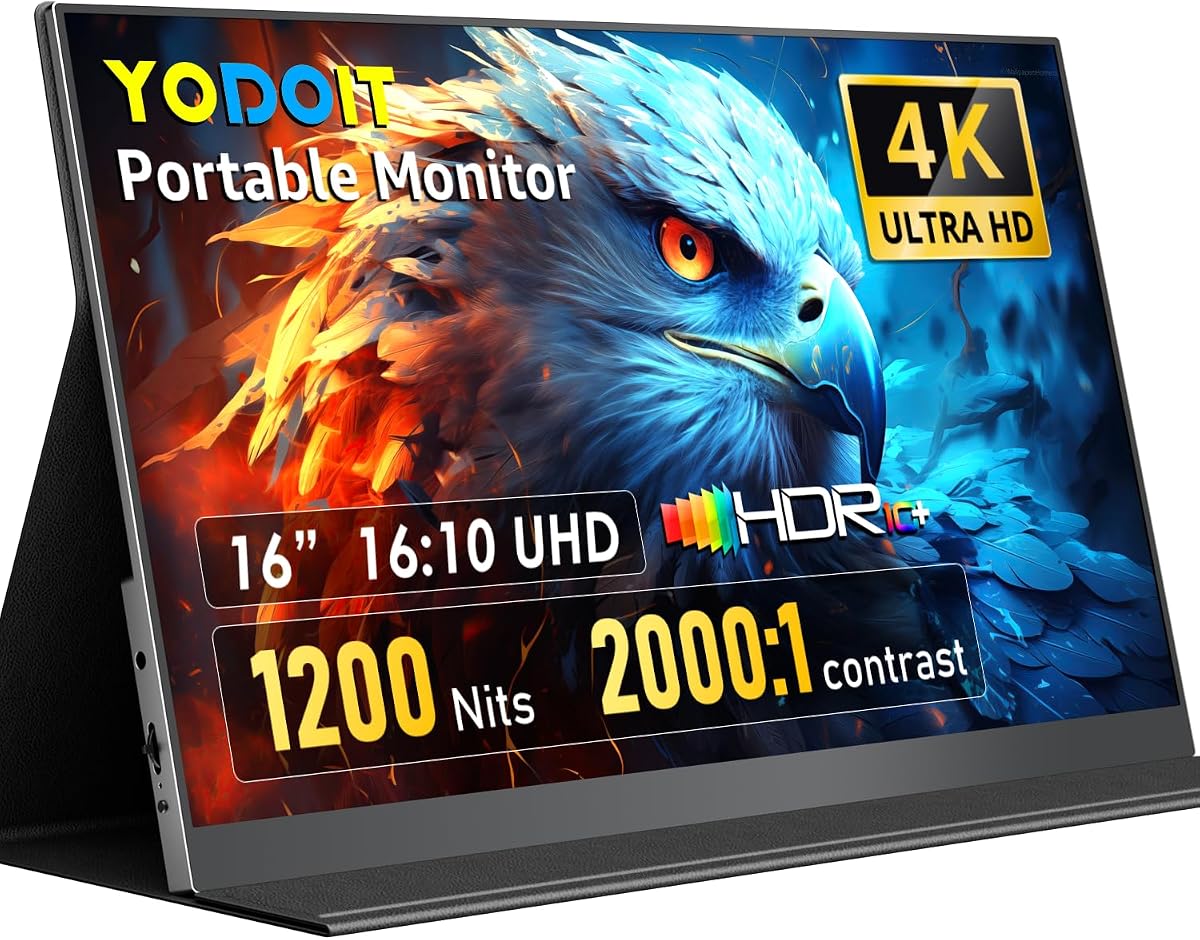
The Yodoit 4K Portable Monitor stands out as the top choice for professionals working outdoors or in high ambient light environments due to its impressive brightness and color accuracy.
We may earn a commission when you buy through this link, at no additional cost to you.
Its 1200 nit peak brightness ensures content remains visible even under direct sunlight while the 145% sRGB gamut delivers accurate colors essential for photo editing and graphic design work.
While it requires external power to achieve peak brightness levels this trade-off is acceptable given the superior visibility and performance it offers compared to standard portable monitors.
Photographers video editors and field workers seeking a reliable external display that performs well anywhere will find this monitor delivers exceptional value and functionality for their mobile workflows.
With 1200 nits of peak brightness this display outshines typical portable monitors which often max out at 400 nits making it truly readable in direct sunlight without glare or loss of detail.
The 145% sRGB coverage and 2000:1 contrast ratio ensure that colors appear rich and true to life which is critical for creatives who need precise color matching across different media and outputs.
We may earn a commission when you buy through this link, at no additional cost to you.
The Dell 24 SE2426H offers a compelling combination of refresh rate and visual comfort making it suitable for users who prioritize smooth motion and eye care during long sessions.
We may earn a commission when you buy through this link, at no additional cost to you.
Its 144Hz refresh rate and 1ms response time deliver fluid visuals that reduce motion blur which is beneficial for gaming or scrolling through fast-paced content on a standard desktop setup.
While it lacks the high brightness needed for direct sunlight the TÜV Rheinland eye comfort certification helps reduce strain during indoor use which is important for productivity focused environments.
Home users and office workers looking for a reliable everyday monitor with smooth performance and eye protection features will appreciate this model cost effective design and solid build quality.
The 144Hz refresh rate ensures that moving images and scrolling content appear fluid and crisp reducing eye strain and improving the overall viewing experience during both work and entertainment.
TÜV certification indicates effective blue light reduction which helps protect vision during extended use making this a good choice for users who spend many hours in front of the screen daily.
We may earn a commission when you buy through this link, at no additional cost to you.
The Dell 27 S2725QS delivers a premium viewing experience with 4K resolution and ComfortView Plus technology ensuring detailed visuals and reduced eye strain for professional creative work.
We may earn a commission when you buy through this link, at no additional cost to you.
Its 4K UHD display provides incredible sharpness for text and images while the 99% sRGB coverage ensures accurate colors which is essential for content creation and design tasks requiring precision.
The slightly higher response time is a minor trade-off considering the overall image quality and comfort features which make it ideal for designers and professionals who value clarity over speed.
Creative professionals and office workers seeking a large high resolution display that balances performance with comfort will find this monitor offers a refined and immersive workspace experience.
The 4K resolution packs significantly more pixels into the 27 inch screen allowing for precise editing and viewing of intricate details without needing to zoom in frequently during complex tasks.
ComfortView Plus reduces blue light emissions without compromising color accuracy making it suitable for long work sessions where maintaining eye health and visual consistency is a priority for users.
We may earn a commission when you buy through this link, at no additional cost to you.
The Dell 24 S2425HSM emphasizes ergonomics and multimedia features making it well suited for office environments where adjustable positioning and audio convenience are valued during daily tasks.
We may earn a commission when you buy through this link, at no additional cost to you.
Its full ergonomic adjustment allows users to set the perfect viewing angle reducing physical strain while the integrated speakers provide clear audio for calls without needing external peripherals on the desk.
Although it does not feature high brightness for outdoor use the TÜV certified eye comfort and smooth motion handling ensure a comfortable experience during long indoor work sessions effectively.
Office workers and home office users who need a flexible monitor with built-in audio and strong ergonomic support will appreciate the convenience and visual clarity of this practical model.
The ability to adjust height tilt pivot and swivel helps users maintain a healthy posture and reduces neck strain which is critical for productivity over long working hours at a desk.
Built-in speakers deliver clear sound for video conferencing and media playback reducing the need for additional hardware and keeping the workspace tidy and organized for efficient daily use.
We may earn a commission when you buy through this link, at no additional cost to you.
The LG 24U411A-B offers excellent value with high refresh rates and accurate color coverage making it an ideal budget option for casual users and gamers who need smooth visuals without extra cost.
We may earn a commission when you buy through this link, at no additional cost to you.
Its 120Hz refresh rate and 1ms motion blur reduction ensure responsive gameplay and fluid navigation while the borderless design maximizes screen space for a clean and immersive viewing experience on desk.
While it lacks height adjustment the Reader Mode and flicker safe technology help maintain comfort during extended viewing sessions which supports general productivity and leisure activities alike effectively.
Students and home users seeking a reliable and affordable monitor with strong visual performance will find this model delivers impressive quality and versatility for everyday computing tasks efficiently.
The 120Hz refresh rate paired with motion blur reduction creates fluid visuals that enhance both gaming experiences and general desktop navigation by minimizing stutter and motion blur effectively.
With 99% sRGB coverage this budget friendly monitor still provides vibrant accurate colors suitable for light creative work and media consumption without requiring a significant financial investment.
We may earn a commission when you buy through this link, at no additional cost to you.
The Acer 27 SB273 G0bi provides a large display area with minimal bezels ideal for users who need more screen space for multitasking and productivity in a standard office environment.
We may earn a commission when you buy through this link, at no additional cost to you.
Its 27 inch size allows for comfortable viewing of multiple documents or applications simultaneously while the zero frame design creates a seamless look that maximizes the usable viewing area on desk.
The 120Hz refresh rate adds fluidity to daily navigation and general workloads ensuring smooth scrolling and window management which contributes to a more efficient and less frustrating user experience.
Office users and home workers who prioritize screen size and visual continuity over high-end color specs will find this monitor offers a practical and spacious solution for general productivity needs.
The 27 inch panel provides ample space to view multiple windows or tools simultaneously improving efficiency for users who handle complex tasks or large datasets during their daily work routines.
The zero frame design minimizes bezel distractions allowing users to focus fully on content without visual interruptions which enhances immersion when consuming media or reviewing documents closely.
We may earn a commission when you buy through this link, at no additional cost to you.
The LG 32 QHD monitor offers a spacious viewing experience with QHD resolution and USB-C connectivity making it suitable for users who want a large screen for media and light creative work.
We may earn a commission when you buy through this link, at no additional cost to you.
Its 32 inch size and 99% sRGB coverage provide vibrant vivid visuals ideal for watching movies or editing images while the USB-C port simplifies connections for laptops and devices efficiently.
The lack of full height adjustment is a limitation for ergonomic positioning but the tilt function and Reader Mode still help maintain reasonable comfort during extended usage sessions at home.
Content consumers and casual users seeking a large visually impressive monitor for entertainment and general tasks will enjoy the clarity and convenience of this immersive display setup option.
The 32 inch QHD display offers significant screen real estate for consuming media or viewing complex documents providing a cinematic experience that enhances engagement with visual content daily.
USB-C support allows for single cable video and power delivery which simplifies desk setups and improves organization making it easier to connect modern laptops without multiple adapters needed.
We may earn a commission when you buy through this link, at no additional cost to you.
The Dell 27 S2725DSM combines sharp QHD resolution with high refresh rates and full ergonomics making it a versatile choice for users who need both visual quality and comfort for daily tasks.
We may earn a commission when you buy through this link, at no additional cost to you.
Its 144Hz refresh rate and 1ms response time ensure crisp clear motion for gaming and general use while the QHD resolution provides plenty of detail for design or spreadsheet work easily.
The inclusion of built-in speakers and ergonomic adjustments adds convenience and flexibility allowing users to tailor the setup to their exact preferences without needing extra hardware or stands.
Gamers and professionals seeking a balanced monitor with strong performance and adjustability will find this model offers a comprehensive solution for both productivity and entertainment needs well.
The combination of QHD resolution and 144Hz refresh rate delivers stunning clarity and smooth motion which is ideal for users who switch between creative work and gaming regularly.
Height tilt pivot and swivel adjustments allow for precise screen positioning that reduces physical strain making it easier to maintain good posture during long work or gaming sessions.
We may earn a commission when you buy through this link, at no additional cost to you.
The Acer 23.8 KB242Y G0bi delivers reliable performance in a compact form factor making it an excellent choice for users with limited desk space who still want smooth visuals.
We may earn a commission when you buy through this link, at no additional cost to you.
Its 120Hz refresh rate ensures fluid motion during navigation and gaming while the zero frame design provides a modern sleek look that fits well in small office or home setups.
With full HD resolution and IPS technology this monitor offers clear viewing angles and accurate colors for everyday tasks without requiring a high-end investment or complex configuration.
Students and home users seeking a compact and cost effective monitor for general computing will find this model offers dependable performance and modern style without compromising basic functionality.
The 23.8 inch screen size saves valuable desk space while still providing enough viewing area for productivity tasks making it ideal for smaller workspaces or dorm rooms.
Despite the low price this monitor offers a 120Hz refresh rate that keeps scrolling and moving content smooth reducing eye strain and improving the overall user experience.
We may earn a commission when you buy through this link, at no additional cost to you.
The Newsoul 4K Portable is a strong alternative for field professionals needing high brightness and portability with its 1200 nit display and 4K resolution suitable for demanding outdoor conditions.
We may earn a commission when you buy through this link, at no additional cost to you.
Its matte screen coating reduces glare effectively while the aluminum alloy shell provides durability and heat dissipation which is important for maintaining consistent performance during travel or field work.
While it requires external power for peak brightness the inclusion of a protective magnetic case and multiple ports makes it convenient for photographers and technicians working on the go.
Mobile professionals and photographers who need a durable bright portable monitor for on-site reviews will appreciate the practical features and high contrast performance of this reliable external display.
The aluminum alloy chassis is both stylish and functional providing better heat dissipation and physical protection which helps the monitor survive the rigors of daily travel and field use.
A 2000:1 contrast ratio allows for deep blacks and bright highlights ensuring details remain visible even in challenging lighting conditions which is vital for accurate outdoor image review.
We may earn a commission when you buy through this link, at no additional cost to you.
Selecting the right monitor for bright environments requires understanding key technical factors that affect visibility color accuracy and usability during extended work sessions.
Peak brightness measured in nits determines how well a screen remains visible under strong light. For outdoor use seek models rated above 800 nits to overcome glare and maintain readability.
Prioritize displays with high peak brightness to ensure content is clear and visible even in challenging lighting conditions.
A matte finish is essential for reducing reflections from direct sunlight or overhead lights which improves visibility and prevents eye strain during long periods of screen time.
Always choose a matte or anti-glare panel to minimize reflections in bright environments.
IPS panels are generally preferred for bright monitors due to their wide viewing angles and consistent color reproduction across the screen surface even when viewed from the side.
IPS technology offers the best balance of color and angle for most sunlight monitor applications.
For photo editing or design work look for monitors covering at least 99% sRGB or wider gamuts to ensure colors remain accurate and vibrant even at high brightness levels.
Verify color gamut coverage to ensure precise color matching for your creative workflows.
Check that the monitor supports the necessary ports such as USB-C or HDMI for your devices. Some portable models may require external power adapters to maintain peak brightness.
Confirm connectivity options match your device requirements for stable power and signal transmission.
Adjustable stands for height and tilt help maintain proper posture during outdoor field work. VESA mount compatibility offers flexibility for mounting setups on custom arms or tripods.
Prioritize ergonomic adjustability to reduce physical strain during extended outdoor sessions.
If the monitor will travel frequently consider weight and included protective cases. Lightweight designs around two pounds are easier to carry alongside camera gear or laptops.
Choose lightweight portable models with protective cases if field use is a primary requirement.
Always use a protective case when transporting portable models to avoid scratches and accidental impacts which can permanently damage the screen surface or internal components.
When using high brightness settings ensure the monitor is connected to a reliable power source to prevent flickering or automatic dimming which can disrupt your workflow in critical moments.
Clean the matte screen gently with a soft microfiber cloth to remove dust and smudges without scratching the anti-glare coating that helps maintain visibility in bright conditions.
For direct sunlight exposure aim for monitors with at least 1000 nits of peak brightness. Standard indoor monitors usually peak around 300 to 400 nits which are insufficient for clear visibility in strong natural light.
Yes portable monitors with high brightness and matte coatings work exceptionally well outdoors. Look for models explicitly labeled as sunlight readable with brightness ratings over 800 nits to ensure you can see the content clearly in any setting.
A matte screen reduces reflections from sunlight or strong indoor lights which improves readability and reduces eye strain. Glossy screens often reflect ambient light making it difficult to see details during outdoor use.
Most portable monitors work with any laptop that has USB-C or HDMI ports. Ensure your laptop supports video output via USB-C or bring the necessary HDMI adapter to connect the monitor properly.
Some high brightness portable monitors require an external power adapter to maintain peak nits levels. Check if the package includes a power adapter or plan to carry a portable battery bank for extended field use.
Use a dry soft microfiber cloth to gently wipe the screen. Avoid harsh chemicals or paper towels which can scratch the matte anti-glare coating and reduce visibility over time.
The Yodoit 4K Portable monitor leads our list with exceptional brightness and color accuracy tailored for professionals working in harsh light conditions.
Prioritize peak brightness and matte coatings when selecting a monitor to ensure clear visibility and comfortable viewing in sunny or high ambient light environments.
Always verify current availability and specifications before purchasing to ensure the model meets your specific workflow needs and budget for the best results.