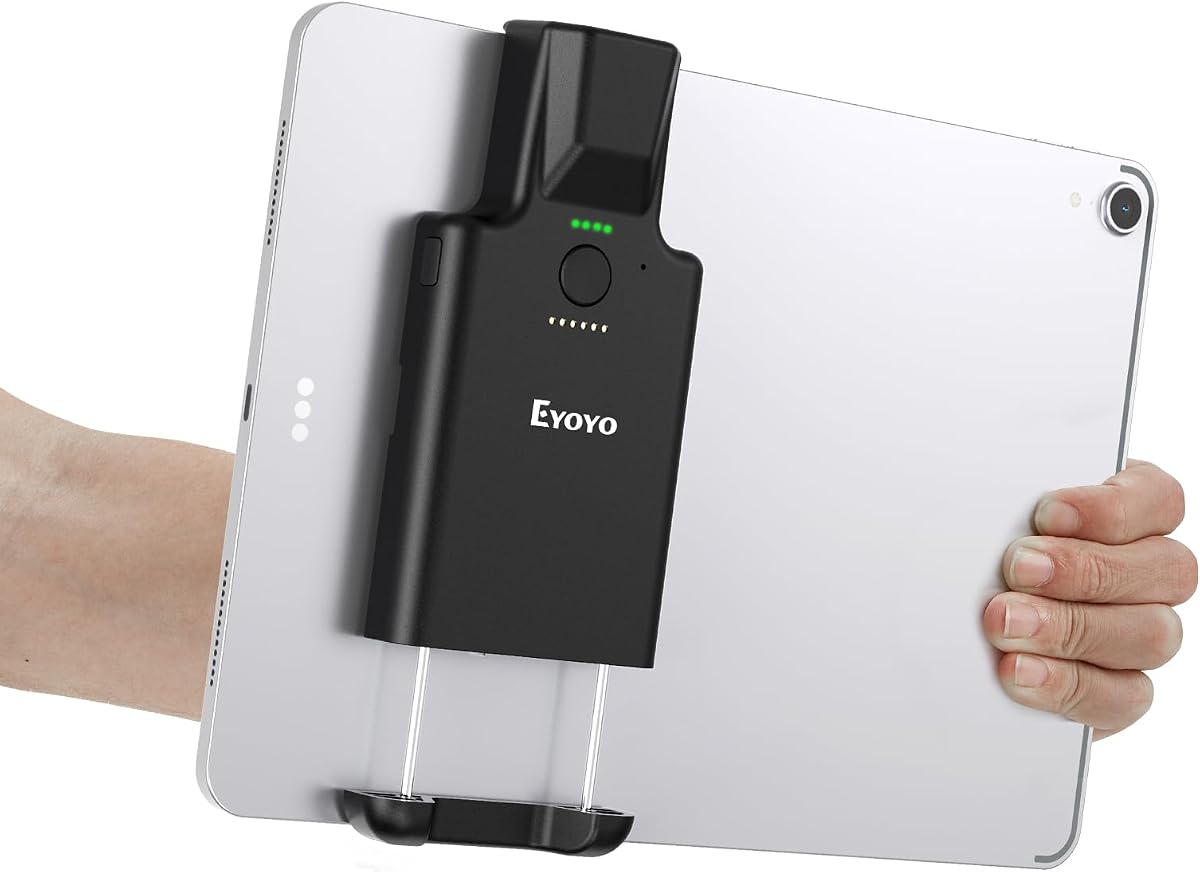
Eyoyo 1D 2D Portable Bluetooth Barcode Scanner Compatible with iPad Tablet
4.9Editor score
Clip design fits tablets
3000mAh battery lasts 30 hours
Scans paper and screen codes
This guide compares the top 10 barcode scanners for iPad to help you find the best wireless, wired, or desktop model for your business inventory needs.
Finding the right barcode scanner for iPad can transform how you manage inventory, track assets, or process sales on the go. Modern scanners offer seamless Bluetooth connectivity, long battery life, and the ability to read both 1D and 2D codes from paper or screens.
We have evaluated ten top-rated models based on compatibility, scan speed, battery endurance, and build quality. Our analysis focuses on devices that pair reliably with iOS systems and support the specific workflows of retail, warehousing, and mobile operations.
Each pick highlights key strengths and potential limitations to help you choose wisely. While prices fluctuate frequently, these models consistently deliver performance. Always verify current listings before purchasing to ensure you get the best value for your specific setup.
4.9Editor score

4.1Editor score

4.3Editor score
The following table provides a side-by-side comparison of all ten selected models. It highlights their primary connection types, battery capacities, and key scanning capabilities to help you quickly identify the right fit for your workflow.


The NETUM Bluetooth Barcode Scanner stands out as a reliable choice for iPad users seeking versatility. With a 4.4 rating, it offers strong recognition capabilities for 1D and stacked barcodes including ISBNs. Its robust build and flexible connectivity make it suitable for various environments.
We may earn a commission when you buy through this link, at no additional cost to you.
This scanner features a high-resolution CCD sensor that decodes codes rapidly even if they are worn or damaged. The 2600mAh battery supports up to 200000 scans on a full charge ensuring you won't run out during critical inventory tasks. It supports manual continuous and auto-sensing modes for convenience.
While it offers extensive programmability including custom prefixes and keyboard keys it requires scanning a setting barcode before use which might confuse new users. Additionally it is not compatible with Square POS systems so check your software needs before purchasing.
Business owners managing retail shelves or library catalogs will appreciate its storage mode for offline data collection. The combination of wireless freedom and reliable performance makes it a top recommendation for those needing a durable tool without breaking the bank.
The CCD sensor ensures accurate reading of damaged or tightly spaced codes without needing perfect lighting conditions.
Store up to 100000 barcodes when out of range and upload them later once you reconnect to your iPad.
We may earn a commission when you buy through this link, at no additional cost to you.
The Eyoyo Mini 1D Bluetooth Barcode Scanner is perfect for users who prioritize portability without sacrificing connectivity. Weighing just 35 grams it fits easily in your pocket while offering a 50 meter Bluetooth range for wireless freedom across large spaces.
We may earn a commission when you buy through this link, at no additional cost to you.
Its advanced 1D scanning technology handles common codes like UPC and Code 128 with ease. The vibration mode allows for silent scanning in quiet environments like libraries which prevents disrupting others during inventory checks. It also supports auto-off features to extend battery life.
The main limitation is that it only reads printed 1D barcodes and cannot scan QR codes or codes from digital screens. This restricts its use in scenarios requiring digital coupon verification or QR based inventory systems which might need a more versatile device.
For small shop owners or book handlers moving around frequently this lightweight unit offers excellent value. Its simple design and robust connectivity options make it a dependable companion for quick checks where heavy-duty 2D scanning is not required.
At just 35 grams it reduces hand fatigue during extended scanning sessions allowing for all-day mobile use.
Ideal for quiet spaces where audible beeps might be disruptive ensuring discreet scanning operations.
We may earn a commission when you buy through this link, at no additional cost to you.
The PecuMecu TM-10B offers exceptional value by providing 2D scanning capabilities at a budget-friendly price point. It handles both 1D and 2D codes including QR and Data Matrix making it versatile for modern retail tasks involving digital coupons or complex labeling.
We may earn a commission when you buy through this link, at no additional cost to you.
With a scanning speed up to 350 times per second it processes items quickly reducing wait times at checkout. The 2600mAh battery supports over 9 hours of continuous use and stores up to 130000 barcodes offline ensuring data is safe even without a connection.
One downside is the four-hour charge time which is longer than some competitors. Additionally like many scanners in this class it does not work with Square POS systems so integration must be verified before purchase to avoid compatibility issues.
Small businesses looking to upgrade from basic 1D tools without spending much will find this model ideal. Its fast performance and robust offline storage make it a strong contender for warehouses or retail shops needing speed and reliability on a tight budget.
Up to 350 scans per second means items are processed instantly keeping lines moving efficiently.
Store up to 130000 codes internally to protect data integrity during connectivity gaps.
We may earn a commission when you buy through this link, at no additional cost to you.
This Eyoyo scanner is uniquely designed for tablet and iPad users with a retractable clip that secures the device directly to your mobile hardware. It holds a remarkable 4.9 rating reflecting high customer satisfaction with its build quality and seamless integration with iOS devices.
We may earn a commission when you buy through this link, at no additional cost to you.
The 3000mAh battery provides up to 30 hours of continuous scanning which is exceptional for long shifts. It supports both 1D and 2D codes including screen codes for digital coupons and offers vibration modes for silent operation. The three scan buttons accommodate both left and right-handed users.
While the price is higher than budget options the premium build and specific iPad compatibility justify the investment. The only notable limitation is the lack of 2.4G wireless mode which might limit range in very large warehouses compared to dual-mode scanners.
For businesses relying heavily on iPad-based inventory systems this scanner offers unmatched convenience. The clip design reduces the need to carry two separate devices streamlining the workflow and increasing efficiency during busy retail or warehouse operations.
The retractable clip holds iPads securely allowing one-handed scanning without needing to hold both device and scanner.
With 30 hours of continuous use you can go days between charges ensuring uninterrupted workflow.
We may earn a commission when you buy through this link, at no additional cost to you.
The NetumScan Desktop Barcode Scanner is designed for high-volume checkout or packing stations where handsfree operation is essential. Its omnidirectional sensor captures codes from any angle meaning you don't need to align the barcode precisely before scanning it.
We may earn a commission when you buy through this link, at no additional cost to you.
The auto-sensing induction trigger activates automatically when an item moves near the window which speeds up the process significantly. The anti-slip base and built-in anti-vibration system protect the unit from damage if it falls while ensuring it stays stable on the desk.
It is not a portable device so it works best for fixed workstations rather than mobile inventory rounds. Additionally it does not support Square POS systems which limits its use for merchants using that specific software platform for their transactions.
Retailers with high traffic counters will benefit greatly from the efficiency this scanner provides. By removing the need to manually hold and trigger the device it reduces staff fatigue and increases throughput during peak hours effectively.
The auto-sensing trigger allows staff to scan items quickly without lifting or holding the scanner manually.
Codes are read from any angle so precise alignment is not required speeding up the checkout process.
We may earn a commission when you buy through this link, at no additional cost to you.
The NetumScan U820 offers an upgraded wireless chip that ensures stable Bluetooth and 2.4G connectivity specifically optimized for iPad and iPhone users. It includes a smart dock that serves as both a fast-charging station and a data receiver simplifying your daily workflow.
We may earn a commission when you buy through this link, at no additional cost to you.
It features a 1200mAh battery that supports extended shifts and charges fully in just four hours. The vibration mode allows for silent scanning in noise-sensitive environments while the CMOS sensor captures 1D and 2D codes accurately even if they are distorted or low-contrast.
The dock adds bulk compared to standalone scanners which might be a drawback for users wanting minimal hardware. Additionally the user rating is slightly lower than competitors so it is important to verify compatibility with your specific POS software before purchasing.
For businesses valuing organized charging and stable connectivity this package offers convenience and efficiency. The compact design ensures it fits easily in a pocket while the dock keeps it ready for daily use without needing separate charging cables.
The dock acts as a charging station and receiver reducing cable clutter and ensuring the scanner is always ready.
Switch to vibration instead of sound for discreet scanning in libraries or offices.
We may earn a commission when you buy through this link, at no additional cost to you.
This variant of the NetumScan U820 distinguishes itself with a 4.9 rating and a compact ergonomic design that feels comfortable during extended use. It includes a dual-button control system that prevents accidental power-offs ensuring you stay focused on your tasks without interruptions.
We may earn a commission when you buy through this link, at no additional cost to you.
The global shutter CMOS sensor provides instant reading of codes on paper tags or digital screens even when they are smudged. Its rugged build can withstand two-meter drops onto concrete making it suitable for warehouse environments where drops are common.
The price is higher than many competitors and requires the dock for charging which might be a constraint for mobile-only users. However the durability and smart control features offer a level of reliability that justifies the cost for heavy industrial or retail use.
Businesses needing a durable reliable scanner for high-frequency scanning will find this model impressive. The combination of smart controls and drop resistance ensures it can handle rough conditions while maintaining performance over time.
Dedicated power and scan buttons prevent accidental shutdowns during intense work periods ensuring reliability.
Built to withstand drops from up to two meters onto concrete ensuring durability in rough environments.
We may earn a commission when you buy through this link, at no additional cost to you.
This Bluetooth Wireless Handheld Barcode Scanner offers a unique combination of 2.4G wireless and Bluetooth connectivity for broad compatibility with iPad and PC systems. Its lightweight design of 110 grams makes it comfortable to hold for long periods without fatigue.
We may earn a commission when you buy through this link, at no additional cost to you.
It includes 16MB of high-capacity memory allowing storage of up to 50000 QR codes offline. The auto-reconnect feature ensures that once you reconnect after a disconnect you can resume scanning immediately without re-pairing which saves valuable time.
The user rating is lower than other models suggesting potential reliability issues with connectivity or build quality. Additionally there is a manual switch on the side that must be pushed to ON before scanning which adds a step to your routine.
For users needing specific PDF417 support or massive offline storage at a mid-range price this scanner offers value. However those prioritizing long-term reliability might prefer models with higher ratings and more seamless connectivity options.
Stores up to 50000 QR codes internally ensuring data is safe even when out of network range.
Automatically reconnects after a disconnect without needing manual pairing again streamlining your workflow.
We may earn a commission when you buy through this link, at no additional cost to you.
The KUIIYER Bluetooth Barcode Scanner uses an advanced 800×600 CMOS sensor to read codes quickly and accurately from any direction. It supports both 1D and 2D codes including QR and is compatible with most universal POS systems making it versatile for general retail use.
We may earn a commission when you buy through this link, at no additional cost to you.
It features a 2000mAh battery and IP54 dust and water rating for durability in various environments. The built-in auxiliary light helps illuminate codes in dark areas ensuring reliable scanning even in poorly lit stockrooms. It also stores up to 50000 barcodes offline.
The main limitation is that it does not work with Square POS systems which is a common requirement for many small businesses. Users should verify their software compatibility before purchasing to avoid compatibility issues that might prevent integration with their inventory apps.
For businesses needing a durable 2D scanner with solid battery life this model offers a strong balance of features. Its robust construction and auxiliary light make it suitable for environments where lighting conditions vary and durability is essential.
Built-in light helps scan codes in dark areas ensuring reliability even in poor lighting conditions.
Resists dust and water splashes protecting the device in challenging warehouse or outdoor environments.
We may earn a commission when you buy through this link, at no additional cost to you.
The Inateck BCST-70 stands out with an incredible 180-day standby time ensuring you rarely need to recharge even with sporadic use. Its 115-foot connection range allows you to work far from your iPad without worrying about signal drops during large warehouse counts.
We may earn a commission when you buy through this link, at no additional cost to you.
It features a protective TPU case that is twice as thick as standard models and withstands 6-foot drops to concrete. The scanner supports multiple keyboard languages and customizable prefixes making it adaptable to different international or specialized data entry requirements.
It is limited to 1D barcodes and cannot scan codes from digital screens which reduces its utility for modern digital inventory systems. However for traditional barcode needs where long-range and battery life are priority it remains a top contender.
Organizations with large facilities or seasonal inventory checks will benefit from its long-range and endurance. Its rugged build ensures it survives tough conditions while the long standby time minimizes downtime during critical operational periods.
With 180 days standby you can use it for months without charging ensuring readiness for critical tasks.
Connect from far away in large warehouses without losing signal ensuring flexible work areas.
We may earn a commission when you buy through this link, at no additional cost to you.
Choosing the right scanner involves balancing connectivity, battery life, and scanning capabilities. This guide breaks down the most critical factors to help you make an informed decision for your specific workflow.
Connectivity determines how your scanner interacts with your iPad. Most models offer Bluetooth, 2.4G wireless, or wired USB options. Bluetooth is the most convenient for mobile use as it requires no cables and connects directly to iOS. 2.4G wireless often provides a longer range and may be more stable in crowded environments. Wired USB is reliable but limits mobility since you must be physically connected to the device.
Prioritize Bluetooth for true mobile freedom but ensure it supports the necessary protocols for your software.
The type of barcodes you need to read dictates the scanner technology. 1D scanners read traditional UPC or EAN codes common in retail. 2D scanners read QR codes, PDF417, and Data Matrix which are used for digital coupons and complex inventory. Some models only read printed codes while others can read codes from iPad screens.
Choose 2D technology if you handle digital coupons or QR codes to future-proof your operations.
Battery life is critical for uninterrupted shifts. Scanners with 2600mAh batteries typically last 20 hours or more. Look for models with low power consumption features like auto-off when not in use. Some models offer storage mode so you can scan offline and upload later without losing battery power on connectivity.
Select a battery capacity that matches your daily scan volume to avoid mid-shift charging interruptions.
Warehouse environments can be tough on devices. Look for scanners with drop resistance ratings and anti-shock designs. IP ratings like IP54 indicate protection against dust and water which is important for dirty environments. A sturdy build ensures the device lasts longer despite frequent use.
Invest in rugged models if you work in harsh conditions to avoid costly replacements.
Ensure the scanner is compatible with your inventory or POS software. Some models are not compatible with Square or Clover systems due to proprietary limitations. Most support HID or SPP modes which work with standard apps. Check the product description for specific software compatibility before buying.
Verify software compatibility explicitly to avoid purchasing a device that cannot integrate with your workflow.
Handheld scanners range from mini pocket sizes to larger ergonomic grips. Smaller units reduce fatigue but may lack battery capacity. Larger units offer better grip but are heavier. Some models include clips for mounting on tablets which streamlines one-handed operations.
Choose a form factor that balances comfort with functionality for your specific daily tasks.
To pair your scanner with iPad, enable Bluetooth in settings and scan the pairing barcode from the manual. Ensure the scanner is in pairing mode before searching for devices. Most models connect within seconds once the initial setup is complete.
Keep the scanner lens clean by wiping it with a soft cloth. Avoid exposing the device to direct sunlight for extended periods as it can degrade internal components. Charge the battery fully before first use to maintain long-term health.
For maintenance, reset the scanner to factory settings if connectivity issues arise. Store the device in a cool dry place when not in use. Regularly update the firmware if updates are provided by the manufacturer to fix bugs and improve performance.
Yes most Bluetooth barcode scanners are compatible with both iPad and iPhone. They support standard iOS Bluetooth protocols which allow seamless switching between devices. Just ensure the scanner supports iOS and pair it with the Bluetooth settings on your device.
In many cases no specific app is needed as the scanner acts like a keyboard input device. However using a dedicated inventory app ensures that scanned codes are directed to the correct fields for better organization. Check compatibility with your specific inventory software.
1D scanners read linear barcodes like UPC codes found on retail products. 2D scanners read square or matrix codes like QR codes and Data Matrix which can store more information. Choose 2D if you need to read digital codes or complex labels.
Charging time typically ranges from 2 to 4 hours depending on the battery capacity. Most models indicate when fully charged via LED lights. Ensure you use the provided cable and charger to avoid damage and ensure optimal charging speed.
Only scanners with advanced CMOS sensors can read codes from digital screens. Many basic models only read printed barcodes. Check the product specifications for screen scanning support if you need to scan digital coupons or QR codes.
Many models offer offline storage mode allowing you to scan without a connection. You can then reconnect later to upload the stored data. Check if your chosen model supports offline storage before purchasing to prevent data loss.
Most standard Bluetooth scanners are not compatible with Square POS systems due to proprietary restrictions. Always check the compatibility notes in the product description before purchasing if you use Square to avoid integration issues.
Selecting the right scanner depends on whether you prioritize portability, durability, or specific code support. The Eyoyo iPad Clip model stands out for seamless tablet integration while the NetumScan models offer robust connectivity options.
For businesses focused on cost-effectiveness the PecuMecu TM-10B delivers excellent 2D scanning at a low price. If you need long-range performance the Inateck BCST-70 provides unmatched battery life and range for large warehouses.
Always verify compatibility with your current software and check current pricing before purchasing. Technology evolves quickly so staying updated on new features ensures you get the best tool for your inventory needs.