
TP-Link Nano AC600
4.5Editor score
Nano size design
Dual band support
Windows and Mac compatible
Compare the top 10 5GHz WiFi dongle adapters for desktops and laptops, covering speed, range, and compatibility to find your ideal wireless connection solution.
Finding a reliable 5GHz WiFi dongle can transform your desktop experience. These adapters offer faster speeds and less interference than older models. A good dongle provides stable connections for streaming and gaming without cables.
We compared ten top-rated adapters based on speed, range, and ease of setup. Our analysis covers USB 3.0 models and newer WiFi 6 options. Each pick balances performance with affordability for different user needs.
Every review highlights key specs and real-world performance details. We include pros and cons to help you decide quickly. Prices and availability change often, so check current listings before purchasing your next adapter.
4.5Editor score

4.4Editor score

4.1Editor score
This side-by-side comparison shows key specs for all ten adapters. Look at speed bands, antenna types, and OS support to find the right fit for your setup.


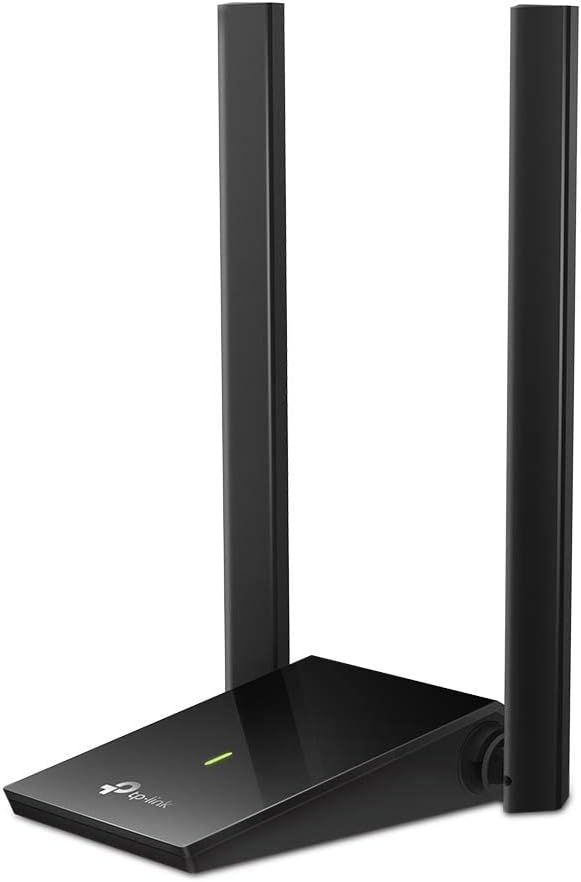


The TP-Link AC600 adapter earns our top spot with solid performance and great value. It offers up to 433 Mbps on the 5GHz band and handles streaming well.
We may earn a commission when you buy through this link, at no additional cost to you.
Its adjustable 5dBi antenna significantly improves signal strength compared to built-in laptop cards. This makes it perfect for desktops where the router is far away.
The USB 2.0 port is a slight bottleneck but acceptable for most home uses. Windows support is extensive, though macOS users should look elsewhere.
If you need a reliable and cheap upgrade for your desktop PC, this adapter delivers consistent results without breaking the bank.
The external antenna helps penetrate walls better than internal cards.
Drivers install smoothly from the TP-Link site for Windows users.
We may earn a commission when you buy through this link, at no additional cost to you.
The Nano AC600 is perfect if space matters. It fits in the port and stays there without blocking other USB slots.
We may earn a commission when you buy through this link, at no additional cost to you.
It supports both 2.4G and 5G bands for faster speeds. The tiny form factor does not hinder performance in close range.
Lacking an external antenna means range is not as far as larger adapters. This is a fair trade-off for the compact design.
Buy this if you want a simple, clean solution for daily web browsing and streaming.
Leaves ports free and keeps your desk clutter-free.
No need to unplug it daily for transport.
We may earn a commission when you buy through this link, at no additional cost to you.
This adapter brings modern WiFi 6 speeds to older desktops. The 1201Mbps on 5GHz ensures smooth 4K streaming and gaming.
We may earn a commission when you buy through this link, at no additional cost to you.
Two high gain antennas capture weak signals better. The included USB extension cable helps you position it for best reception.
The price is higher than AC models, but future-proofing justifies it. Note that Mac users are not supported.
Choose this if you have a WiFi 6 router and want maximum performance for years.
OFDMA reduces congestion in crowded networks.
Extension cable lets you place adapter near a window.
We may earn a commission when you buy through this link, at no additional cost to you.
The AC1300 offers a significant speed boost over AC600 models. It is great for households with multiple streaming devices.
We may earn a commission when you buy through this link, at no additional cost to you.
Beamforming helps direct signal to your device for better stability. The USB 3.0 port ensures data transfer is not bottlenecked.
It lacks external antennas so range is moderate. Setup requires downloading drivers from TP-Link website first.
This is a solid middle ground for users needing more speed without external hardware.
Sends data to multiple devices simultaneously for less lag.
USB 3.0 supports higher throughput than 2.0.
We may earn a commission when you buy through this link, at no additional cost to you.
Nineplus offers a great budget option with dual high gain antennas. These help reach routers through multiple walls easily.
We may earn a commission when you buy through this link, at no additional cost to you.
The AC1300 speeds support smooth video calls and gaming. USB 3.0 ensures your PC can handle the data rate.
Setup involves downloading drivers for older Windows systems. Mac users cannot use this device.
Select this for a reliable and powerful connection at an affordable price.
Improves reception on both transmit and receive channels.
Offers faster data transfer than older USB 2.0.
We may earn a commission when you buy through this link, at no additional cost to you.
This adapter simplifies setup with built-in Windows drivers. It brings modern WiFi 6 efficiency to desktops easily.
We may earn a commission when you buy through this link, at no additional cost to you.
AP Mode lets your PC act as a hotspot for other devices. This is useful for temporary connections or IoT devices.
Compatibility is limited to Windows 10 and 11 only. Users on other systems should avoid this model.
It is a strong pick for Windows users wanting new tech without driver hassles.
Saves time by avoiding manual downloads.
Allows sharing internet connection wirelessly.
We may earn a commission when you buy through this link, at no additional cost to you.
Tenda delivers a high gain antenna for better signal strength. This helps in areas with weak coverage.
We may earn a commission when you buy through this link, at no additional cost to you.
Preloaded drivers mean you can start using it right away. AP mode allows flexibility for hotspot use.
The 5GHz band reaches 600Mbps for smooth gaming. Mac users are not supported by this adapter.
Choose this if you need better range without complex setup.
Provides multi-dimensional rotation for best signal.
Share internet with up to 8 devices.
We may earn a commission when you buy through this link, at no additional cost to you.
Dual high gain antennas improve range significantly. This makes it ideal for large rooms or offices.
We may earn a commission when you buy through this link, at no additional cost to you.
USB 3.0 ensures maximum data transfer speed. It supports both Windows and macOS systems.
The larger size might block adjacent ports. Ensure you have enough space around the USB port.
Pick this for a balanced solution with strong signal and speed.
Improves transmission performance significantly.
Flexible deployment for best reception.
We may earn a commission when you buy through this link, at no additional cost to you.
The AX1800 offers top speeds with advanced security. WPA3-SAE keeps your connection safe online.
We may earn a commission when you buy through this link, at no additional cost to you.
Cooling vents maintain performance during long sessions. Built-in drivers save time for Windows users.
It is not compatible with macOS or older Windows versions. Check your OS before buying.
This is a premium choice for secure and fast home networks.
Provides advanced encryption for safer browsing.
Share your internet with other devices easily.
We may earn a commission when you buy through this link, at no additional cost to you.
This mini adapter fits neatly without blocking other ports. It supports modern WiFi 6 standards effectively.
We may earn a commission when you buy through this link, at no additional cost to you.
Setup is easy with pre-loaded drivers. Windows 11 and 10 systems work perfectly.
USB 2.0 limits data rates compared to 3.0. This is acceptable for standard browsing tasks.
Choose this for a tidy workspace without sacrificing speed.
Measures 1.4 inches for seamless integration.
Eliminates need for manual driver installation.
We may earn a commission when you buy through this link, at no additional cost to you.
Selecting the right dongle depends on your needs. Consider speed, range, and OS compatibility to find the best fit.
AC models like AC600 are budget-friendly but older. AX models (WiFi 6) offer better efficiency and speed for future use.
If you have a new router, choose AX. Otherwise AC is fine for basic tasks.
USB 3.0 handles faster data transfer than USB 2.0. If speed is a priority, ensure the adapter supports USB 3.0.
Look for USB 3.0 ports on your PC for best performance.
External antennas provide better range than internal ones. Adjustable antennas help you aim the signal correctly.
Choose adapters with external high-gain antennas for large spaces.
Most adapters support Windows, but Mac and Linux support varies. Check specs before buying if you use non-Windows OS.
Ensure your OS is listed on the product page.
Dual band means both 2.4GHz and 5GHz. 5GHz offers faster speeds while 2.4GHz has better range.
Look for dual band to switch between speed and range as needed.
Some models come with built-in drivers or auto-install. Others require manual downloads which can be tricky.
Preloaded drivers save time and reduce setup issues.
Plug the dongle into a free USB port on your PC. Wait for the system to recognize it or install any necessary drivers.
Go to network settings and connect to your 5GHz WiFi network by selecting your SSID and entering the password.
Keep the adapter in a well-ventilated area to prevent overheating during long sessions.
A 5GHz dongle offers faster speeds and less interference compared to 2.4GHz. This is ideal for streaming and gaming.
Not necessarily but a dual-band router is needed to use 5GHz. Ensure your router supports 5GHz bands.
Check if the adapter comes with a CD or online driver. Download from the manufacturer site if not included.
Many adapters support macOS but not all. Check product specs carefully for compatibility with macOS.
Yes USB 3.0 supports faster speeds than 2.0. Use it if your PC has the port available.
Yes adapters with external antennas improve range. Position the dongle near a window for best results.
We reviewed ten top adapters for 5GHz WiFi. Each offers unique features from budget to premium options.
Pick based on your needs for speed range and budget. Look for AC1300 or AX models for best performance.
Prices change often so check current listings before buying. Verify OS compatibility before purchase.