
Fosmon Fast Charging for Xbox Controller Charger Station Dock
4.5Editor score
5280mWh battery life
SGS certified safety
Smart charging board
This guide compares the top Xbox controller charging stations including dual docks and single stands with battery packs for Series X and One models.
Finding the right charging station ensures your Xbox controllers stay powered during long gaming sessions. The best models offer fast charging, clear indicators, and reliable battery storage for seamless gameplay.
We compared ten top-rated charging solutions based on compatibility, battery capacity, and build quality. Each pick includes detailed specs and real-world performance insights to help you choose confidently.
Every product review highlights key features, pros, and cons to guide your decision. Note that prices and availability change frequently, so check current listings before purchasing your ideal dock.
4.5Editor score

4.6Editor score

4.4Editor score
Below is a side by side comparison of all ten controller charging stations evaluated in this guide. Each entry lists core specifications to help you quickly identify the right dock for your setup.



This upgraded station stands out with its massive 6200mWh battery packs that deliver up to 25 hours of play. Rated 4.6 stars it offers reliable dual charging with clear visual indicators.
We may earn a commission when you buy through this link, at no additional cost to you.
The standout feature is the extended battery life which reduces interruptions during critical game moments. The X shape LED lights show charging status without being distracting while sitting on your desk.
Trade-offs include the batteries sitting on the bottom of the dock and no support for third-party controllers. These are acceptable given the superior capacity and safety features included in the kit.
Buy this if you need long-lasting power and value eco-friendly reusable batteries over disposable AA options. It is an excellent choice for serious gamers who play daily.
The 6200mWh packs provide nearly double the capacity of standard options ensuring you play longer between charges.
Unique LED indicators give instant status updates without distracting from your gaming session or rest time.
We may earn a commission when you buy through this link, at no additional cost to you.
Fosmon offers a budget-friendly dual dock that includes high capacity 5280mWh batteries for up to 45 hours of play. Rated 4.5 stars it combines value with certified safety standards.
We may earn a commission when you buy through this link, at no additional cost to you.
The SGS certification ensures the batteries meet rigorous safety requirements for heat and current protection. This peace of mind is rare at this price level and adds long-term reliability.
It does not support the Elite 2 controller and has a simpler design compared to premium options. These limitations are minor considering the impressive battery life and warranty coverage.
Choose this if you want reliable dual charging without spending extra. It is perfect for casual gamers or families needing a cost-effective solution.
SGS certification guarantees the battery and dock meet high safety standards for safe daily charging.
With up to 45 hours per charge you rarely need to worry about running out of power mid-session.
We may earn a commission when you buy through this link, at no additional cost to you.
This Razer stand delivers premium aesthetics and function with a magnetic contact system and quick charge capability. Rated 4.4 stars it is designed to match your controller look perfectly.
We may earn a commission when you buy through this link, at no additional cost to you.
The magnetic mount secures your controller firmly ensuring no interruption to charging. It charges in under three hours and offers overcharge protection for safe usage.
The main trade-off is the higher price and lack of included batteries. You must supply your own power source but the dock quality justifies the investment for enthusiasts.
Buy this if you value design and want a seamless charging experience that matches your controller. It is ideal for streamers or collectors.
Magnetic contacts ensure your controller stays aligned for consistent charging without cable issues.
One-handed navigation lets you use the controller while docked for smooth dashboard access.
We may earn a commission when you buy through this link, at no additional cost to you.
PowerA offers a compact single stand that is officially licensed for Xbox Series X and One controllers. Rated 4.6 stars it provides a reliable place to charge and display your controller.
We may earn a commission when you buy through this link, at no additional cost to you.
Official licensing ensures fit and quality standards are met. It includes a 1100 mAh battery and door for easy swap out between gaming sessions.
The single controller limit means it is best for solo players. For most users this is an acceptable constraint given the price and official certification.
Select this if you need a simple official solution for one controller. It is great for small setups or secondary setups.
Licensed by Microsoft it guarantees compatibility and safety for all supported Xbox controllers.
Its small footprint leaves room on your desk while keeping your controller charged and visible.
We may earn a commission when you buy through this link, at no additional cost to you.
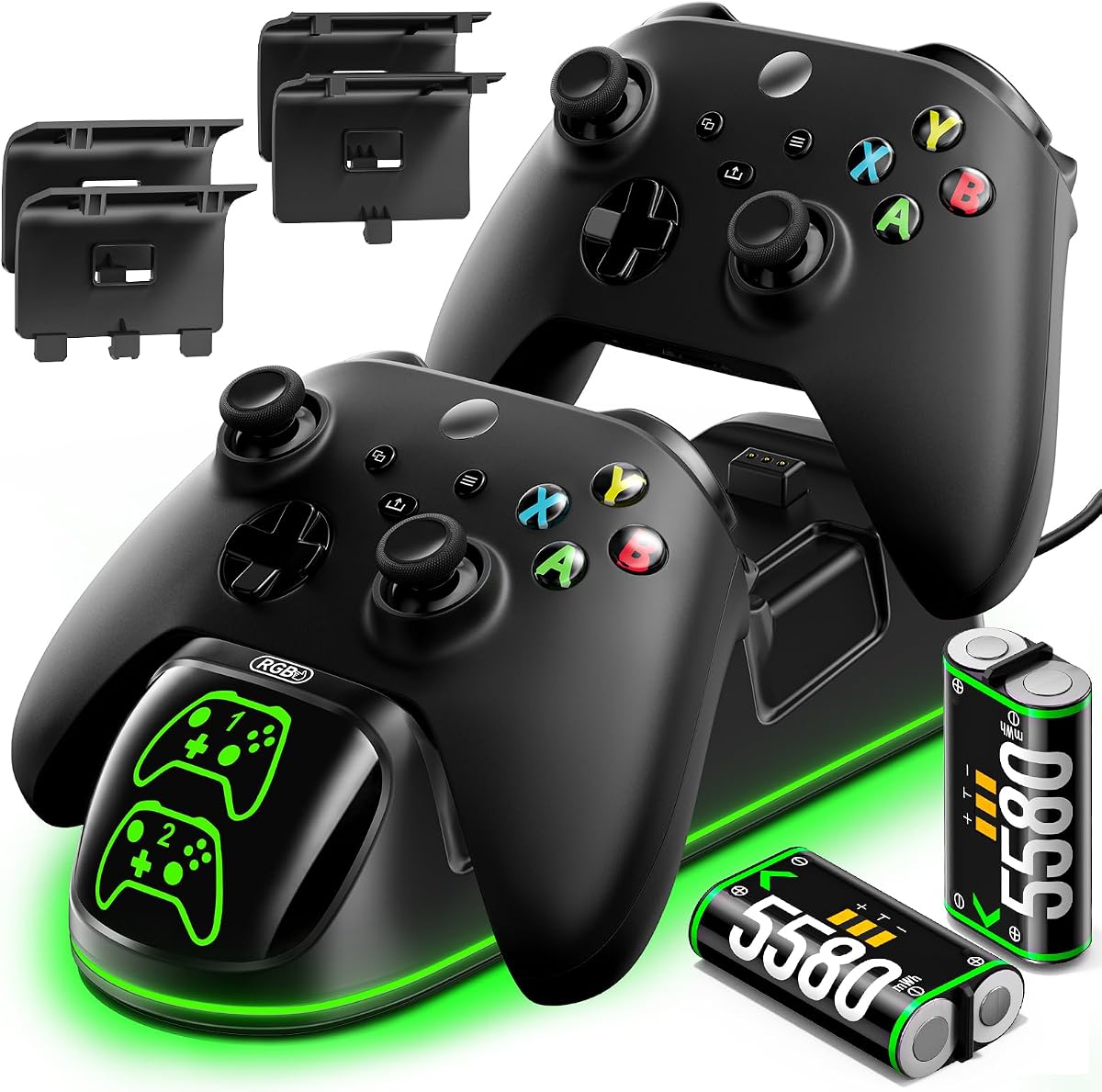
This OlVO charger holds a perfect 5 star rating for reliability and speed. It includes 5580mWh batteries that fully charge in just 2.5 hours.
We may earn a commission when you buy through this link, at no additional cost to you.
The fast charge time ensures your controllers are ready quickly after sessions. High cycle life up to 3000 charges makes these batteries durable for long-term use.
Note that Elite 2 controllers are not supported and batteries sit outside the dock. Most users will find this fine given the impressive performance and rating.
Choose this for fast reliable charging for standard Xbox controllers. It is ideal for households that need multiple controllers ready fast.
Two and a half hour full charge means less waiting and more gaming time.
3000 recharge cycles ensure the batteries last years of daily use without degrading.
We may earn a commission when you buy through this link, at no additional cost to you.
8BitDo offers a sleek magnetic dock that aligns perfectly with Xbox Series controllers. Rated 4.6 stars it provides a secure charging experience and storage.
We may earn a commission when you buy through this link, at no additional cost to you.
The magnetic system ensures contact without cables. It includes a 1100 mAh battery and is officially licensed for safe use.
Single controller support and small battery may limit heavy users but the design is excellent. For one controller setups this dock is top tier.
Buy this for style and reliable magnetic charging. It fits well in modern gaming setups.
Magnets hold the controller tightly to prevent disconnects during charging.
The black finish complements official Xbox hardware beautifully on any shelf.
We may earn a commission when you buy through this link, at no additional cost to you.
This station stands out with a robot helmet inspired front design. Rated 4.6 stars it offers dual charging and 25 hours of play.
We may earn a commission when you buy through this link, at no additional cost to you.
The aesthetic adds superhero momentum to your setup. Battery storage on the dock ensures you never lose spares during play.
The design may be too bold for some minimalist setups. However the function and battery capacity are strong for the price.
Select this if you like unique accessories and reliable power. It is great for gamers who love style.
The robot helmet look adds a fun visual element to your desk.
The bottom compartment holds spare batteries neatly out of the way.
We may earn a commission when you buy through this link, at no additional cost to you.
Nyko provides a dual station with an extra USB port for charging other gear. Rated 4.2 stars it is functional and budget-friendly.
We may earn a commission when you buy through this link, at no additional cost to you.
The extra port is useful for headsets or remotes. Dual drop design makes charging simple after play.
The lower rating suggests minor quality issues but it works for basic needs. It is a good option for casual multiplayer gaming.
Buy this if you need extra USB connectivity. It is suitable for shared play sessions.
Use the extra port to charge headsets or other accessories simultaneously.
Charge two controllers at once so your friend can play next to you.
We may earn a commission when you buy through this link, at no additional cost to you.
This stand matches the Pulse Red Xbox Series controller color perfectly. Rated 4.6 stars it uses magnetic contacts for a secure charge.
We may earn a commission when you buy through this link, at no additional cost to you.
Official licensing ensures quality. The ergonomic design lets you navigate Xbox dashboards while docked.
Limited to Pulse Red color means it may not fit other setups. But for matching enthusiasts it is a great pick.
Choose this if you own a Pulse Red controller. It keeps your desk looking clean and coordinated.
The exact color match helps your setup look unified and professional.
Use your controller to browse Xbox menus while it charges on the stand.
We may earn a commission when you buy through this link, at no additional cost to you.
This station combines 6200mWh capacity with 9 RGB lighting modes. Rated 4.5 stars it offers customizable visuals and long play.
We may earn a commission when you buy through this link, at no additional cost to you.
The RGB light switch lets you change colors or turn them off. Battery capacity provides up to 30 hours of use.
RGB may not fit minimalist setups. But for immersive gamers the lighting adds to the experience.
Select this for visual flair and powerful battery. It is ideal for setup enthusiasts.
Choose from nine colors to match your room's lighting and mood.
6200mWh packs give you up to 30 hours of consistent gaming.
We may earn a commission when you buy through this link, at no additional cost to you.
Selecting the right charging station depends on compatibility, battery capacity, and design preferences. This guide outlines the key factors to consider.
Battery capacity determines how long your controller lasts between charges. Higher capacity such as 6200mWh provides up to 30 hours of play while lower packs may last around 15 to 20 hours. Look for mAh or mWh values when comparing options to ensure they match your play style.
Choose high capacity for extended sessions and low capacity for occasional use.
Faster charging means less downtime. Some stations fully charge batteries in 2.5 hours while others take up to 5 hours. Check the manufacturer specs for charge time if you need controllers ready quickly.
Shorter charge times are best for heavy gamers who play multiple sessions.
Not all stations support Elite controllers or third-party brands. Verify the product lists your specific model such as Series X or Elite 2 before buying. Some docks are single slot while others are dual for two controllers.
Match the dock to your controller type to avoid fit or charge issues.
Some kits include rechargeable batteries and covers while others sell them separately. Kits save money and ensure compatibility. Check if the package has enough packs for your controller count.
Kits with batteries are usually better value than docks sold alone.
Look for certifications like SGS or built-in protections against overcharge and overheating. These features ensure the battery and controller stay safe during long charging cycles.
Safety certifications reduce risk of damage to your controllers.
Visual status lights show if a battery is charging or full. Clear indicators save you from guessing. Some models let you toggle lights to avoid distraction at night.
Indicators help you manage charging cycles efficiently.
Docks come in standard black or themed colors like Pulse Red. Consider if the look matches your desk or gaming setup. Some models feature RGB lights for extra style.
Choose a design that fits your room's vibe.
Longer warranties indicate manufacturer confidence. Some brands offer lifetime coverage while others provide two years. Check support options in case the dock fails.
Better warranties give peace of mind for long-term use.
Plug the station into a USB port on your console or PC using the included cable. Ensure the dock is stable on a flat surface.
Drop your controller into the slots so metal contacts align. The LED will turn red to show charging and green when full.
Clean the contacts occasionally with a dry cloth to maintain charging quality. Store spare batteries in the provided compartment if available.
Not all stations work with every model. Some support Series X and One but exclude Elite 2 or third-party controllers. Always check the product's compatibility list before purchasing to ensure your specific controller fits and charges.
Charging time varies by battery capacity and dock speed. Smaller batteries take around 3 hours while larger ones may take up to 5 hours. Most modern stations aim for under 3 hours for quick turnaround.
No you do not need to remove batteries from your controller when using a docking station. The dock charges the batteries directly inside the controller. This eliminates the need to swap batteries between sessions.
Rechargeable batteries are more eco-friendly and cost-effective over time. They offer consistent power and eliminate the cost of disposable AA cells. While upfront cost is higher they pay off after a few months.
Most modern docks have auto-stop charging and overcharge protection. You can safely leave controllers on overnight without risk. Check your product's manual for safety certification to confirm.
Many RGB docks include a switch to toggle lighting or cycle modes. Look for a button near the LEDs. Press and hold or tap to turn lights off or change colors.
Some stations support Elite and Elite Series 1 but Elite Series 2 often requires specific adapters or docks. Check the product description to confirm Elite 2 support before buying.
This could be due to misaligned contacts or dirt on the battery terminals. Clean the dock with a dry cloth and reseat the controller. If it still fails try different batteries to isolate the issue.
The best stations combine high capacity batteries with fast charging and clear status indicators. Top picks include Upgraded Charger Station for capacity and Razer for premium design.
Prioritize safety certifications and controller compatibility to ensure long-term reliability. Choose based on whether you need one or two controllers and battery life.
Prices and availability change quickly so verify current listings and stock before buying. Regular checks will help you get the best deal on your preferred station.