
CRUA 34 Inch 165Hz UWQHD IPS Ultrawide Gaming Monitor
4.2Editor score
165Hz refresh rate
IPS panel technology
Full connectivity options
Finding a reliable display that balances cost and performance can be challenging for many users. Cheap ultrawide monitors offer an immersive experience without breaking the bank, making them ideal for gamers and professionals alike. These screens provide extra horizontal space for multitasking and enhance visual engagement significantly.
This comprehensive guide evaluates ten top models based on key performance metrics and user feedback. We analyze resolution, refresh rates, panel types, and connectivity options to ensure you find the right fit. Our comparisons highlight the strengths and weaknesses of each option available in the current market.
Each selection showcases specific benefits tailored to different needs such as gaming productivity or general office use. Read through the detailed reviews to understand how each monitor performs in real-world scenarios. Please note that availability and pricing may change over time so check current listings before purchasing.
4.2Editor score

4.4Editor score

4.6Editor score
As an Amazon Associate we earn from qualifying purchases.
The following table provides a side-by-side overview of the ten selected models to help you make an informed decision quickly. Each entry includes essential specifications and direct links to product details for further exploration.


This monitor stands out as an excellent choice for users seeking high performance at an accessible price point. It delivers a stunning visual experience with its high resolution and fast refresh rate that caters to both gaming and professional workflows effectively.
We may earn a commission when you buy through this link, at no additional cost to you.
The 200Hz refresh rate ensures ultra-smooth motion which is critical for competitive gaming. Its AI built-in features help optimize image quality automatically while the fast response time minimizes motion blur significantly during intense sessions.
While it lacks built-in speakers which might be inconvenient for some users the overall performance compensates for this drawback. The stand offers basic tilt adjustments but lacks height or swivel options which could limit ergonomic flexibility for certain setups.
Buyers looking for a balance between features and cost will find this model particularly appealing. It is highly recommended for gamers and creatives who prioritize visual fidelity and speed without overspending on premium brand names.
The curvature enhances immersion by wrapping the view around your field of vision which reduces eye strain during long sessions.
Integrated AI features adjust brightness and color profiles dynamically to ensure optimal viewing conditions in any lighting environment.
We may earn a commission when you buy through this link, at no additional cost to you.
The CRUA monitor offers exceptional value for money making it one of the most accessible options in the ultrawide category. It combines solid specifications with a competitive price point that appeals to budget-conscious consumers without sacrificing core features.
We may earn a commission when you buy through this link, at no additional cost to you.
Its IPS panel delivers vibrant colors and wide viewing angles which are essential for creative work and casual gaming alike. The 165Hz refresh rate paired with AMD FreeSync ensures smooth gameplay free from tearing or stuttering issues during intense action sequences.
The included speakers are a nice addition for basic audio needs though they are not high fidelity. The stand is functional but lacks extensive ergonomic adjustments which might require a monitor arm for users who need precise positioning or height control.
This model is ideal for students or home office users who need a reliable display without breaking the bank. It performs well for multitasking and general media consumption while keeping costs low for those on a tight budget.
Final recommendation leans towards buyers who prioritize screen real estate and color performance over premium build materials. It serves as an excellent entry point into the ultrawide ecosystem with room to grow as needs evolve.
PIP and PBP modes allow you to view content from two sources simultaneously enhancing productivity significantly.
Multiple HDMI and DisplayPort inputs ensure you can connect various devices easily without needing extra adapters or hubs.
We may earn a commission when you buy through this link, at no additional cost to you.
LG delivers a premium ultrawide experience with this model that emphasizes quality build and advanced features. It is designed for professionals who need reliable performance and superior ergonomics for long hours of work or creative tasks.
We may earn a commission when you buy through this link, at no additional cost to you.
The USB-C port supports power delivery which simplifies your setup by reducing cable clutter significantly. This feature is particularly useful for laptop users who want a single cable solution for video data and charging simultaneously.
While the refresh rate is lower than some gaming focused models it is more than sufficient for productivity and casual gaming. The stand offers height tilt and swivel adjustments which make it easy to find a comfortable viewing position.
This monitor is best suited for office environments or content creators who value color fidelity and connectivity options. It may be more expensive than competitors but the added features justify the investment for serious users.
A single USB-C connection handles display data and laptop charging streamlining your workspace effectively.
Fully adjustable stand ensures proper posture and comfort during extended work sessions reducing physical strain significantly.
We may earn a commission when you buy through this link, at no additional cost to you.
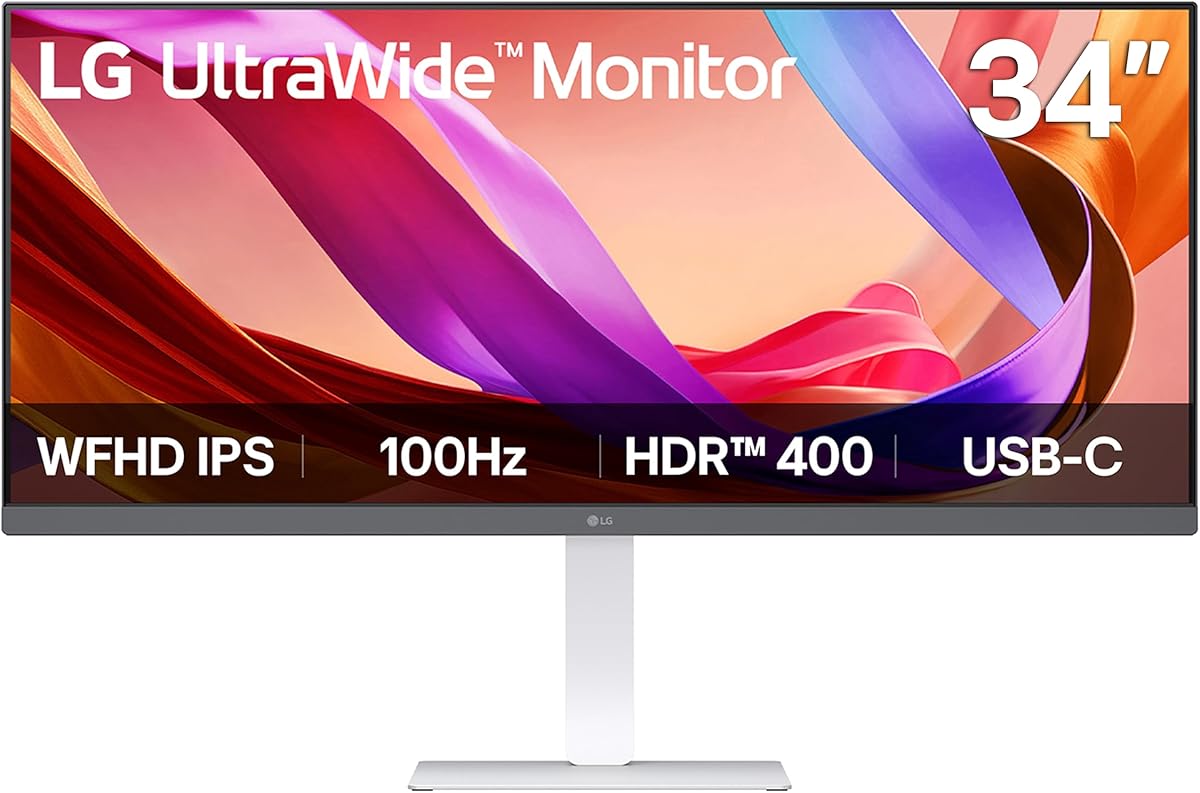
This monitor blends style and function with a white finish that suits modern setups well. It provides a solid balance of features for everyday computing tasks without focusing heavily on high-end gaming specifications or specialized tools.
We may earn a commission when you buy through this link, at no additional cost to you.
The IPS panel ensures consistent colors across the screen which is great for browsing and reading. USB-C connectivity adds versatility allowing you to connect laptops easily while reducing cable clutter on your desk space.
Gaming performance is decent but limited by the lower resolution and refresh rate compared to newer models. If you prioritize aesthetics and basic multitasking over competitive gaming this model offers a reliable and attractive option.
It is best for home offices or living room setups where appearance matters. The stand provides good adjustability ensuring comfort even during long periods of use without needing additional hardware.
The white finish offers a clean look that complements light colored desks and modern interior designs effectively.
Wide screen aspect ratio helps you manage multiple windows side by side efficiently during work or study sessions.
We may earn a commission when you buy through this link, at no additional cost to you.
MSI delivers a monitor focused on productivity with features that enhance workflow efficiency. The high resolution allows for detailed work while the 120Hz refresh rate keeps motion smooth for everyday computing tasks.
We may earn a commission when you buy through this link, at no additional cost to you.
VA panel technology provides deep blacks and high contrast which enhances video playback quality. Built-in speakers offer convenience for users who prefer not to deal with external audio setups immediately.
While the stand is basic it supports VESA mounting so you can upgrade to an arm for better positioning. This flexibility makes it a versatile choice for users who plan to customize their desk setup later.
Ideal for professionals and students needing a reliable display for coding writing or research. The balance of price and performance makes it a strong contender for general office use and media consumption.
VA panel ensures deep blacks and sharp details making it great for viewing content in various lighting conditions.
VESA compatibility allows easy attachment to monitor arms for improved ergonomics and desk space optimization.
We may earn a commission when you buy through this link, at no additional cost to you.
This model brings HDR capability to the affordable ultrawide category enhancing visual depth for media consumption. The IPS panel ensures accurate colors which are vital for designers and photographers who need precision in their work.
We may earn a commission when you buy through this link, at no additional cost to you.
USB-C connectivity includes high power delivery making it convenient for laptop users. This feature allows a single cable to handle both video and charging which significantly reduces cable clutter on your desk.
While the stand offers tilt it lacks height adjustment which may affect ergonomics for some users. However the image quality and connectivity options make up for this limitation in many scenarios.
Perfect for users who want HDR support without investing in expensive premium models. It serves well for content creation streaming and general productivity tasks requiring accurate color reproduction.
HDR10 support delivers richer contrast and brighter highlights enhancing the viewing experience for compatible content.
High wattage USB-C allows you to charge your laptop while connected ensuring a clean and efficient workspace.
We may earn a commission when you buy through this link, at no additional cost to you.
Samsung offers a robust solution with strong eye care features suitable for long work hours. The borderless design creates an immersive viewing experience making multiple monitors seamless if you plan to expand later.
We may earn a commission when you buy through this link, at no additional cost to you.
AMD FreeSync ensures smooth gaming performance while HDR10 enhances media quality. The monitor balances basic utility with sufficient specs for casual gamers and professionals alike without unnecessary bloat.
While the stand is limited in adjustment it supports mounting options for greater flexibility. Eye care modes reduce strain which is critical for users who spend most of their day looking at a screen.
This monitor is a safe choice for those who value brand reputation and eye comfort. It is well suited for office environments or home offices where consistent performance is preferred over high-end gaming features.
Ambient light sensor and Eye Saver Mode help reduce eye strain by adjusting brightness and reducing blue light emission.
PIP and PBP allow you to view multiple inputs simultaneously improving workflow efficiency without second monitor needed.
We may earn a commission when you buy through this link, at no additional cost to you.
This variant emphasizes a minimalist aesthetic with thin bezels that enhance focus on content. It shares many features with other models in the series but focuses on visual continuity and clean design for modern setups.
We may earn a commission when you buy through this link, at no additional cost to you.
HDR10 and FreeSync ensure a balanced experience for both work and play. Eye care features continue to be a highlight providing comfort during extended use without additional adjustments required.
The stand is functional but lacks height adjustment which might necessitate a monitor arm for optimal positioning. However the visual quality and connectivity options remain strong points for general daily tasks.
Ideal for users prioritizing design and brand consistency in their workspace. It is a reliable choice for general office work casual gaming and media viewing needs.
Thin bezels create a near borderless look which is ideal for dual monitor setups or immersive single screen experiences.
A mix of gaming and productivity features ensures versatility whether you are working or watching videos.
We may earn a commission when you buy through this link, at no additional cost to you.
Acer brings competitive specs with a high refresh rate and low response time tailored for gamers. The curved design enhances immersion making it suitable for racing simulators or fast-paced action games.
We may earn a commission when you buy through this link, at no additional cost to you.
AMD FreeSync Premium ensures smooth visuals which eliminates tearing even in demanding scenarios. It is a budget-friendly option for those prioritizing speed over resolution for competitive gameplay experiences.
The resolution is lower than others which may impact text clarity for productivity work. However for gaming this model delivers a fluid experience that competes well with more expensive alternatives.
Best for gamers on a budget who want smooth performance without overspending. It offers excellent value for those who prioritize frame rates over pixel density in their gaming sessions.
200Hz refresh rate combined with 1ms response ensures motion remains blur-free during high-speed competitive gaming sessions.
The curved screen wraps around your vision providing better peripheral visibility in games and media.
We may earn a commission when you buy through this link, at no additional cost to you.
KTC offers a strong combination of resolution and speed making it a versatile option for gaming and productivity. The HVA panel provides excellent contrast which enhances dark scenes in media content effectively.
We may earn a commission when you buy through this link, at no additional cost to you.
With 180Hz refresh rate and 1ms response time gameplay remains smooth without tearing. VESA compatibility means you can easily attach a monitor arm if the included stand does not meet your ergonomic needs.
Some users report minor stability issues with the stand so using a mount is recommended. Overall the performance metrics rival much more expensive models providing exceptional value.
Highly recommended for users seeking high resolution and speed without paying for premium branding. It is a compelling choice for competitive gamers and content creators alike.
HVA panel delivers deep blacks and strong contrast ratios which improves image depth and realism in dark content.
180Hz ensures fast moving objects appear fluid and clear which is crucial for competitive gaming scenarios.
We may earn a commission when you buy through this link, at no additional cost to you.
Selecting the right monitor requires understanding key features that impact performance and usability. This guide helps you evaluate options based on your specific needs and budget constraints.
Resolution determines the clarity and detail of images on your screen. Higher resolutions like UWQHD provide more sharpness and workspace compared to standard Full HD options which can be beneficial for multitasking and creative work.
Look for at least 3440 x 1440 resolution if you want clear text and detailed graphics for productivity tasks.
The refresh rate indicates how many times per second the screen updates which affects motion smoothness. Higher rates like 144Hz or 165Hz are crucial for competitive gaming to reduce motion blur and improve responsiveness.
For gaming choose at least 144Hz while 100Hz is generally sufficient for office work and casual entertainment.
Panel type affects color accuracy contrast and viewing angles. IPS panels offer the best color consistency while VA panels provide deeper blacks which is useful for watching movies in dim environments.
Choose IPS for color accuracy and VA for better contrast depending on your primary usage scenario.
Response time measures how quickly pixels change color which impacts motion clarity in games. Faster response times like 1ms minimize ghosting and smearing ensuring sharper images during fast-paced action sequences.
Prioritize 1ms to 5ms response times to ensure smooth visuals and minimal motion blur.
Connectivity options determine how you connect your devices to the monitor. Look for HDMI and DisplayPort inputs along with USB-C if you need power delivery or data transfer for laptops and peripherals.
Ensure the monitor has enough ports for all your devices to avoid buying extra adapters or dongles.
Adjustability like height tilt and swivel helps you maintain a healthy posture. Proper ergonomics reduce eye strain and fatigue during long work sessions or gaming marathons.
Check if the stand offers enough adjustments or supports VESA mounting for a monitor arm.
Well-known brands often provide better build quality and support services. Established manufacturers typically offer reliable warranties and easier access to customer support which can be helpful if issues arise.
Research the brand's customer service and warranty terms before purchasing to ensure long-term reliability.
Setting a clear budget helps narrow down choices while ensuring you get the features you need. Balancing price with performance is key to finding a monitor that offers value without unnecessary costs.
Determine your spending limit early to find the best match within your financial range.
Start by properly installing the monitor stand ensuring all connections are secure before powering on. Use the included cable management features to keep your workspace tidy and avoid tangling wires during initial setup.
Adjust the brightness and color settings to match your environment using the on-screen menu. Many monitors have presets for different tasks like gaming reading or movies which optimize image quality automatically.
Clean the screen regularly using a microfiber cloth to avoid scratches. Avoid spraying liquid directly onto the display and instead apply cleaner to the cloth for gentle cleaning.
Yes many affordable models offer high refresh rates and fast response times suitable for gaming. Features like AMD FreeSync help reduce screen tearing and improve overall smoothness during intense play sessions.
UWQHD or 3440 x 1440 is considered the sweet spot for balancing sharpness and performance. It provides ample space for multitasking without demanding excessive graphics power for gaming.
Some models feature USB-C ports with power delivery allowing you to charge laptops through the display. This feature is common in mid-range models and reduces cable clutter significantly.
Absolutely the wide screen allows you to run multiple windows side by side comfortably. This makes it ideal for coding writing and data analysis without needing multiple screens.
IPS panels provide better color accuracy and viewing angles while VA panels offer deeper blacks and higher contrast. The choice depends on whether you prioritize color precision or dark room media viewing.
Built-in speakers are convenient for basic audio needs but generally lack quality. Most users prefer external speakers or headphones for better sound especially during gaming or movie watching.
We have explored ten top models offering excellent value for budget-conscious buyers. Each option provides unique features catering to different needs from gaming to professional productivity.
Prioritize resolution refresh rate and panel type based on your primary use case to get the most out of your purchase. A good match ensures comfort efficiency and long-term satisfaction.
Check current availability and deals before making your decision since prices may change. We hope this guide helps you find the perfect monitor for your setup.