
HP Chromebook 14 x360 Plus
4.2Editor score
360-degree 2-in-1 hinge
Intel N150 processor
14-inch WUXGA Touchscreen
Finding the right laptop can be challenging when you want Apple performance without the premium price tag. Whether you need a machine for school, work, or creative projects, there are many powerful options available today that rival the MacBook experience.
We have carefully selected ten top-rated devices ranging from budget-friendly Chromebooks to high-performance Windows and Mac laptops. Each product was evaluated based on build quality, performance, battery life, and overall value to ensure you get the best deal.
Every pick in this list highlights specific strengths and ideal use cases to help you make an informed decision. Please note that prices and availability can change frequently, so check current listings before making your final purchase choice today.
4.2Editor score

4.6Editor score

4.4Editor score
As an Amazon Associate we earn from qualifying purchases.
The following table provides a detailed side-by-side comparison of all ten products featured in this guide. Review the key specifications and features to quickly identify which device best matches your specific computing needs and budget requirements.




The Apple 2026 MacBook Neo stands out as the top choice for users seeking a premium alternative to standard Mac models. It has received strong ratings for its balance of portability and performance. This laptop brings the power of AI to everyday tasks in a sleek aluminum enclosure that feels incredibly durable.
We may earn a commission when you buy through this link, at no additional cost to you.
Key strengths include the A18 Pro chip which handles multitasking and creative apps with ease. The up to 16 hours of battery life ensures you can work all day without a charger. Additionally the Liquid Retina display offers vibrant colors and sharp text perfect for media consumption and detailed work.
While the 8GB unified memory might be limiting for heavy professional workflows it is sufficient for most students and general users. The higher price point compared to budget options is justified by the build quality and longevity of the device. It represents a solid investment for long-term use.
This model is ideal for anyone already invested in the Apple ecosystem or those needing reliable performance for school and work. The integration with iPhone and other Apple devices adds significant value. For most users this MacBook Neo provides the perfect blend of style and function.
The device promises up to 16 hours of battery life allowing users to go from morning classes to evening study sessions without needing to find an outlet.
Built for Apple Intelligence this laptop helps you write, summarize notes, and manage tasks effortlessly while maintaining strong privacy protections throughout.
We may earn a commission when you buy through this link, at no additional cost to you.
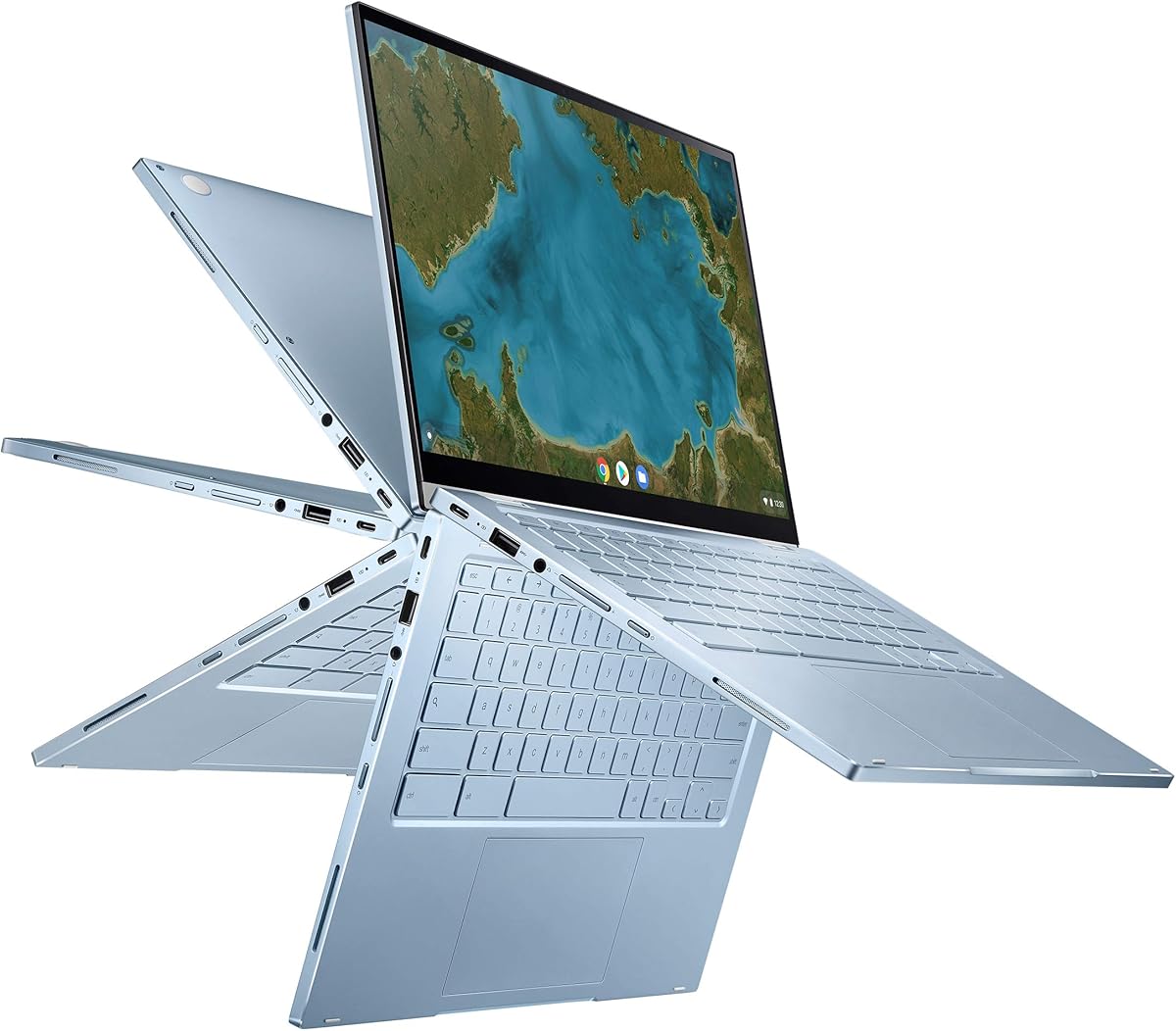
The HP Chromebook 14 x360 Plus is an excellent entry point for those who need a flexible laptop without spending much. It features a 360-degree hinge allowing four modes of use for different scenarios. This versatility makes it a great companion for students or casual home users.
We may earn a commission when you buy through this link, at no additional cost to you.
It offers a crisp 14-inch WUXGA touchscreen that maximizes screen real estate with narrow borders. The Intel N150 processor handles web browsing and document editing smoothly while 4GB LPDDR5 memory supports multitasking. Built-in cloud backup and Google Assistant make daily tasks simple and secure.
While the 128GB storage is modest it is adequate for cloud-based workflows. The battery life is decent but might not last a full day of heavy use. However the rugged MIL-STD 810H testing ensures it can withstand daily bumps and drops in various environments.
This Chromebook is best suited for K-12 students, families, and anyone needing a secondary device for light productivity. The touch interaction and flexible hinge add significant value at this price. It is a reliable choice for basic computing needs on a tight budget.
The 360-degree hinge enables laptop, tent, stand, and tablet modes making it adaptable for video calls, reading, and creative tasks.
Designed to pass MIL-STD 810H testing this device ensures dependable performance across diverse working environments and daily handling.
We may earn a commission when you buy through this link, at no additional cost to you.
This Apple 2021 MacBook Pro offers raw power that rivals or exceeds many modern workstations. The M1 Max chip combined with 64GB RAM and 2TB SSD makes it a dream for video editing and software development. It has been professionally inspected to ensure it meets high standards.
We may earn a commission when you buy through this link, at no additional cost to you.
The key strength lies in its ability to handle demanding tasks without lag. The display is vibrant and accurate making it perfect for design work. Despite being a renewed product it functions like new with a battery exceeding 80% capacity. This ensures reliable performance for daily tasks.
The only trade-off is the higher price compared to standard renewed laptops. It is also slightly heavier than newer 13-inch models. However for professionals needing top-tier specs the value is undeniable. The renewed status offers a discount compared to buying brand new.
This machine is ideal for creative professionals or power users who require extensive memory and storage. It is a smart buy for those who want premium specs without the highest retail price. If you need a reliable workstation this model delivers outstanding performance.
With 64GB RAM and M1 Max chip this laptop handles complex workflows including video editing and virtual machines effortlessly.
Professionally inspected and tested by qualified suppliers this unit ensures no visible cosmetic imperfections and full functionality.
We may earn a commission when you buy through this link, at no additional cost to you.
The ASUS Chromebook Flip CX1 is a strong contender for users who rely heavily on cloud services and web apps. It features an 8GB RAM capacity which is generous for a Chromebook allowing multiple tabs to run smoothly. The convertible design makes it useful for reading and watching content.
We may earn a commission when you buy through this link, at no additional cost to you.
A standout feature is the free Google One AI Premium plan included which offers storage and AI tools. The 14-inch FHD NanoEdge display provides a great viewing experience with narrow bezels. Connectivity is robust with USB-C support for power and data transfer.
However the eMMC storage is slower than SSDs found in Windows laptops. The processor is capable for web tasks but not for heavy workloads. Battery life is decent at up to 11 hours. This device is optimized for simplicity and web-based efficiency.
This laptop is perfect for students or home users who want a lightweight secondary device. The included cloud tools add value for families or schools. If you need a versatile Chromebook with extra RAM this CX1 is a reliable choice.
The free Google One AI Premium plan provides Gemini Advanced and storage enhancing productivity without extra monthly costs for three months.
The 360-degree touchscreen allows tent stand and tablet modes making it adaptable for sharing content or writing notes directly.
We may earn a commission when you buy through this link, at no additional cost to you.
The Samsung Galaxy Book4 is a robust Windows laptop designed for business and professional use. It features a 10-core Intel Core 7 processor which delivers strong performance for productivity apps. The 16GB memory ensures smooth operation even with many browser tabs open.
We may earn a commission when you buy through this link, at no additional cost to you.
Its 15.6-inch FHD display offers ample space for spreadsheets and documents. The fingerprint reader adds a layer of security for sensitive work. Connectivity includes USB-C, HDMI, and an Ethernet port making it versatile for office setups without needing dongles.
Battery life is solid at up to 12 hours for general use. The 512GB SSD provides quick boot times and storage for files. While it may be heavier than some ultrabooks the durability and port selection justify the bulk for office use.
This model is ideal for professionals needing a reliable Windows machine for work or study. It bridges the gap between performance and cost effectively. If you need a full Windows experience with solid specs this Galaxy Book4 is a top pick.
The Intel Core 7 150U with 10 cores handles multitasking and business applications with speed and efficiency.
A fingerprint reader on the keyboard offers quick and secure logins keeping your data safe and accessible.
We may earn a commission when you buy through this link, at no additional cost to you.
The Google Pixelbook Go is designed for those who prioritize portability and battery life above all else. It weighs barely 1kg and is 13mm thin making it easy to slip into any bag. The fanless design ensures it stays cool and quiet during use.
We may earn a commission when you buy through this link, at no additional cost to you.
Key features include the 8th Gen Intel Core processor which provides snappy performance for web tasks. The up to 12 hours of battery life means you can travel without a charger. The backlit keyboard and Hush Keys add comfort for late night typing.
The touchscreen allows for smooth navigation and media interaction. However the specs might be older than newer Chromebooks. The design focuses on build quality and endurance rather than raw power. It is a well-crafted device for on-the-go users.
This laptop is perfect for travelers or students who need a light secondary device. The premium feel and battery longevity make it stand out. If weight and comfort are your main priorities this Pixelbook Go is an excellent choice.
At barely 1kg and 13mm thin this device is incredibly easy to carry anywhere without feeling weighed down.
The fanless design stays cool and allows you to work comfortably on your lap without noise or heat distractions.
We may earn a commission when you buy through this link, at no additional cost to you.
The Lenovo Flex 14 offers strong value with a 2-in-1 design and solid specs. The 12GB RAM is generous for this price range ensuring smooth multitasking. It includes an active pen which is perfect for students who like to write notes directly on the screen.
We may earn a commission when you buy through this link, at no additional cost to you.
The 14-inch FHD touchscreen provides a vibrant display for media and work. The Ryzen 5 processor handles daily tasks well. A privacy shutter for the webcam adds a necessary layer of security for video calls. The build is durable and practical.
While Windows 10 support is ending the machine can often run Windows 11. The battery life is decent but not exceptional compared to Chromebooks. The recharge technology helps power it up quickly when needed. It is a balanced option for hybrid use.
This laptop is best for students or home users needing a versatile Windows machine. The inclusion of the pen and high RAM makes it stand out. If you want a 2-in-1 with good performance this Flex 14 is a great pick.
The included active pen lets you draw or take notes directly on the screen anywhere you go for a natural experience.
A built-in privacy shutter allows you to physically close the webcam whenever you are not using it for security.
We may earn a commission when you buy through this link, at no additional cost to you.
The ASUS Chromebook Flip C433 is a compact and stylish device designed for portability. It fits a 14-inch screen into a 13-inch footprint thanks to the NanoEdge display. This saves space while providing plenty of room for your work and apps.
We may earn a commission when you buy through this link, at no additional cost to you.
Powered by Intel Core m3 processor it handles everyday tasks with ease. The 8GB RAM ensures smooth operation when switching between tabs. The aluminum build feels premium and the backlit keyboard adds utility for dark environments. It is a very portable choice.
Storage is limited to 64GB eMMC so you will rely on cloud services. However for web users this is often enough. The 360-degree hinge allows flexible viewing angles. Battery life is decent for short trips and daily commuting.
This Chromebook is ideal for users who value style and portability. It is great for travel and students needing a light notebook. If you want a well-built device that feels like a premium laptop this C433 is a solid option.
The 4-way NanoEdge display features ultra-narrow bezels allowing a 14-inch screen to fit in a 13-inch footprint.
The durable 360 degree hinge allows for tent stand and tablet modes to suit different work scenarios.
We may earn a commission when you buy through this link, at no additional cost to you.
The Lenovo Flagship Chromebook is designed with class-leading battery life and reliable connectivity in mind. The MediaTek Kompanio 520 processor is a significant upgrade offering solid performance for everyday tasks like browsing and video calls. It is ready for Zoom and Google Classroom.
We may earn a commission when you buy through this link, at no additional cost to you.
It features a 14-inch FHD touchscreen with IPS technology for wide viewing angles. The privacy shutter is a welcome addition for security. Wi-Fi 6 ensures fast and reliable connections in busy environments. The slim design makes it easy to carry around school or home.
The 4GB RAM is adequate for running multiple browser tabs. The 64GB storage is small but sufficient for cloud storage users. This device is simple secure and fast. It focuses on essential features without unnecessary bloat. It is practical for education.
This Chromebook is perfect for students or anyone needing a simple reliable device. The battery life and connectivity make it great for online learning. If you want an affordable tool for remote work this Lenovo Flagship is a reliable option.
With Wi-Fi 6 this device provides fast and reliably connected experiences for home and commercial enterprise use.
An integrated privacy shutter allows you to physically close the webcam for enhanced privacy when not using it.
We may earn a commission when you buy through this link, at no additional cost to you.
This renewed MacBook Pro offers a classic Mac experience with strong specs at a budget price. The 15-inch Retina display provides ample workspace and sharp visuals. The 16GB RAM allows for decent multitasking capabilities making it useful for older Mac workflows.
We may earn a commission when you buy through this link, at no additional cost to you.
It features an Intel Core i7 processor which is still capable of general tasks. The 512GB storage offers plenty of room for files. Being renewed it saves money compared to newer models. The build quality remains robust and professional in feel.
However Intel Macs can run hotter and use more battery than Apple Silicon. The renewed status means battery health might vary. It is suitable for those who need macOS compatibility on a budget. It offers value for specific legacy use cases.
This machine is ideal for developers or students needing a specific older Mac OS setup. The large screen and memory make it a solid workstation. If you need a refurbished Mac with big screen this Pro is a practical choice.
The stunning 15-inch Retina display provides ample space for creative work and multitasking in any environment.
This product comes professionally inspected tested and cleaned to offer reliable performance at a lower cost.
We may earn a commission when you buy through this link, at no additional cost to you.
Choosing the right laptop involves weighing factors like performance, portability, and ecosystem compatibility. This guide breaks down the essential criteria to consider before you buy.
Your choice of operating system will determine which apps you can run and how easily your device integrates with other gadgets. Windows offers broad software compatibility and gaming support while macOS provides a polished interface and seamless iPhone integration. ChromeOS is streamlined for web apps and cloud storage making it ideal for students and basic users.
The processor is the brain of your laptop determining how quickly it handles tasks. Modern chips like Apple Silicon or recent Intel cores offer great efficiency and speed. Memory should ideally be 8GB or more to prevent slowdowns during multitasking. This ensures smooth operation whether you are editing photos or browsing multiple tabs.
Since you will be staring at the screen for hours resolution and color accuracy matter. Retina or IPS panels offer vibrant colors and sharp text which reduces eye strain. Touchscreens add versatility for note-taking or media consumption. Higher brightness helps when working outdoors or in brightly lit rooms.
Long battery life is crucial if you plan to work away from outlets frequently. Apple Silicon models lead with 15 to 20 hours while Windows laptops vary from 6 to 12 hours. Chromebooks often offer a sweet spot of 10 to 12 hours. Consider your daily workflow to decide how much power you truly need.
A sturdy build ensures your device lasts through daily drops and travel. Aluminum or magnesium alloys offer better resistance than plastic. Military grade testing like MIL-STD 810H is a good indicator of durability. Also check the hinge quality if you plan to use a 2-in-1 convertible model.
Modern laptops often rely on USB-C so having enough ports avoids the need for dongles. Look for HDMI USB-A and audio jacks if you use external monitors or legacy devices. Wi-Fi 6 ensures fast wireless speeds in crowded networks. Good connectivity saves time and frustration in the long run.
Solid State Drives offer faster boot and load times than older hard drives. While 256GB is a good starting point many users may need more. Chromebooks rely heavily on cloud storage so local space matters less. Always check upgrade options before buying since some storage is soldered.
Biometric login options like fingerprint readers and face recognition add a layer of security. Physical webcam shutters protect your privacy from unauthorized access. Regular automatic software updates are also critical for keeping your device safe. These features are standard on premium devices but vary in budget models.
Manage your battery health by avoiding extreme heat and unplugging the charger once the device is fully charged. If you use a 2-in-1 model be gentle with the hinge when switching modes to prevent mechanical wear. Taking these precautions ensures your device serves you well for many years.
Chromebooks are excellent alternatives for users who primarily use web-based apps and cloud storage. They are often cheaper and lighter with longer battery life. However they lack the full desktop software support of macOS. They are best for students and light users who do not need heavy creative tools.
You cannot run native Mac apps on a Windows laptop without using emulation or virtualization which can be slow. However many popular services like Adobe Creative Cloud have Windows versions. Check the specific software you need before switching platforms to ensure compatibility.
Apple Silicon chips offer better performance per watt meaning they run cooler and last longer on battery. They handle creative tasks faster than older Intel chips while consuming less power. This makes Macs with M series chips ideal for portable work and travel.
For basic web browsing and streaming 8GB of RAM is generally sufficient. If you plan to edit videos or run multiple heavy apps you should aim for 16GB or more. More memory prevents slowdowns and ensures smooth multitasking over time.
Yes renewed laptops are often safe and reliable when purchased from reputable sellers. They undergo professional inspection and testing to ensure functionality. Just verify the warranty and return policy before buying to protect yourself against defects.
A touchscreen adds convenience for navigation and media consumption but is not strictly necessary. It can be useful for drawing or taking notes if you have a stylus. If you mostly use a mouse and keyboard it may not be worth the extra cost.
Remember that prices change often so check current listings before making your decision. We hope this guide helps you find the perfect laptop to suit your lifestyle. Happy shopping and enjoy your new device.