
Lenovo Smartcard Wired Keyboard II-US English
4.4Editor score
Affordable wired connectivity
Integrated smart card reader
Compact enterprise design
This guide compares the top keyboards with built-in smart card readers for secure authentication, highlighting features like TAA compliance, ergonomics, and
In an era where cybersecurity is paramount, integrating secure authentication directly into your workflow is essential. A keyboard with smart card reader capabilities allows users to authenticate seamlessly without relying on external hardware. These devices combine typing comfort with robust security protocols, making them ideal for government, healthcare, and financial sectors where data protection is critical.
We evaluated ten leading models based on compatibility, build quality, and security standards. Our analysis focuses on factors like TAA compliance, ergonomic design, and reader reliability. Each product was assessed for its ability to support common protocols such as PC/SC and ISO7816. This ensures that the selected options meet rigorous enterprise requirements while maintaining user comfort during extended sessions.
Each pick below highlights specific strengths tailored to different organizational needs and budgets. Whether you require a budget-friendly option or a premium ergonomic solution, this list covers the spectrum. Note that availability and pricing can fluctuate based on market demand and vendor contracts. Always verify current specifications with the manufacturer before finalizing your procurement decision for critical infrastructure.
4.4Editor score
4.6Editor score

4.1Editor score
This side-by-side comparison outlines the key specifications and unique features of each selected keyboard to help you make an informed decision based on your specific security and ergonomic requirements.


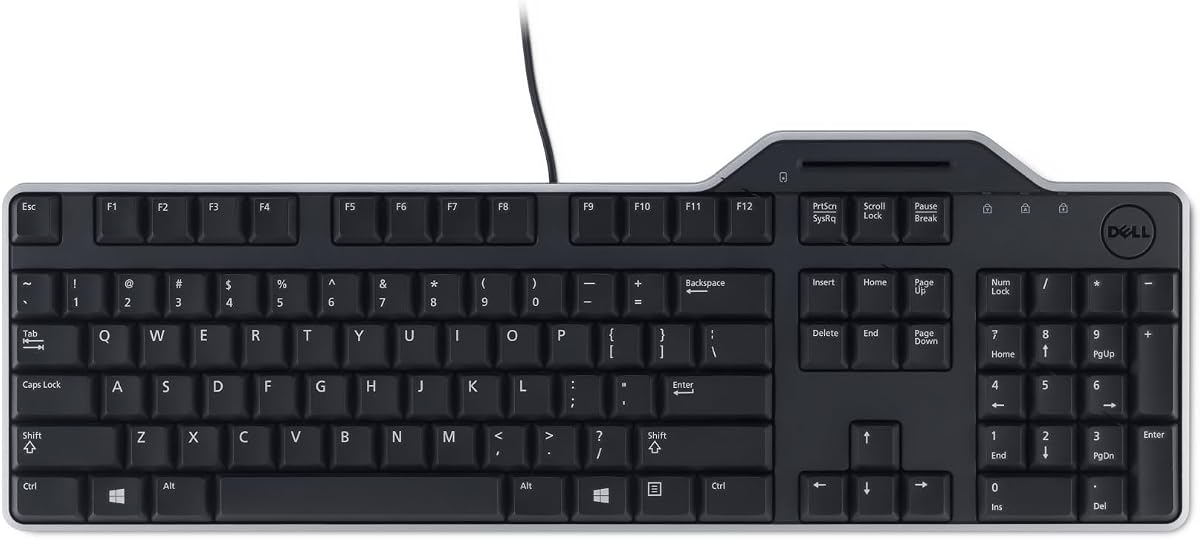
The Dell KB813 stands out as a top contender in the secure input market, earning a strong 4.6 rating from users who value reliability and durability. It integrates a smart card reader directly into the layout, allowing for seamless login processes without the clutter of external dongles. This design choice significantly enhances workstation security while maintaining a familiar typing experience for employees.
We may earn a commission when you buy through this link, at no additional cost to you.
Key strengths include its spill-resistant construction, which protects internal electronics from accidental liquid damage—a common issue in busy office environments. The ergonomic design features a detachable palm rest that supports neutral wrist positions during long shifts. Furthermore, the low-profile keys offer a quiet typing experience, minimizing noise distractions in shared workspaces.
While it lacks backlighting and advanced multimedia keys, these omissions are acceptable trade-offs for users prioritizing security and basic functionality over gaming or creative tasks. The lack of wireless connectivity ensures a stable connection, reducing latency issues often found in budget wireless models. This makes it a robust choice for stationary workstations.
This keyboard is ideal for IT departments seeking a reliable solution for general office staff requiring secure access. Its blend of durability and ergonomic comfort ensures that employees can work efficiently without compromising on security protocols. For organizations needing a straightforward, secure input device, the Dell KB813 delivers consistent performance.
The integrated reader ensures that sensitive authentication credentials are handled locally and securely without external vulnerabilities.
Advanced internal channels divert liquids away from critical components, preserving functionality even after accidental spills.
We may earn a commission when you buy through this link, at no additional cost to you.
The Adesso TruForm AKB-150SB-TAA is designed for professionals who demand both security and ergonomic support. With a 4.1 rating, it appeals to users in healthcare and government sectors where TAA compliance is mandatory. The split design promotes a natural hand position, reducing the risk of repetitive strain injuries over long working hours.
We may earn a commission when you buy through this link, at no additional cost to you.
Its built-in smart card reader adheres to ISO7816 and PC/SC standards, ensuring compatibility with a wide range of secure systems. The inclusion of thirteen multimedia and internet hotkeys adds versatility, allowing quick access to common tools without leaving the keyboard. Additionally, the integrated palm rest provides consistent support, enhancing overall typing comfort.
The primary trade-off is the learning curve associated with the split ergonomic design, which may take some time to master for users accustomed to flat layouts. The price is also higher than standard models, reflecting its specialized compliance features. However, for regulated environments, these costs are often justified by the security and health benefits provided.
This keyboard is best suited for enterprise procurement where regulatory compliance and employee health are top priorities. It serves organizations that need to demonstrate adherence to U.S. Trade Agreement Act specifications. For users seeking a secure, compliant, and comfortable typing experience, the Adesso TruForm is an excellent investment.
TAA compliance ensures eligibility for purchase by federal agencies and government contractors meeting strict sourcing standards.
The split zones and sloped shape encourage a neutral posture, alleviating discomfort in wrists and forearms.
We may earn a commission when you buy through this link, at no additional cost to you.
The Lenovo Smartcard Wired Keyboard II offers a cost-effective solution for organizations needing secure authentication without breaking the budget. Rated 4.4, it provides the essential functionality of a built-in smart card reader in a straightforward package. It is particularly popular among small businesses or departments requiring a bulk upgrade to secure entry systems.
We may earn a commission when you buy through this link, at no additional cost to you.
Its design prioritizes simplicity and reliability, utilizing a standard USB connection that eliminates the need for drivers or batteries. The compact dimensions make it easy to fit into existing desk setups without requiring significant workspace adjustments. While it lacks advanced ergonomic features, the key response is solid for daily office tasks.
Users may find the lack of extra features like multimedia keys or spill resistance limiting compared to higher-end models. However, for core secure logging functions, it performs adequately. The lightweight build means it might feel less substantial than heavier keyboards, but this also aids in portability if needed for shared workstations.
This keyboard is ideal for budget-conscious IT managers who need to secure multiple workstations quickly. It provides the necessary security layer without the overhead of complex configuration. For basic secure login requirements where cost efficiency is key, this Lenovo model represents strong value.
Delivers essential card reader functionality at a price point accessible for widespread deployment across large teams.
Requires no software installation, allowing immediate use upon connecting to a compatible USB port.
We may earn a commission when you buy through this link, at no additional cost to you.
The Cherry KC 1000 is a robust option for environments requiring strict adherence to security protocols like FIPS 201. With a rating of 4.6, it is trusted by sectors where data integrity is non-negotiable. The design focuses on functional reliability, featuring a dedicated PIN entry module that enhances security during authentication processes.
We may earn a commission when you buy through this link, at no additional cost to you.
It supports a wide range of operating systems including Windows, MacOS, and Linux, making it versatile for mixed-OS environments. The low-profile design ensures a slim footprint, saving desk space while maintaining comfortable key travel. The one-handed operation of the smart card module allows for efficient workflow without interrupting typing rhythm.
Despite its strong security credentials, the keyboard lacks aesthetic flair or advanced multimedia capabilities. Users accustomed to ergonomic splits or backlighting might find it utilitarian. However, these compromises are necessary to maintain the high security standards and compliance certifications required by regulated industries.
This model is perfect for IT administrators managing secure servers or government workstations. Its certification status ensures it meets rigorous security requirements. For those prioritizing compliance and operational versatility over features, the Cherry KC 1000 is a reliable and secure choice.
FIPS 201 approval validates the device for secure government and enterprise identity management systems.
Supports Windows, MacOS, and Linux, ensuring seamless integration regardless of the underlying operating system.
We may earn a commission when you buy through this link, at no additional cost to you.
The Adesso EasyTouch 130SB brings mechanical durability to the secure keyboard category, rated 4.6 for its robust performance. Its red mechanical switches provide clear tactile feedback, ensuring users feel every keystroke which can improve typing accuracy. This is particularly beneficial for data entry tasks where precision is paramount.
We may earn a commission when you buy through this link, at no additional cost to you.
A standout feature is the large print keycaps, which significantly improve readability for users with visual impairments or in low-light conditions. The integrated Copilot AI hotkey allows quick access to Microsoft Copilot, streamlining productivity tasks. Combined with a smart card reader, it offers a blend of modern features and traditional security.
However, mechanical keyboards can be louder than membrane models, which might be disruptive in quiet libraries or open offices. The size of the keycaps might require adjustments for users with smaller hands. Despite this, the 50 million keystroke lifecycle ensures longevity that justifies the investment in high-traffic environments.
This keyboard suits users who value tactile feedback and modern productivity tools alongside security. It is well-suited for developers or professionals who appreciate mechanical switches. For environments needing enhanced visibility and durable construction, the Adesso EasyTouch provides a secure and feature-rich experience.
High-rated switches ensure the keyboard withstands heavy daily use without loss of tactile feel or responsiveness.
Large print keycaps make characters easier to read, reducing eye strain during extended typing sessions.
We may earn a commission when you buy through this link, at no additional cost to you.
Rated 4.7, the Dell Keyboard Smartcard USB is a strong contender for those prioritizing quiet operation in shared spaces. It maintains the robust build quality expected from Dell, offering a full-size layout that accommodates standard workflows efficiently. The smart card reader is seamlessly integrated to support secure login processes without extra clutter.
We may earn a commission when you buy through this link, at no additional cost to you.
The detachable palm rest adds a layer of comfort during long work sessions, helping to reduce wrist strain. Its spill-resistant design is a practical feature for office environments where beverages are common. The wired USB connection ensures stable power and data transfer without needing battery replacements or charging.
While it lacks advanced multimedia keys, its primary focus is on reliability and basic security. Some users might prefer additional features found in higher-end models, but this simplicity reduces the learning curve for new employees. The quiet keys make it ideal for environments where noise levels must be kept low.
This keyboard is a safe choice for standard enterprise deployments needing quiet, reliable secure input. It balances performance with cost-effectiveness effectively. For general office staff requiring secure access with minimal distraction, the Dell Smartcard USB offers a comfortable and dependable solution.
Specially designed keys minimize sound output, maintaining a peaceful environment for colleagues nearby.
Wired USB ensures continuous power and data integrity without dependency on battery life or wireless pairing.
We may earn a commission when you buy through this link, at no additional cost to you.
The Kensington KB201C is engineered for organizations requiring Common Access Card (CAC) compatibility. Despite a lower average rating of 3.8, it remains a key choice for government entities due to its TAA compliance and CAC certification. It ensures secure and efficient access to protected networks and applications.
We may earn a commission when you buy through this link, at no additional cost to you.
Key features include a full-size layout with a numeric keypad for efficient data entry. The quiet-click mechanism allows for discreet typing, which is beneficial in shared workspaces. The inclusion of a three-year limited warranty provides peace of mind for administrators managing long-term assets.
The lower rating suggests some users may experience issues with build quality or key feel compared to competitors. However, for strict compliance needs, it offers necessary security protocols. The basic design focuses on function rather than aesthetics, which is often acceptable in regulated environments.
This keyboard is best for federal contractors and government agencies needing compliant hardware. It supports standard authentication protocols essential for secure access. For procurement teams prioritizing compliance over premium features, the Kensington KB201C provides the necessary security assurances.
Designed specifically for CAC and TAA requirements to meet federal government security and sourcing standards.
Includes a three-year limited warranty that protects against defects and ensures long-term reliability for IT assets.
We may earn a commission when you buy through this link, at no additional cost to you.
The HP USB Business Slim Smartcard Keyboard is praised for its slim profile and practical spill drainage design. With a rating of 4.5, it is valued in busy office environments where space efficiency and durability are crucial. The built-in spill drain directs liquids away from internal components, protecting the device from damage.
We may earn a commission when you buy through this link, at no additional cost to you.
Its membrane keyswitch technology provides a comfortable and quiet typing experience. The LED indicators offer clear visual feedback for key locks and security status, which aids in operational clarity. This combination of features makes it a reliable choice for daily business operations.
Some users may prefer the tactile feedback of mechanical switches, but the membrane design ensures a quieter workspace. The smart card integration supports standard authentication methods needed for secure logging. While basic, it fulfills all essential needs for office security and productivity.
This keyboard is ideal for organizations needing a slim, durable, and secure input device. It supports efficient workflows without taking up much desk space. For environments where spill protection and space-saving design are priorities, the HP USB Business Slim delivers strong performance.
Channels direct liquids away from circuitry, protecting the device even after accidental contact with fluids.
LED lights provide clear feedback on Num Lock and Caps Lock status to prevent typing errors.
We may earn a commission when you buy through this link, at no additional cost to you.
The Cherry Secure Board 1.0 distinguishes itself with an integrated RF/NFC interface in addition to standard smart card reading. With a 4.2 rating, it is a solid choice for organizations adopting contactless authentication methods. The secure mode ensures that authentication data is encrypted during transmission, enhancing overall data protection.
We may earn a commission when you buy through this link, at no additional cost to you.
It is specifically designed for thin client environments, making it ideal for virtual desktop setups where security is paramount. The GS approval indicates it meets stringent quality and safety standards required in European and global markets. This versatility makes it a flexible tool for diverse IT infrastructures.
However, utilizing RF and NFC features requires compatible cards, which might not be standard in all organizations. This adds a layer of complexity to deployment but offers significant benefits for contactless efficiency. Users should ensure their smart card infrastructure aligns with these capabilities before purchase.
This keyboard is best for organizations looking to modernize authentication with contactless tech. It supports robust encryption and thin client protocols securely. For businesses needing flexible card support beyond contact pins, the Cherry Secure Board provides a secure and advanced solution.
RF/NFC integration allows users to authenticate by tapping a card, streamlining the login process significantly.
Tailored for secure thin client environments to support remote desktop workflows efficiently and safely.
We may earn a commission when you buy through this link, at no additional cost to you.
The NEW OEM Dell KB813t offers a straightforward solution for organizations needing a direct replacement or fresh deployment of secure keyboards. With a 4.4 rating, it matches the functionality of standard Dell secure models without extra bloat. The unopened condition ensures that the device is pristine for immediate use.
We may earn a commission when you buy through this link, at no additional cost to you.
Its English layout and standard black finish blend seamlessly into professional workspaces. The smart card reader supports secure login processes required for enterprise access. This option is particularly useful for IT managers replacing damaged units or upgrading older secure terminals quickly.
While it lacks advanced multimedia or ergonomic features, its simplicity ensures compatibility and reliability. Users should expect standard membrane performance rather than premium mechanical feedback. This makes it a solid choice for general administrative tasks where security and standard input are the primary focus.
This keyboard is ideal for IT procurement teams needing reliable replacement units. It provides the essential Dell quality and security at a straightforward price point. For organizations maintaining legacy secure systems, this OEM model offers a practical and dependable hardware solution.
Designed to work seamlessly with existing Dell enterprise infrastructure, ensuring quick installation and minimal downtime.
Includes essential smart card functionality needed for secure logons in professional office environments.
We may earn a commission when you buy through this link, at no additional cost to you.
Selecting the right secure keyboard requires evaluating compliance, ergonomics, and connection types to match your organization's specific needs and security protocols.
Ensure the keyboard supports necessary standards like FIPS 201, PC/SC, and ISO7816. Government agencies often require TAA compliance to meet sourcing regulations. Verifying these certifications ensures the device will integrate smoothly with existing secure authentication systems without compatibility issues.
Always check the product documentation for specific protocol support before purchasing. This guarantees that your security infrastructure remains compliant and functional.
Decide between contact smart card readers and RF/NFC interfaces. Contact readers require inserting a card, while RF/NFC allows for tapping. Consider your workflow preferences and existing card infrastructure when selecting the appropriate reader type.
Choosing the right interface impacts both user convenience and hardware costs. Align your choice with your organization's authentication protocols.
Look for split designs, palm rests, or low-profile keys to reduce strain during long typing sessions. Ergonomic features are critical for employee health and productivity. A comfortable keyboard reduces the risk of repetitive strain injuries over time.
Prioritize ergonomic features if your staff types extensively. Comfort is key to long-term productivity and health.
Evaluate materials and features like spill resistance or durable key switches. Enterprise environments require hardware that can withstand accidental damage and heavy daily use. A robust build ensures longevity and reduces replacement costs.
Invest in keyboards with proven durability features to protect your hardware investment. Longevity is essential for large-scale deployments.
Verify that drivers are available for your operating systems, including Windows, macOS, and Linux. Mixed-OS environments need versatile compatibility to ensure smooth integration. Lack of driver support can lead to significant configuration headaches.
Confirm compatibility lists before procurement to avoid driver issues. Smooth integration is vital for efficient operations.
Most secure keyboards use wired USB for stable power and data transfer. Wireless options are rare due to security risks. Wired connectivity ensures that the smart card reader functions consistently without battery dependency.
Stick to wired models for maximum reliability and security. Power consistency is crucial for secure authentication devices.
Some models include multimedia keys or AI assistant shortcuts to enhance workflow. While not critical for security, these features can improve efficiency. Consider if these add-ons provide value to your specific user base.
Weigh extra features against your budget. Basic security models often suffice for administrative tasks.
Check the warranty terms and manufacturer support options. A longer warranty indicates confidence in product quality. Ensure the vendor provides reliable technical support for enterprise procurement.
Prioritize products with strong warranty coverage. Reliable support minimizes downtime during critical failures.
Begin by connecting the keyboard to your computer via a standard USB port. Ensure your system has the necessary drivers installed to recognize both the typing keys and the smart card reader. Most modern operating systems automatically detect these devices, but you should verify functionality by testing the authentication process.
Insert your smart card into the reader slot smoothly. Avoid forcing it if resistance is felt. Once inserted, the system should prompt for your PIN to authenticate. This ensures that access is granted securely to authorized users only.
Maintain your keyboard by cleaning it regularly with compressed air and a microfiber cloth. Avoid spills near the reader slot and consider using a keyboard cover if liquids are common in your workspace. Regular maintenance prolongs the life of the internal mechanisms and electronic components.
Not all models support both. Some require inserting a contact chip, while others use RF/NFC technology. Check the specifications to ensure compatibility with your existing smart card type before purchase.
Many models support macOS, but driver availability varies by manufacturer. Ensure the product page lists macOS compatibility before ordering to guarantee smooth integration with Apple hardware.
Check the USB connection first. If it is secure, reinstall the drivers or test on another machine. Contact the manufacturer for warranty support if the issue persists to replace defective units.
No, TAA compliance is primarily required for government agencies and contractors. Private companies typically do not need this certification unless they work with federal clients requiring specific sourcing standards.
Most modern operating systems recognize CCID readers automatically without extra drivers. However, specific protocols might require proprietary software. Check system requirements to ensure plug-and-play functionality.
Use compressed air to blow out dust from the slot. Avoid inserting metal objects that might damage contacts. Gently wipe the exterior with a microfiber cloth to maintain hygiene and functionality.
Slow reading can result from driver conflicts or USB port issues. Try switching to a direct USB port instead of a hub. Updating drivers may also improve authentication speed significantly.
Most are spill-resistant but not fully waterproof. They have internal channels to direct liquids away. Avoid submerging them or exposing them to heavy liquids to prevent permanent damage.
Choosing the right keyboard with smart card reader capabilities ensures your organization maintains high security standards while supporting user comfort. The Dell KB813, Adesso TruForm, and Lenovo Smartcard Wired II offer excellent options depending on budget and compliance needs.
Prioritize compliance certifications like TAA and FIPS if you work in regulated sectors. Ergonomics and build quality should also influence your decision to protect employee health and reduce maintenance costs over time.
Always verify current pricing and availability before purchasing. Security hardware requirements can change, and staying updated ensures you select the most appropriate tool for your evolving secure infrastructure.