
BENFEI USB C to HDMI Adapter 4K@60Hz
4.4Editor score
Supports 4K resolution at 60Hz
Compact portable design for travel
Compatible with Thunderbolt 3 and 4
This guide compares the top Flash Drive to HDMI Adapter options for Windows and Mac users seeking reliable video output solutions without expensive internal
Finding the right Flash Drive to HDMI Adapter can transform your laptop into a powerful workstation. These compact devices allow you to connect external monitors seamlessly using standard USB ports.
We evaluated ten leading models based on compatibility, resolution support, and build quality. Our analysis ensures you find a solution that fits your specific workflow needs and budget constraints.
Each pick highlights key strengths and potential limitations to help you decide. Prices may fluctuate frequently so always verify current costs before making your final purchase decision today.
4.4Editor score

4.1Editor score

4.5Editor score
The following table provides a side by side overview of all ten selected adapters allowing you to compare specifications and features at a quick glance.





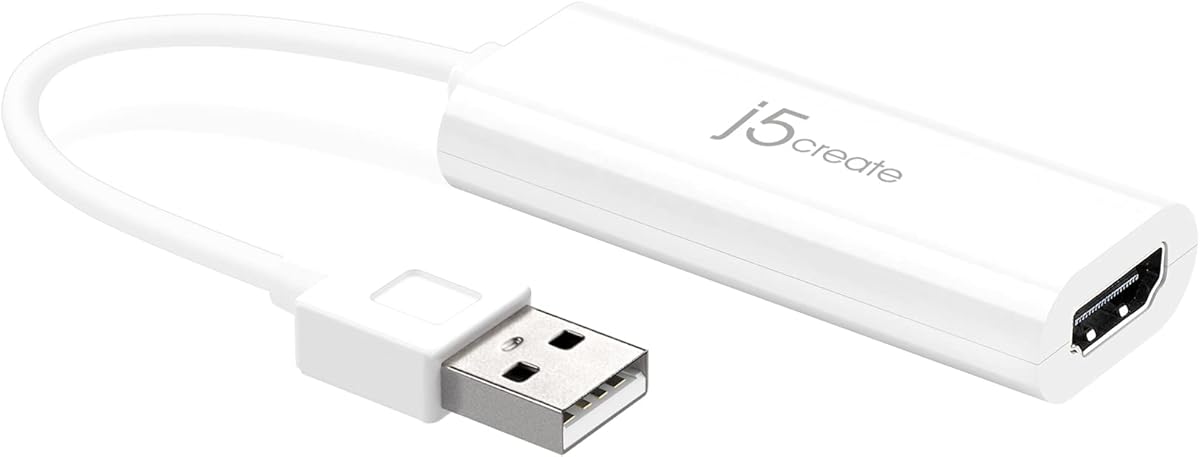
The Reborn USB to HDMI Adapter stands out as a top choice for users needing a reliable connection without breaking the bank. With a solid rating and strong performance metrics it delivers consistent 1080P output at 60Hz making it ideal for everyday tasks.
We may earn a commission when you buy through this link, at no additional cost to you.
Its compact design ensures you can easily carry it in a bag while the dual mode support enhances productivity by allowing extended desktop setups. The adapter works seamlessly with both Windows and macOS provided you install the necessary driver first.
While the driver requirement might be a slight inconvenience for some users the one time setup process is straightforward and quick to complete. This small trade-off is worth the cost savings and reliable performance you get from this device.
If you need a budget friendly solution for connecting your laptop to an external monitor this adapter offers excellent value. It is particularly suited for students professionals and home office users who prioritize simplicity and affordability.
Delivers sharp 1080P visuals at 60Hz ensuring smooth video playback and clear text for work.
Allows you to mirror or extend your screen enabling greater flexibility in how you arrange your workspace.
We may earn a commission when you buy through this link, at no additional cost to you.
The StarTech USB-A 3.0 to HDMI Converter is designed specifically for professional environments where stability is key. Its robust construction and TAA compliance make it a trusted choice for government and corporate deployments that require strict security standards.
We may earn a commission when you buy through this link, at no additional cost to you.
It delivers consistent 1080P performance at 60Hz allowing you to extend your desktop effortlessly across multiple displays. This capability significantly boosts workflow efficiency by giving you more screen real estate for multitasking and data analysis.
While it is limited to Windows systems the adapter handles Intel AMD and Snapdragon platforms with ease. The requirement for administrator rights during driver installation ensures security protocols are maintained within enterprise IT environments effectively.
For IT professionals or business users needing a certified reliable solution this adapter is an excellent investment. Its focus on stability and compliance makes it superior to consumer grade options for critical work applications.
TAA compliance ensures it meets government procurement standards for secure and reliable hardware deployments in offices.
Extends your desktop to allow for side by side work on spreadsheets documents and research tools simultaneously.
We may earn a commission when you buy through this link, at no additional cost to you.
This versatile USB to HDMI Adapter is built to accommodate a wide range of systems and USB standards. Whether you have a newer USB 3.0 port or an older USB 2.0 connection this device ensures you can still connect to an external display effectively.
We may earn a commission when you buy through this link, at no additional cost to you.
It supports both Windows and macOS which broadens its appeal across different user bases. The hot plug feature means you can disconnect and reconnect the adapter without restarting your computer making it convenient for mobile professionals.
The inclusion of a generous warranty period provides added peace of mind for buyers concerned about long term reliability. While the user rating is slightly lower the hardware capabilities remain strong for general productivity and media consumption tasks.
If you need a flexible adapter that works with older and newer hardware this is a solid option to consider. It balances compatibility with cost making it accessible for users with mixed device environments.
Works with both USB 3.0 and 2.0 ports ensuring it remains useful even on older laptops or desktop towers.
Offers a 36 month warranty period which is longer than many competitors reducing long term ownership risk.
We may earn a commission when you buy through this link, at no additional cost to you.
The WAVLINK adapter distinguishes itself by supporting newer Mac hardware including the M1 to M5 chips which often have limited external display options. This makes it a critical tool for Mac users who need to expand their screen real estate significantly.
We may earn a commission when you buy through this link, at no additional cost to you.
It supports up to six monitors when using multiple adapters enabling complex workstation setups for traders designers and engineers. The 2K resolution output ensures text and graphics remain sharp even when managing multiple windows across several displays.
Audio input and output capabilities are included allowing you to use the adapter as a communication hub during meetings. This adds functional value beyond simple video mirroring making it a comprehensive solution for remote work needs.
Mac users looking for a powerful way to extend their display should prioritize this adapter. Its compatibility with newer processors sets it apart from older models that struggle with Apple Silicon Macs.
Compatible with M1 to M5 Macs offering crucial support for those needing external displays on Apple hardware.
Scales up to six monitors enabling massive workspace expansions that are perfect for professional multitasking needs.
We may earn a commission when you buy through this link, at no additional cost to you.
This adapter offers a unique solution for users who want two external displays from a single USB port connection. It supports one 4K monitor at 30Hz and one 1080P monitor at 60Hz allowing for a high resolution primary display and a utility secondary screen.
We may earn a commission when you buy through this link, at no additional cost to you.
The build quality is designed for professionals who need reliability over time. StarTech backs this product with a three year warranty and technical support ensuring that any issues are resolved quickly without affecting your work productivity.
While it is limited to Windows systems the dual monitor capability provides significant value for power users. The ability to manage two screens from one adapter reduces cable clutter and simplifies your desk setup effectively.
If you need to run dual monitors but have limited video outputs this adapter is a strong candidate. It is especially useful for traders programmers and researchers who benefit from extensive screen real estate.
Enables two external monitors via one USB port simplifying connections for users needing multiple screens.
Handles 4K resolution for a main viewing screen ensuring detailed images and video playback remain crisp.
We may earn a commission when you buy through this link, at no additional cost to you.
Certified by DisplayLink this adapter guarantees compatibility with a wide range of laptops and desktops including ultrabooks and small form factor systems. This certification reduces the risk of driver conflicts and ensures a stable connection for your external display.
We may earn a commission when you buy through this link, at no additional cost to you.
It features an automated driver installation process which simplifies setup for users who may not be tech savvy. This ease of use combined with robust performance makes it an attractive option for general office environments.
The support for 5.1 surround sound adds an entertainment element to its functionality allowing for rich audio playback on connected monitors. This feature enhances the experience when watching movies or participating in video conferences with audio output.
For users seeking a reliable and certified solution this adapter provides peace of mind. The DisplayLink seal ensures that it has passed rigorous testing for performance and stability in business scenarios.
Ensures guaranteed compatibility with most USB A laptops reducing troubleshooting time and connection issues.
Supports 5.1 channel audio through HDMI delivering immersive sound for entertainment and multimedia use.
We may earn a commission when you buy through this link, at no additional cost to you.
This adapter is specifically tailored for iPhone iPad and Mac users who need to connect to TVs or projectors without hassle. It supports 4K video at 60Hz ensuring high quality visuals during presentations or home entertainment sessions.
We may earn a commission when you buy through this link, at no additional cost to you.
The inclusion of a charging port allows you to power your device while using the adapter which prevents battery drain during long usage. This feature is essential for mobile users who rely on their devices throughout the day.
It supports plug and play functionality for most Apple devices meaning you do not need to install drivers before use. However be aware that certain streaming apps like Netflix have DRM restrictions that prevent mirroring to external displays.
If you frequently present content from an iPhone or iPad this adapter offers a seamless experience. The charging port adds a layer of convenience that makes it superior to standard HDMI cables for mobile devices.
Allows simultaneous charging and video output ensuring your device stays powered during extended presentations.
No drivers needed for iPhone and iPad enabling immediate connection when you plug it into your device.
We may earn a commission when you buy through this link, at no additional cost to you.
This adapter features a sleek silver design that complements modern laptops and desktops visually. It delivers reliable 1080P performance at 60Hz ensuring smooth visuals for general work and entertainment use across various environments.
We may earn a commission when you buy through this link, at no additional cost to you.
One unique feature is its support for 3D displays which adds a layer of versatility for users with compatible TVs or monitors. This makes it a good choice for home theaters where 3D content playback is desired occasionally.
The driver installation process is local and does not require internet access which preserves user privacy. This attention to data security appeals to privacy conscious users who prefer not to upload sensitive information online.
For those who value aesthetics and performance this adapter strikes a good balance. It is a solid choice for users who want a stylish accessory that performs well for everyday display tasks.
Driver installs locally without internet access ensuring your data remains private during the setup process.
Includes 3D display support for users with compatible hardware allowing for immersive viewing experiences.
We may earn a commission when you buy through this link, at no additional cost to you.
The BENFEI USB C to HDMI Adapter is widely recognized for its outstanding value proposition. It delivers 4K resolution at 60Hz which is rare at this price point making it a top choice for budget conscious buyers.
We may earn a commission when you buy through this link, at no additional cost to you.
Its compact and lightweight design makes it easy to carry in a pocket or bag for on the go use. The durable construction ensures it withstands frequent plugging and unplugging without compromising signal quality or integrity.
It supports Thunderbolt 3 4 and 5 devices ensuring compatibility with the latest high speed USB C ports. The built in IC chip converts digital signals efficiently providing stable video output without flickering or lag.
If you need a reliable adapter that does not break the bank this model is highly recommended. It balances cost and performance better than most competitors in the USB C adapter market today.
Works seamlessly with Thunderbolt 3 4 and 5 ports ensuring fast stable data and video transmission speeds.
Plated connectors and strain relief design protect the cable from wear and tear over time.
We may earn a commission when you buy through this link, at no additional cost to you.
This adapter is designed for professionals who need to add a monitor without installing internal hardware cards. It supports hot swappable USB connections allowing you to connect or disconnect screens without rebooting your system.
We may earn a commission when you buy through this link, at no additional cost to you.
It is particularly useful for fields like finance healthcare and design where managing large datasets or multiple windows is critical. The ability to view spreadsheets or documents on two screens simultaneously enhances focus and efficiency.
Setup involves installing a driver initially but once done the adapter works reliably for extended periods. The support for both Windows and macOS means it fits into diverse office environments effectively.
If you are looking to upgrade your workstation quickly without expensive hardware changes this is a practical solution. It is a reliable choice for professionals who prioritize functionality and ease of use.
Allows you to connect or remove monitors without rebooting saving time and improving workflow continuity.
Designed to help manage large windows across screens for professionals in data intensive roles.
We may earn a commission when you buy through this link, at no additional cost to you.
Selecting the right adapter depends on your operating system and display needs. This guide explains key factors to consider before making your purchase.
Ensure the adapter supports your specific OS. Many adapters work well with Windows but some are limited to Windows only. Check macOS support carefully if you use a Mac or iPad.
Always verify OS support before buying to avoid returning a product that does not work with your device.
Higher resolutions like 4K require more bandwidth. Ensure your USB port is version 3.0 or higher to support 1080P at 60Hz or 4K at 30Hz or 60Hz.
Match the resolution to your monitor capabilities for a smooth viewing experience.
Some adapters need driver installation while others offer plug and play. Driver based adapters often provide better performance but require initial setup steps.
Consider if you are comfortable installing software before choosing your adapter.
Adapters come with USB A or USB C connectors. Choose the type that matches your laptop ports. USB C often supports power delivery for charging while in use.
Check if the adapter includes a charging port if you need to power your device simultaneously.
Look for braided cables or aluminum casings that offer better heat dissipation. Durable materials extend the lifespan of the adapter during daily use.
A sturdy build prevents damage from frequent plugging and unplugging.
A longer warranty period indicates manufacturer confidence. Look for brands that offer at least a year of coverage and responsive customer support.
Good support ensures quick resolution if you encounter any technical issues.
Budget adapters often lack premium features like 4K support. Evaluate if you need extra features or if a basic 1080P adapter is sufficient.
Balance your budget with the performance you need for your specific tasks.
If you need multiple displays check if the adapter supports extending to more than one screen. Some models allow dual monitor connections from a single port.
Verify limits before buying to ensure it meets your workspace requirements.
To begin connect the USB end of the adapter to your computer and the HDMI end to your monitor. Ensure your monitor is set to the correct input source to detect the signal.
If your adapter requires drivers download the latest version from the manufacturer's website. Install the software while connected to the internet to ensure proper configuration.
Store the adapter in a cool dry place when not in use to prevent heat damage. Avoid bending the cable sharply as this can damage the internal wiring over time.
Not all adapters support macOS. Some are designed exclusively for Windows. Always check the product description for explicit macOS compatibility before purchasing.
No some adapters offer plug and play functionality while others need drivers. USB C adapters often do not require drivers but USB A models usually do.
Adapters generally have higher latency than direct HDMI ports. They work for casual gaming but may not be ideal for competitive or fast-paced games.
Most modern adapters support up to 4K at 60Hz. However older models may be limited to 1080P depending on the USB version used.
Yes most adapters transmit audio over HDMI. You can route sound to external speakers or TV audio systems through the connected display.
Flickering often occurs if the USB port does not supply enough power. Try using a USB 3.0 port or a powered USB hub to stabilize the connection.
Only if the adapter has a dedicated charging port. Standard adapters do not pass power through to the device they are connected to.
Yes most support hot swapping on Windows and Mac. You can disconnect and reconnect without restarting your computer.
The Reborn adapter offers the best balance of price and features for general users. It provides reliable 1080P performance with good compatibility across systems.
For professionals StarTech adapters provide the reliability and certification needed for enterprise environments. They support higher resolutions and multiple monitors effectively.
Always verify current prices and compatibility details before purchasing to ensure you get the best deal for your specific setup needs.